
Latex code for making neural networks diagrams

Overview

PlotNeuralNet

DOI

Latex code for drawing neural networks for reports and presentation. Have a look into examples to see how they are made. Additionally, lets consolidate any improvements that you make and fix any bugs to help more people with this code.

Examples

Following are some network representations:
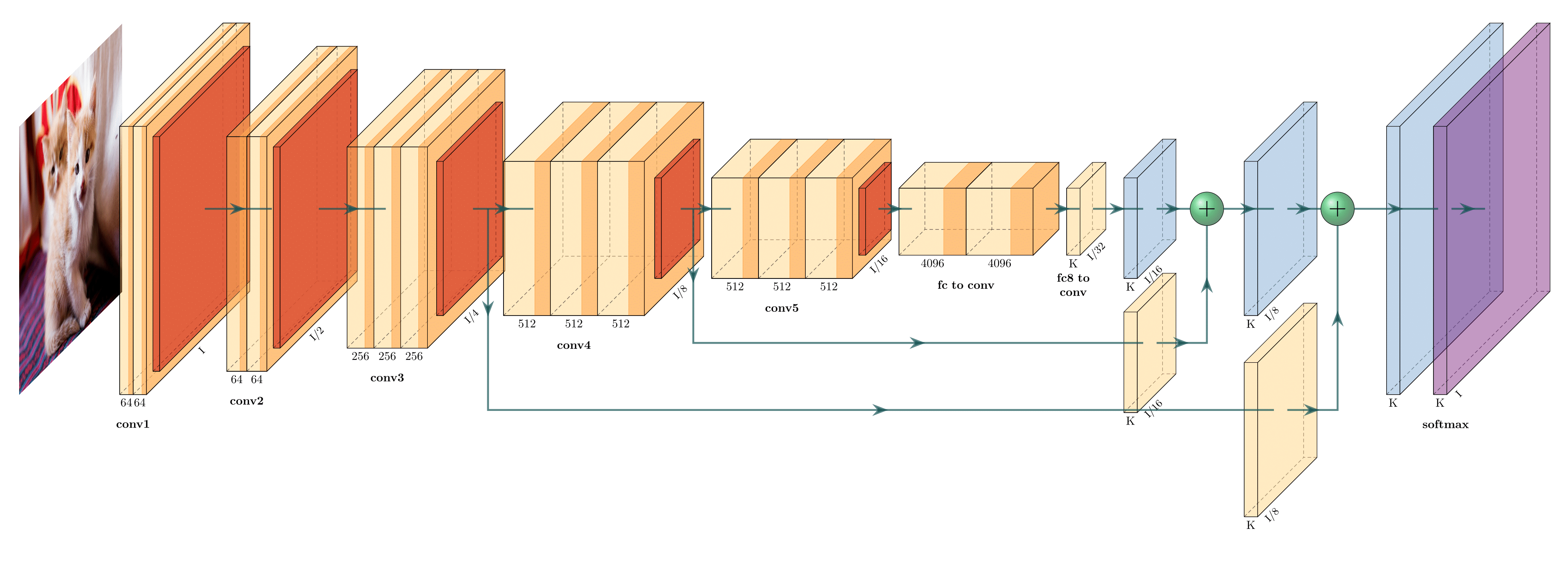
FCN-8 (view on Overleaf)
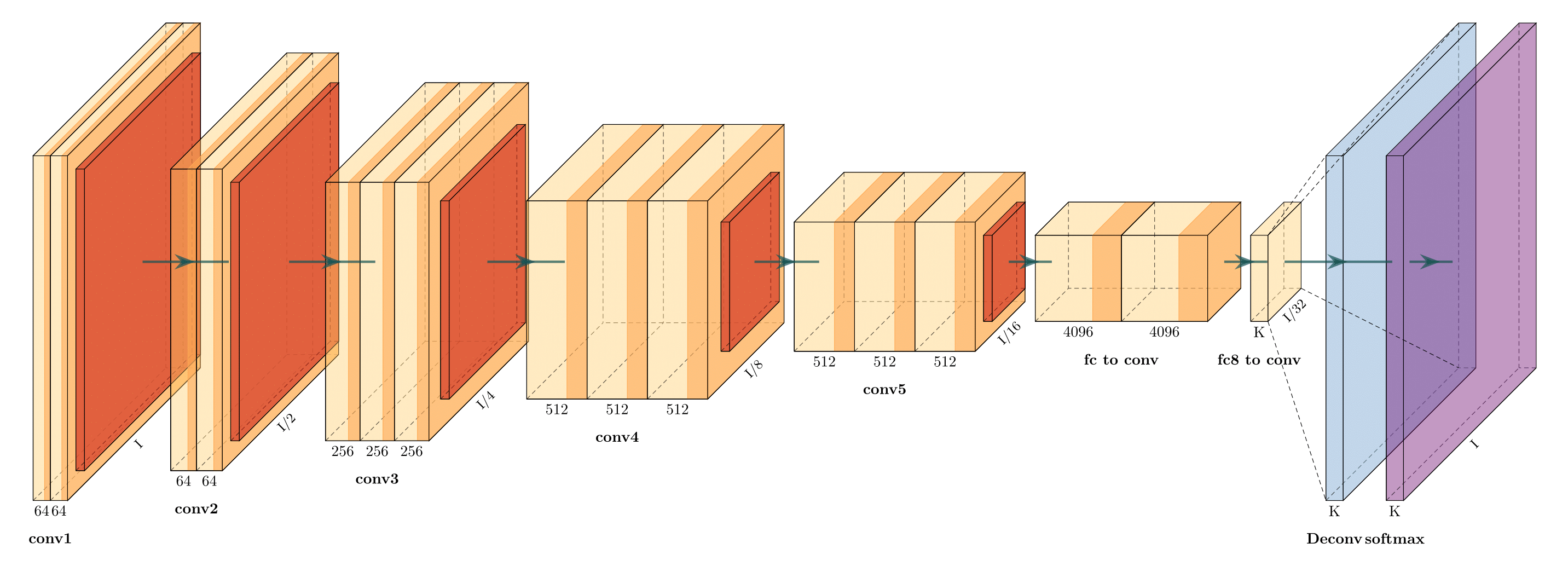
FCN-32 (view on Overleaf)

Holistically-Nested Edge Detection (view on Overleaf)

Getting Started

  1. Install the following packages on Ubuntu.

    • Ubuntu 16.04

      sudo apt-get install texlive-latex-extra
      
    • Ubuntu 18.04.2 Base on this website, please install the following packages.

      sudo apt-get install texlive-latex-base
      sudo apt-get install texlive-fonts-recommended
      sudo apt-get install texlive-fonts-extra
      sudo apt-get install texlive-latex-extra
      
    • Windows

    1. Download and install MikTeX.
    2. Download and install bash runner on Windows, recommends Git bash or Cygwin(https://www.cygwin.com/)
  2. Execute the example as followed.

    cd pyexamples/
    bash ../tikzmake.sh test_simple
    

TODO

  • Python interface
  • Add easy legend functionality
  • Add more layer shapes like TruncatedPyramid, 2DSheet etc
  • Add examples for RNN and likes.

Latex usage

See examples directory for usage.

Python usage

First, create a new directory and a new Python file:

$ mkdir my_project
$ cd my_project
vim my_arch.py

Add the following code to your new file:

import sys
sys.path.append('../')
from pycore.tikzeng import *

# defined your arch
arch = [
    to_head( '..' ),
    to_cor(),
    to_begin(),
    to_Conv("conv1", 512, 64, offset="(0,0,0)", to="(0,0,0)", height=64, depth=64, width=2 ),
    to_Pool("pool1", offset="(0,0,0)", to="(conv1-east)"),
    to_Conv("conv2", 128, 64, offset="(1,0,0)", to="(pool1-east)", height=32, depth=32, width=2 ),
    to_connection( "pool1", "conv2"),
    to_Pool("pool2", offset="(0,0,0)", to="(conv2-east)", height=28, depth=28, width=1),
    to_SoftMax("soft1", 10 ,"(3,0,0)", "(pool1-east)", caption="SOFT"  ),
    to_connection("pool2", "soft1"),
    to_end()
    ]

def main():
    namefile = str(sys.argv[0]).split('.')[0]
    to_generate(arch, namefile + '.tex' )

if __name__ == '__main__':
    main()

Now, run the program as follows:

bash ../tikzmake.sh my_arch
Comments
  • Error when running readme example: `I can't find file `tikzlibraryquotes.code.tex'`

    Error when running readme example: `I can't find file `tikzlibraryquotes.code.tex'`

    python my_arch.py works fine, producing the output included below. However, when I run pdflatex, I get error:

    ! I can't find file `tikzlibraryquotes.code.tex'.
    <argument> ...nput tikzlibrary\[email protected] .code.tex 
                                                      \catcode `\@ =\csname tikz...
    l.2 \usetikzlibrary{quotes,arrows.meta}
    

    I presume this is a simple fix requiring an install. Please may you help me diagnose what I need installed on my system for this to run? I am able to run tikz fine and create examples e.g. this one.

    LaTeX info

    $ pdflatex --version
    pdfTeX 3.1415926-2.5-1.40.14 (TeX Live 2013/Debian)
    kpathsea version 6.1.1
    Copyright 2013 Peter Breitenlohner (eTeX)/Han The Thanh (pdfTeX).
    There is NO warranty.  Redistribution of this software is
    covered by the terms of both the pdfTeX copyright and
    the Lesser GNU General Public License.
    For more information about these matters, see the file
    named COPYING and the pdfTeX source.
    Primary author of pdfTeX: Peter Breitenlohner (eTeX)/Han The Thanh (pdfTeX).
    Compiled with libpng 1.2.50; using libpng 1.2.50
    Compiled with zlib 1.2.8; using zlib 1.2.8
    Compiled with poppler version 0.24.5
    

    Python output:

    \documentclass[border=8pt, multi, tikz]{standalone} 
    \usepackage{import}
    \subimport{../layers/}{init}
    \usetikzlibrary{positioning}
    \usetikzlibrary{3d} %for including external image 
    
    
    \def\ConvColor{rgb:yellow,5;red,2.5;white,5}
    \def\ConvReluColor{rgb:yellow,5;red,5;white,5}
    \def\PoolColor{rgb:red,1;black,0.3}
    \def\UnpoolColor{rgb:blue,2;green,1;black,0.3}
    \def\FcColor{rgb:blue,5;red,2.5;white,5}
    \def\FcReluColor{rgb:blue,5;red,5;white,4}
    \def\SoftmaxColor{rgb:magenta,5;black,7}   
    
    
    \newcommand{\copymidarrow}{\tikz \draw[-Stealth,line width=0.8mm,draw={rgb:blue,4;red,1;green,1;black,3}] (-0.3,0) -- ++(0.3,0);}
    
    \begin{document}
    \begin{tikzpicture}
    \tikzstyle{connection}=[ultra thick,every node/.style={sloped,allow upside down},draw=\edgecolor,opacity=0.7]
    \tikzstyle{copyconnection}=[ultra thick,every node/.style={sloped,allow upside down},draw={rgb:blue,4;red,1;green,1;black,3},opacity=0.7]
    
    
    \pic[shift={(0,0,0)}] at (0,0,0) 
        {Box={
            name=conv1,
            caption= ,
            xlabel={{64, }},
            zlabel=512,
            fill=\ConvColor,
            height=64,
            width=2,
            depth=64
            }
        };
    
    
    \pic[shift={ (0,0,0) }] at (conv1-east) 
        {Box={
            name=pool1,
            caption= ,
            fill=\PoolColor,
            opacity=0.5,
            height=32,
            width=1,
            depth=32
            }
        };
    
    
    \pic[shift={(1,0,0)}] at (pool1-east) 
        {Box={
            name=conv2,
            caption= ,
            xlabel={{64, }},
            zlabel=128,
            fill=\ConvColor,
            height=32,
            width=2,
            depth=32
            }
        };
    
    
    \draw [connection]  (pool1-east)    -- node {\midarrow} (conv2-west);
    
    
    \pic[shift={ (0,0,0) }] at (conv2-east) 
        {Box={
            name=pool2,
            caption= ,
            fill=\PoolColor,
            opacity=0.5,
            height=28,
            width=1,
            depth=28
            }
        };
    
    
    \pic[shift={(3,0,0)}] at (pool1-east) 
        {Box={
            name=soft1,
            caption=SOFT,
            xlabel={{" ","dummy"}},
            zlabel=10,
            fill=\SoftmaxColor,
            opacity=0.8,
            height=3,
            width=1.5,
            depth=25
            }
        };
    
    
    \draw [connection]  (pool2-east)    -- node {\midarrow} (soft1-west);
    
    
    \end{tikzpicture}
    \end{document}
    
    opened by JamesOwers 8
  • Importing Standalone output to tex document

    Importing Standalone output to tex document

    Hey, Thanks for the tool, the graphics look awesome. I'm having some difficulty importing the outputted standalone tex file into a technical report of mine and was wondering if someone tried to do something similar and can help :) Thanks!

    opened by aklyussef 5
  • Fully Connected layer box

    Fully Connected layer box

    Below is the code that implements a fully connected layer box since I wasn't able to find it in the code. I used to_SoftMax function and modified it.

    The code should be put inside pycore/tikzeng.py file.

    def to_FullyConnected( name, s_filer=" ", n_filer=" ", offset="(0,0,0)", to="(0,0,0)", width=1.5, height=3, depth=25, opacity=0.8, caption=" " , zlabelposition='midway'):
        return r"""
    \pic[shift={"""+ offset +"""}] at """+ to +""" 
        {Box={
            name=""" + name +""",
            caption=""" +caption + """,
            xlabel={{ """+ '"'+str(n_filer) +'", "dummy"'+ """ }},
            zlabel="""+ str(s_filer) +""",
            zlabelposition="""+zlabelposition+""",
            fill=\FcColor,
            bandfill=\FcReluColor,
            opacity="""+ str(opacity) +""",
            height="""+ str(height) +""",
            width="""+ str(width) +""",
            depth="""+ str(depth) +"""
            }
        };
    """
    

    Cheers.

    opened by chrismaliszewski 5
  • to_input(...) doesn't have east, west... properties

    to_input(...) doesn't have east, west... properties

    I would like to connect the input image to conv blocks and other blocks, but it is not possible since to_input(...) doesn't have east, west, northeast, etc... properties. How to solve this? Maybe wrap to_input(...) in a box or something?

    opened by dougsouza 5
  • Unet to DenseNets

    Unet to DenseNets

    I am trying to modify Unet tex code to create DenseNets block. f838717a-6ad1-11e6-9391-f0906c80bc1d

    I am wondering how to modify the connection lines that then look like densenets style? Thank you for your time!

    opened by zuxfoucault 4
  • ModuleNotFoundError: No module named 'pycore.tikzeng'

    ModuleNotFoundError: No module named 'pycore.tikzeng'

    After running pip install pycore when I try to run in python: from pycore.tikzeng import * I got: ModuleNotFoundError: No module named 'pycore.tikzeng'

    Version: pycore==17.4.17

    opened by amirubin87 4
  • I want to know how to add legend

    I want to know how to add legend

    Hi, I wonder if there is a way of adding legend to the figure (identifying which color corresponds to which type of layer).

    A example default

    And how to eliminate cube number?

    opened by quinwu 4
  • Font size in the graph

    Font size in the graph

    Does anyone know how to change the font size in the graph? I tried to simply add to the documentclass

    \documentclass[border=15pt, multi, tikz]{standalone}

    but it doesn't work and returns some errors with positioning.

    opened by wufeim 3
  • unet error

    unet error

    pyexamples|master⚡ ⇒ bash ../tikzmake.sh unet

    File "unet.py", line 19 block_2ConvPool( name='b2', botton='pool_b1', top='pool_b2', s_filer=256, n_filer=128, offset="(1,0,0)", size=(32,32,3.5), opacity=0.5 ), ^ SyntaxError: invalid syntax This is pdfTeX, Version 3.14159265-2.6-1.40.19 (TeX Live 2018) (preloaded format=pdflatex) restricted \write18 enabled. entering extended mode ! I can't find file `unet.tex'. <> unet.tex

    (Press Enter to retry, or Control-D to exit) Please type another input file name: ^D ! Emergency stop. <*> unet.tex

    ! ==> Fatal error occurred, no output PDF file produced! Transcript written on texput.log. rm: *.aux: No such file or directory rm: *.vscodeLog: No such file or directory rm: *.tex: No such file or directory ../tikzmake.sh: line 10: xdg-open: command not found

    opened by wm901115nwpu 3
  • Labeling Blocks will create a solid line

    Labeling Blocks will create a solid line

    I tried to let the Box block's edges be invisible via fill=\fill, draw=\fill in Box.sty.

    Actually, It only let edges AH, AD, DE, CD, EF and HE invisible.

    Finally I found that \path (b) edge ["\bf\xlabel"', midway] (c); created a solid line in BC, so do AB and CF.

    I have no idea to fix this and I don't know why the solid lines emerged though no pic action acted in above code.

    Furthermore, I want customize the style of draw line, but nothing changes after I put thin into "box" style setting.

    opened by omegahh 3
  • What does the single quotation mark which follows double quotation marks mean?

    What does the single quotation mark which follows double quotation marks mean?

    Thanks for your amazing work! I am confused with the quotation mark like "\cubezlabel"'. What is the difference between "\cubezlabel".

    Looking forwarding your answer:)

    opened by omegahh 3
  • Made python interface installable via pip

    Made python interface installable via pip

    Hi, HarisIqbal88!

    My boss told me to use your package for my master thesis and I really like it, but it was bugging me, that it didn't have an installer. So I made it installable via pip. I had to rearrange your directories a little bit, but I hope you like it.

    I also added CITATION.cff, this will show how to cite your software directly in the repos sidebar.

    You might want to add your email or ORCID in pyproject.toml and check CITATION.cff for errors.

    I wish you a happy New Year!

    Kind regards, Jonas Eichhorn

    opened by AlreadyTakenJonas 1
  • Add a documentation

    Add a documentation

    Hello,

    Thank you for the good work.

    Please can you work toward doing a good documentation for this repo ? Some arguments are not clearly defined, and it's not clear what values we should use etc.. a proper documentation would be greatly appreciated !

    Cordially

    opened by NicolasNerr 0
  • Add arrow as legend (U-Net Model)

    Add arrow as legend (U-Net Model)

    How can I use an arrow as a legend of the plot? Please give me an example!

    Model architecture: U-Net (I want to plot "concatenate arrows" in U-Net as legend)

    image

    opened by mehrdad-dev 0
Releases(v1.0.0)
  • v1.0.0(Dec 25, 2018)

    This is the first release that is built on the idea to further extend the functionality with maximum backward compatibility. Layer names(e.g., Box,RightBandedBox) and their attributes(e.g., caption,xlabels) are generic. Moreover, the code is much better readable than the previous version. TO DO's:

    • Add easy legend functionality
    • Add more layer shapes like TruncatedPyramid, 2DSheet etc
    Source code(tar.gz)
    Source code(zip)
  • v0.1(Dec 25, 2018)

    This is the very first release in which layers were defined by specific names like Conv, ConvRelu,Deconv and a workable solution was created. This version is not suitable for extension because having a separate layer just because it is represented by a different colour is not clever. In future release, layers should be defined in generic terms like Box, RightBandedBox, Ball etc so that less code can make different layers with colour as a parameter. Additionally, attributes of each layer should also be changed to generic for example: from numFilters to xlabels

    Source code(tar.gz)
    Source code(zip)
Owner
Haris Iqbal
Computer Science Student at Saarland University
Haris Iqbal
[ICLR 2022] Contact Points Discovery for Soft-Body Manipulations with Differentiable Physics

CPDeform Code and data for paper Contact Points Discovery for Soft-Body Manipulations with Differentiable Physics at ICLR 2022 (Spotlight). @InProceed

(Lester) Sizhe Li 29 Nov 29, 2022
[CVPR2021] Look before you leap: learning landmark features for one-stage visual grounding.

LBYL-Net This repo implements paper Look Before You Leap: Learning Landmark Features For One-Stage Visual Grounding CVPR 2021. Getting Started Prerequ

SVIP Lab 45 Dec 12, 2022
NeurIPS'21 Tractable Density Estimation on Learned Manifolds with Conformal Embedding Flows

NeurIPS'21 Tractable Density Estimation on Learned Manifolds with Conformal Embedding Flows This repo contains the code for the paper Tractable Densit

Layer6 Labs 4 Dec 12, 2022
Official implementation of EdiTTS: Score-based Editing for Controllable Text-to-Speech

EdiTTS: Score-based Editing for Controllable Text-to-Speech Official implementation of EdiTTS: Score-based Editing for Controllable Text-to-Speech. Au

Neosapience 98 Dec 25, 2022
Simple reimplemetation experiments about FcaNet

FcaNet-CIFAR An implementation of the paper FcaNet: Frequency Channel Attention Networks on CIFAR10/CIFAR100 dataset. how to run Code: python Cifar.py

76 Feb 04, 2021
Torchserve server using a YoloV5 model running on docker with GPU and static batch inference to perform production ready inference.

Yolov5 running on TorchServe (GPU compatible) ! This is a dockerfile to run TorchServe for Yolo v5 object detection model. (TorchServe (PyTorch librar

82 Nov 29, 2022
Implementation of "Bidirectional Projection Network for Cross Dimension Scene Understanding" CVPR 2021 (Oral)

Bidirectional Projection Network for Cross Dimension Scene Understanding CVPR 2021 (Oral) [ Project Webpage ] [ arXiv ] [ Video ] Existing segmentatio

Hu Wenbo 135 Dec 26, 2022
Breaching - Breaching privacy in federated learning scenarios for vision and text

Breaching - A Framework for Attacks against Privacy in Federated Learning This P

Jonas Geiping 139 Jan 03, 2023
MEND: Model Editing Networks using Gradient Decomposition

MEND: Model Editing Networks using Gradient Decomposition Setup Environment This codebase uses Python 3.7.9. Other versions may work as well. Create a

Eric Mitchell 141 Dec 02, 2022
Toward Multimodal Image-to-Image Translation

BicycleGAN Project Page | Paper | Video Pytorch implementation for multimodal image-to-image translation. For example, given the same night image, our

Jun-Yan Zhu 1.4k Dec 22, 2022
Implementing a simplified copy of Shazam application from scratch using MinHashing and LSH.

Building Shazam from scratch In this repository we tried to implement a simplified copy of the Shazam application able to tell you the name of a song

Arturo Ghinassi 0 Nov 17, 2022
Code for the paper "Balancing Training for Multilingual Neural Machine Translation, ACL 2020"

Balancing Training for Multilingual Neural Machine Translation Implementation of the paper Balancing Training for Multilingual Neural Machine Translat

Xinyi Wang 21 May 18, 2022
BrainGNN - A deep learning model for data-driven discovery of functional connectivity

A deep learning model for data-driven discovery of functional connectivity https://doi.org/10.3390/a14030075 Usman Mahmood, Zengin Fu, Vince D. Calhou

Usman Mahmood 3 Aug 28, 2022
An open source AutoML toolkit for automate machine learning lifecycle, including feature engineering, neural architecture search, model compression and hyper-parameter tuning.

NNI Doc | 简体中文 NNI (Neural Network Intelligence) is a lightweight but powerful toolkit to help users automate Feature Engineering, Neural Architecture

Microsoft 12.4k Dec 31, 2022
Can we visualize a large scientific data set with a surrogate model? We're building a GAN for the Earth's Mantle Convection data set to see if we can!

EarthGAN - Earth Mantle Surrogate Modeling Can a surrogate model of the Earth’s Mantle Convection data set be built such that it can be readily run in

Tim 0 Dec 09, 2021
Koç University deep learning framework.

Knet Knet (pronounced "kay-net") is the Koç University deep learning framework implemented in Julia by Deniz Yuret and collaborators. It supports GPU

1.4k Dec 31, 2022
Out-of-Domain Human Mesh Reconstruction via Dynamic Bilevel Online Adaptation

DynaBOA Code repositoty for the paper: Out-of-Domain Human Mesh Reconstruction via Dynamic Bilevel Online Adaptation Shanyan Guan, Jingwei Xu, Michell

198 Dec 29, 2022
TraND: Transferable Neighborhood Discovery for Unsupervised Cross-domain Gait Recognition.

TraND This is the code for the paper "Jinkai Zheng, Xinchen Liu, Chenggang Yan, Jiyong Zhang, Wu Liu, Xiaoping Zhang and Tao Mei: TraND: Transferable

Jinkai Zheng 32 Apr 04, 2022
Backend code to use MCPI's python API to make infinite worlds with custom generation

inf-mcpi Backend code to use MCPI's python API to make infinite worlds with custom generation Does not save player-placed blocks! Generation is still

5 Oct 04, 2022
Lightwood is Legos for Machine Learning.

Lightwood is like Legos for Machine Learning. A Pytorch based framework that breaks down machine learning problems into smaller blocks that can be glu

MindsDB Inc 312 Jan 08, 2023