A very simple calculator with a modern UI made in Python thanks for the stunning Sun-Valley-ttk-theme and Segoe UI Variable font.

Overview

Fluent-Python-Calculator

A simple Python calculator with Sun-Valley-ttk-theme image
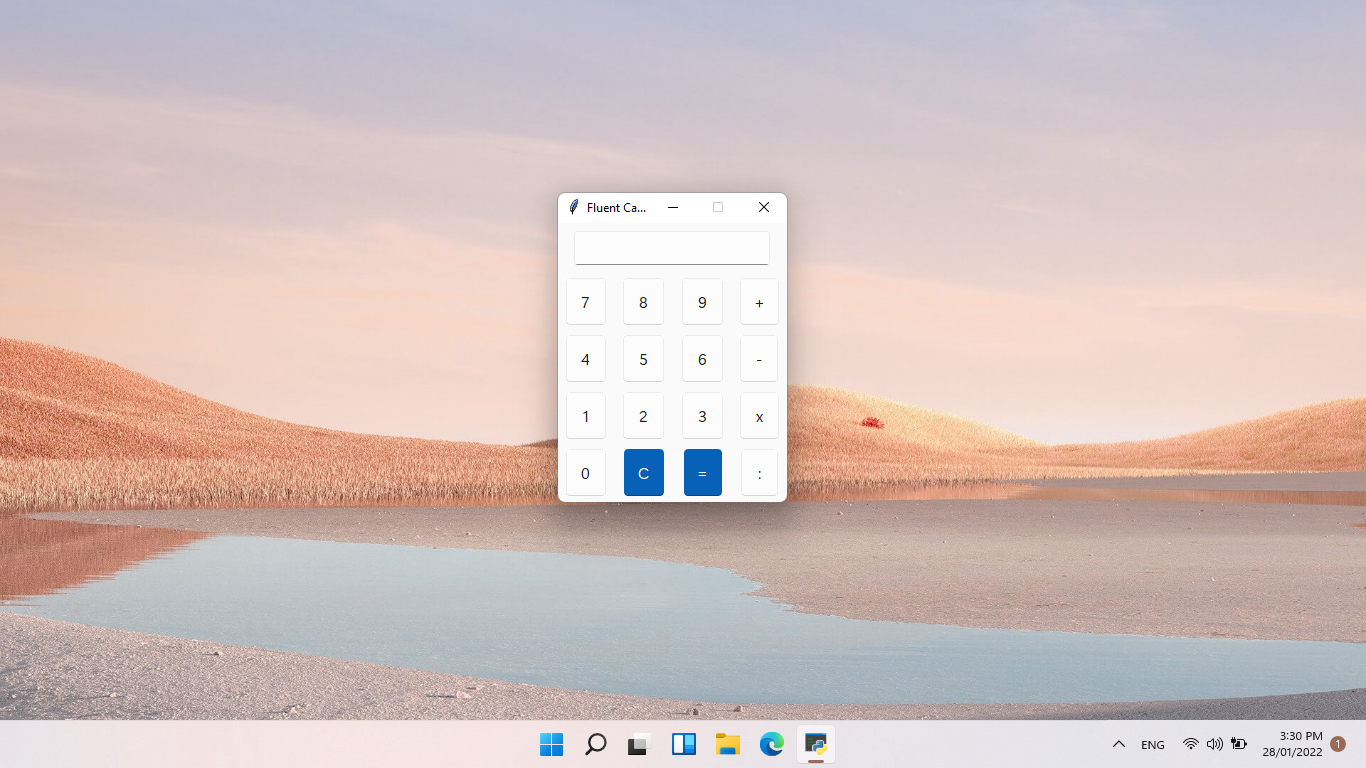
About Fluent-Python-Calculator:

A very simple calculator with a modern UI made in Python thanks for the stunning Sun-Valley-ttk-theme and Segoe UI Variable font. This is my first project ever in my life so feel free to open an issue or pull requests to help me finish the project!

Use the calculator

  • Make sure you have a code editor (VS code, Notepad ++,..) and Python installed.
  • Download the file in release
  • You can double click to run the program or open with a code editor to edit it

Dark/Light mode images

Light mode: image
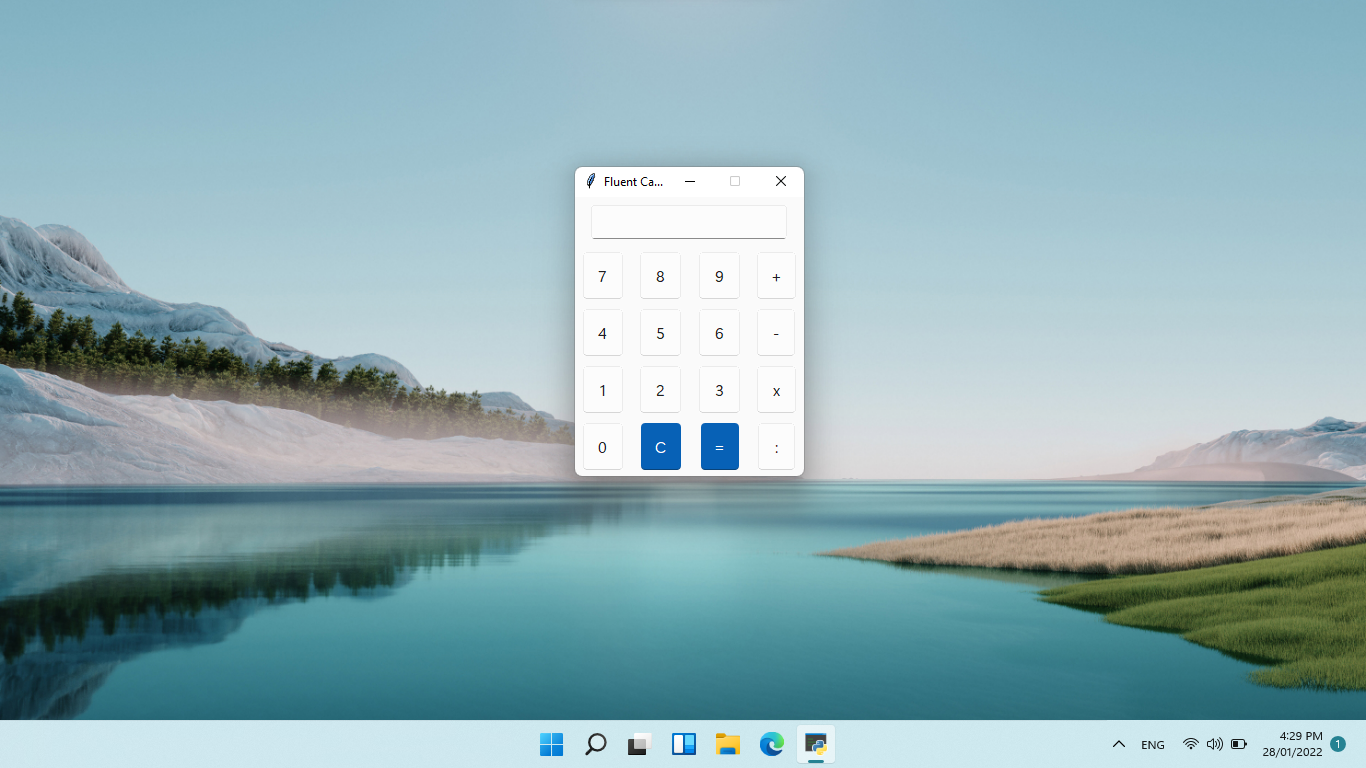
Dark mode: image

Future development

  • Improve button size
  • Add 'error' message into the app
  • Improve UI
  • Add proper changing dark/light mode
  • Change to exe? (maybe)
Comments
  • Make titlebar dark

    Make titlebar dark

    In the latest release notes you said that you look for a way to make the Titlebar change color. I dont know a direct solution, but when using the BlurWindow Module (python -m pip install BlurWindow) with Dark = True, the titlebar changes its color to dark. And the window also gets blurred, which looks great on modern apps! I would make a pull request, but i cant get to my PC at the moment.

    EDIT: i dont know if this solution also works for the menu bar. You need to check.

    ✨ feature 
    opened by not-nef 41
  • App's UI is not working perfectly

    App's UI is not working perfectly

    I downloaded the v5 (Beta) version and ran it on my Windows 10 laptop and here's how it looks:

    Fluent Calculator 2_19_2022 7_44_59 PM Fluent Calculator 2_19_2022 7_45_10 PM Fluent Calculator 2_19_2022 7_45_16 PM

    The first photo's background is white only, however on taking screenshot, it shows black. The second photo is of dark mode. The third photo is after disabling dark mode, in which also the background is white but in screenshot it is black. I am running Windows 10 Version 21H1.

    📣 bug ✨ feature 
    opened by RivanParmar 27
  • Buttons need to click multiple times before they can be insert into the content

    Buttons need to click multiple times before they can be insert into the content

    More info: Only happens in light mode because the 'pressed' state in light mode is a bit transparent, but the windows was also transparent for the mica effects so it needs to click multiple times before they can be insert into the content. This does not happen in dark mode, because the 'pressed' state in dark mode is not transparent. This was not happens before switching to the sv_ttk because I modified the 'pressed' state. Not sure if you guys facing the same issue, if yes, I will ask rdbende to modify the button to not transparent

    https://user-images.githubusercontent.com/86362423/164738773-eeb3e5c1-9327-49ff-83a6-482e21669943.mp4

    📣 bug 
    opened by HuyHung1408 23
  • Zero division easter egg

    Zero division easter egg

    This is just a little idea i had: We could add a small easter egg: the application will not say error after a few times of trying, but things like: "Stop dividing by zero!", "Seriously, stop", "STOP IT!!!!!!". And things like that. I thought this will be a cool little secret.

    ✨ feature 
    opened by not-nef 18
  • Better way of using Mica with tkinter

    Better way of using Mica with tkinter

    Hey, I found a way of using mica with tkinter without a third party app

    You need to use these two pieces of code

    https://gist.github.com/Olikonsti/879edbf69b801d8519bf25e804cec0aa the first one enables the windows immersive dark mode with a dark title bar

    https://gist.github.com/Olikonsti/8cbcba376c92831a27bc92ce0bb4dbc7 this code blurs the window

    you first run dark_title_bar(window) on your window and then enable_blur(window)

    this needs to happen after changing window.resizable()

    I am currently building a library with the sun valley ttk theme, the tkinter blur and extra widgets like scrollframes and entry boxes with ghost text: https://github.com/Olikonsti/MTK

    ✨ feature 
    opened by Olikonsti 10
  • No option to backspace

    No option to backspace

    There is no option to backspace. You can't remove single digits in the entry widget. There is option to only clear the widget and you have to type everything back again.

    Possible solution:

    • Add another button for backspace. OR
    • Make it such that on clicking the "C" button once, removes a single digit from the entry widget and on long press, clears the entire widget.
    ✨ feature 
    opened by RivanParmar 9
  • Move calculations to a different .py file

    Move calculations to a different .py file

    What do you think about that @HuyHung1408 ? I would like to move the calculation part of the program to a different .py file, as it is about to get larger. Only an idea tho, i just want to make the code look good. No problem if you dont want it.

    opened by not-nef 5
  • Modified entry widget to interact properly with keyboard

    Modified entry widget to interact properly with keyboard

    I have modified the Entry widget to be set to focus throughout the program right from the start. This is because the user won't have to click on the widget to write in it from the physical keyboard. The user will only be able to input numbers and operators to the Entry widget from the physical keyboard. The operators include: "+", "-", "*" and "/". You can add more in the checkIfNumberOrOperator function.

    opened by RivanParmar 5
  • Revert my last pr

    Revert my last pr

    Ok, so, i investigated in this topic a little bit further (I think you say it like that) and found out, that the buttons actually dont change position when dark mode is enabled. The contrast between the border color of the white buttons and the white background is just so low, that they appear 1px smaller than they actually are, which is the reason that the dark buttons look like they are closer to each other. I will attach a video that shows this. Sorry for the inconvenience.

    https://user-images.githubusercontent.com/83908932/163678536-d5cc54dc-d935-4850-9319-ade9ee2a0c15.mp4

    opened by not-nef 3
  • Cannot import sv_ttk

    Cannot import sv_ttk

    This isn't exactly an issue but, on opening the source code files in VSCode, it shows error on 'import sv_ttk'. The error is ModuleNotFoundError: No module named 'sv_ttk'. I have also downloaded this repository: https://github.com/rdbende/Sun-Valley-ttk-theme, however it isn't working. Moreover I could not find any other library named sv_ttk. I have the BlurWindow module and there's no error in importing it. So, could you please describe the steps to setup sv-ttk in VSCode project?

    opened by RivanParmar 3
Releases(v2.0)
  • v2.0(May 29, 2022)

    This is version 2.0 of FluxCalc! We are so excited to bring you the new UI redesign and all the other new Features!

    New Features

    • Big UI redesign by @HuyHung1408
    • Proper Bracket multiplication by @not-nef
    • Added Always on top feature so you can easily pin it on top, and use it anytime.
    • Fluent Python Calculator finally has a proper, a better name, FluxCalc, hope that we can bring you the best experience while enjoying our apps!

    Full Changelog: https://github.com/Futura-Py/FluxCalc/compare/v1.0...v2.0

    Source code(tar.gz)
    Source code(zip)
    FluxCalc-setup.exe(8.57 MB)
  • v1.0(Mar 7, 2022)

    The first version of Fluent Python Calculator! First, I want to thank all of you for helping me finish this project. I couldn't finish it without the help of y'all

    • Improved entry width!
    • Add Mica* (thanks for @sumeshir26 and @Olikonsti)
    • Fixed AccentButton (thanks for @RivanParmar)
    • Add backspace button
    • Fluent Calculator now follow your system dark/light mode
    • Fixed "+" button bigger than usual.
    • Fluent Calculator is now installed as an app!
    • App will launch faster!

    Light mode | Dark mode :-------------------------:|:-------------------------: image | image

    *No Mica for Windows 10

    Source code(tar.gz)
    Source code(zip)
    FluentCalculatorInstaller.exe(8.55 MB)
  • v0.5(Feb 11, 2022)

    Big update!

    • #6 Proper division button (thanks for @sumeshir26)
    • Acrylic, dark title when dark mode on (thanks for @sumeshir26, @not-nef, and @im-coder-lg)
    • New functions!
    • Change from menu bar to button to change dark/light mode. Trying to use the Json config file again since it was deleted (because I changed from menu bar to button)

    Known issues:

    • The title bar was still dark even when it was changed into light mode.
    • Acrylic sometimes broken!

    Light mode | Dark mode :-------------------------:|:-------------------------: image | image

    Source code(tar.gz)
    Source code(zip)
    Fluent.Calculator.zip(9.39 MB)
  • v0.4(Jan 31, 2022)

  • v0.3(Jan 29, 2022)

    New update!

    • Light/dark mode changing through a menu bar button thanks for @TimothyMalahy
    • Looking for a way make menu bar changing color, not sure if it's possible (because change to dark mode make the title bar looks bad)

    Light mode | Dark mode :-------------------------:|:-------------------------: image | image

    Source code(tar.gz)
    Source code(zip)
    Fluent.Calculator.zip(9.35 MB)
  • v0.2.3(Jan 29, 2022)

    New update for sure!

    ⚠️ Currently since antivirus marked it as a virus because I converted it into .exe using pyinstaller, if you still think it is a virus, check the python file.

    • Converted file to .exe, wow!
    • All should work correctly, IMPORTANT read README.md for more information about some notes for the .exe file!
    • New app icon ✨
    • Due to python limitations, don't delete .ico, .tcl and theme folder Note: Nothing changed about the design, so I will not attach it here, if you want the python file, check here (v0.2)

    image

    Source code(tar.gz)
    Source code(zip)
    Fluent.Calculator.zip(9.35 MB)
  • v0.2(Jan 28, 2022)

  • v0.1(Jan 28, 2022)

    First release!

    • All of the buttons should work
    • Some buttons have different sizes although they have the same size in the code, will fix it in the next version!
    Source code(tar.gz)
    Source code(zip)
An qt asset browser for applications like houdini/nuke/maya/blender

AssetBrowser A qt asset browser for applications like houdini/nuke/maya/blender Currently in development Note: Only houdini plugin available during de

Jonas Sorgenfrei 6 Aug 05, 2022
Make desktop applications using HTML and CSS with python

Neutron Make desktop applications using HTML and CSS with python What is Neutron Neutron will allow developers to design modern applications in python

Ian Baldelli 284 Dec 29, 2022
GUIOfTemperatureConverterUsingPython - GUI Of Temperature Converter Using Python

Fahrenheit To Celcius GUI Of Temperature Converter Below Video is the Output Of

SUJITHA RASAMSETTY 0 Mar 06, 2022
Introduce QML-like declarative structure to Python world. Developer writes only pure Python code for QML.

Introduce QML-like declarative structure to Python world. Developer writes only pure Python code for QML.

likianta 4 Mar 27, 2022
UberGui is a lightweight multi-threaded, webRender UI module for TouchDesigner

UberGui V4 UberGui is a lightweight multi-threaded, webRender UI module for TouchDesigner projects. The aim is to solve the trifecta of challenges bui

LUCAS M MORGAN 48 Nov 20, 2022
EZ Presence - A GUI-Python app which makes it easy to set a custom Discord Rich Presence. (BETA)

EZ Presence EZ Presence is a GUI-Python app which makes it easy to set any custom Discord Rich Presence. Using the App How to Run Since the app is in

notsniped 2 Mar 01, 2022
A Virtual Desktop Assistant Written in Python

DesktopAssitant A Virtual Desktop Assistant Written in Python. It's generally a basic virtual assistant The basic purpose of this is to make work easi

Technerd Brainiac 597 Dec 31, 2022
Gmail account using brute force attack

Programmed in Python | PySimpleGUI Gmail Hack Python script with PySimpleGUI for hack gmail account using brute force attack If you like it give it

Adrijan 127 Dec 30, 2022
This a pythonTkinter GUI with sqlite3 Project.

FootballGym_MIS This a pythonTkinter GUI with sqlite3 Project. This software is useful if you want to enjoy running a gym. It helps you know which tea

Hikmatullah Mohammadi 2 Jun 19, 2022
OpenPort scanner GUI tool (CNMAP)

CNMAP-GUI- OpenPort scanner GUI tool (CNMAP) as you know it is the advanced tool to find open port, firewalls and we also added here heartbleed scanni

9 Mar 05, 2022
psgresizer - a PySimpleGUI application that will resize your images and BASE64 encode them.

psgresizer A PySimpleGUI Application Resize your images quickly and easily with this GUI application. Resizes and encodes to Base64 so that the result

PySimpleGUI 10 Dec 25, 2022
The quick and easy way to add versatile graphical interfaces with networking capabilities to your Python programs.

The quick and easy way to add versatile graphical interfaces with networking capabilities to your Python programs. Give instant access to your application to whoever you want on the Internet, without

Claude SIMON 215 Dec 28, 2022
A calculator made using Python and Tkinter

Abacus Abacus is a calculator used to compute expressions with the operators of Addition, Subtraction, Multiplication and Division. It is named after

0 Jun 24, 2022
Plantasia, all your plants and muchrooms in one place!

Plantasia Project Description Tkinter GUI to be used as a repository for plants and muchrooms. It helps to optimize the search for species that have h

Marco Rodrigues 1 Dec 23, 2021
A simple Python Module for sending cross-platform desktop notifications on Windows, macOS and Linux

notify.py Cross platform desktop notifications for Python scripts and applications. Docs You can read the docs on this Git's Wiki, or here Supported P

Mustafa 178 Dec 26, 2022
A simple, yet powerful web GUI to manage your Wireguard server, powered by Flask.

Linguard Linguard aims to provide a clean, simple yet powerful web GUI to manage your WireGuard server, and it's powered by Flask. Read the docs for f

Jose Antonio Mazón San Bartolomé 111 Jan 07, 2023
Software com funçoes de A a Z feito no Python

Introdução Iniciante em programação Python, decidi criar um programa com diversas ferramentas de A a Z. Funções Ferramenta de Gerenciamento e Manutenç

João Pedro 1 Jan 26, 2022
Project made in Qt Designer + Python, for evaluation in the subject Introduction to Programming in IFPE - Paulista campus.

Project made in Qt Designer + Python, for evaluation in the subject Introduction to Programming in IFPE - Paulista campus.

Paola Rodrigues 2 Apr 13, 2022
Verify file hashes of downloaded files easily in a GUI

HASH-verify Verify file hashes of downloaded files easily in a GUI What it does... This gui based Python3 app calculates 3 types of file hashes and ca

Christian Richter-Pedersen 10 Dec 13, 2022