Concept Modeling: Topic Modeling on Images and Text

Overview

PyPI - Python PyPI - PyPi docs PyPI - License

Concept

Concept is a technique that leverages CLIP and BERTopic-based techniques to perform Concept Modeling on images.

Since topics are part of conversations and text, they do not represent the context of images well. Therefore, these clusters of images are referred to as 'Concepts' instead of the traditional 'Topics'.

Thus, Concept Modeling takes inspiration from topic modeling techniques to cluster images, find common concepts and model them both visually using images and textually using topic representations.

Installation

Installation, with sentence-transformers, can be done using pypi:

pip install concept

Quick Start

First, we need to download and extract 25.000 images from Unsplash used in the sentence-transformers example:

import os
import zipfile
from tqdm import tqdm
from PIL import Image
from sentence_transformers import util


# 25k images from Unsplash
img_folder = 'photos/'
if not os.path.exists(img_folder) or len(os.listdir(img_folder)) == 0:
    os.makedirs(img_folder, exist_ok=True)
    
    photo_filename = 'unsplash-25k-photos.zip'
    if not os.path.exists(photo_filename):   #Download dataset if does not exist
        util.http_get('http://sbert.net/datasets/'+photo_filename, photo_filename)
        
    #Extract all images
    with zipfile.ZipFile(photo_filename, 'r') as zf:
        for member in tqdm(zf.infolist(), desc='Extracting'):
            zf.extract(member, img_folder)
images = [Image.open("photos/"+filepath) for filepath in tqdm(img_names)]

Next, we only need to pass images to Concept:

from concept import ConceptModel
concept_model = ConceptModel()
concepts = concept_model.fit_transform(images)

The resulting concepts can be visualized through concept_model.visualize_concepts():

However, to get the full experience, we need to label the concept clusters with topics. To do this, we need to create a vocabulary:

from sklearn.datasets import fetch_20newsgroups
from sklearn.feature_extraction.text import TfidfVectorizer
docs = fetch_20newsgroups(subset='all',  remove=('headers', 'footers', 'quotes'))['data']
vectorizer = TfidfVectorizer(ngram_range=(1, 2)).fit(docs)
words = vectorizer.get_feature_names()
words = [words[index] for index in np.argpartition(vectorizer.idf_, -50_000)[-50_000:]]

Then, we can pass in the resulting words to Concept:

from concept import ConceptModel

concept_model = ConceptModel()
concepts = concept_model.fit_transform(images, docs=words)

Again, the resulting concepts can be visualized. This time however, we can also see the generated topics through concept_model.visualize_concepts():

NOTE: Use Concept(embedding_model="clip-ViT-B-32-multilingual-v1") to select a model that supports 50+ languages.

Comments
  • Question about the Function transform

    Question about the Function transform

    Thank you for your excellent job-:) I have a question when i read the code about function transform You say, given the images and image_embedding, and the return is Predictions:Concept predictions for each image But when i read the code of transform, the output is not the concept prediction for each image. can you explain it ?Thank you very much!

    opened by shaoniana1997 7
  • Pandas key error during model fitting

    Pandas key error during model fitting

    I tried the demo code and it worked for a small sample, tried to feed it more images and I got this error KeyError: '[-1] not found in axis'

    dependencies: concept=='0.2.1' pandas=1.4.0

    /home/<username>/anaconda3/envs/rd38/lib/python3.8/site-packages/torchvision/transforms/transforms.py:332: UserWarning: Argument 'interpolation' of type int is deprecated since 0.13 and will be removed in 0.15. Please use InterpolationMode enum.
      warnings.warn(
    100%|███████████████████████████████████████████████████████████████████████████████████████| 20/20 [00:21<00:00,  1.06s/it]
    ---------------------------------------------------------------------------
    KeyError                                  Traceback (most recent call last)
    Input In [30], in <cell line: 3>()
          1 from concept import ConceptModel
          2 concept_model = ConceptModel()
    ----> 3 concepts = concept_model.fit_transform(img_names[3500:6000])
    
    File ~/anaconda3/envs/rd38/lib/python3.8/site-packages/concept/_model.py:124, in ConceptModel.fit_transform(self, images, docs, image_names, image_embeddings)
        122 # Reduce dimensionality and cluster images into concepts
        123 reduced_embeddings = self._reduce_dimensionality(image_embeddings)
    --> 124 predictions = self._cluster_embeddings(reduced_embeddings)
        126 # Extract representative images through exemplars
        127 representative_images = self._extract_exemplars(image_names)
    
    File ~/anaconda3/envs/rd38/lib/python3.8/site-packages/concept/_model.py:261, in ConceptModel._cluster_embeddings(self, embeddings)
        257 self.cluster_labels = sorted(list(set(self.hdbscan_model.labels_)))
        258 predicted_clusters = list(self.hdbscan_model.labels_)
        260 self.frequency = (
    --> 261     pd.DataFrame({"Cluster": predicted_clusters, "Count": predicted_clusters})
        262       .groupby("Cluster")
        263       .count()
        264       .drop(-1)
        265       .sort_values("Count", ascending=False)
        266 )
        267 return predicted_clusters
    
    File ~/anaconda3/envs/rd38/lib/python3.8/site-packages/pandas/util/_decorators.py:311, in deprecate_nonkeyword_arguments.<locals>.decorate.<locals>.wrapper(*args, **kwargs)
        305 if len(args) > num_allow_args:
        306     warnings.warn(
        307         msg.format(arguments=arguments),
        308         FutureWarning,
        309         stacklevel=stacklevel,
        310     )
    --> 311 return func(*args, **kwargs)
    
    File ~/anaconda3/envs/rd38/lib/python3.8/site-packages/pandas/core/frame.py:4956, in DataFrame.drop(self, labels, axis, index, columns, level, inplace, errors)
       4808 @deprecate_nonkeyword_arguments(version=None, allowed_args=["self", "labels"])
       4809 def drop(
       4810     self,
       (...)
       4817     errors: str = "raise",
       4818 ):
       4819     """
       4820     Drop specified labels from rows or columns.
       4821 
       (...)
       4954             weight  1.0     0.8
       4955     """
    -> 4956     return super().drop(
       4957         labels=labels,
       4958         axis=axis,
       4959         index=index,
       4960         columns=columns,
       4961         level=level,
       4962         inplace=inplace,
       4963         errors=errors,
       4964     )
    
    File ~/anaconda3/envs/rd38/lib/python3.8/site-packages/pandas/core/generic.py:4279, in NDFrame.drop(self, labels, axis, index, columns, level, inplace, errors)
       4277 for axis, labels in axes.items():
       4278     if labels is not None:
    -> 4279         obj = obj._drop_axis(labels, axis, level=level, errors=errors)
       4281 if inplace:
       4282     self._update_inplace(obj)
    
    File ~/anaconda3/envs/rd38/lib/python3.8/site-packages/pandas/core/generic.py:4323, in NDFrame._drop_axis(self, labels, axis, level, errors, consolidate, only_slice)
       4321         new_axis = axis.drop(labels, level=level, errors=errors)
       4322     else:
    -> 4323         new_axis = axis.drop(labels, errors=errors)
       4324     indexer = axis.get_indexer(new_axis)
       4326 # Case for non-unique axis
       4327 else:
    
    File ~/anaconda3/envs/rd38/lib/python3.8/site-packages/pandas/core/indexes/base.py:6644, in Index.drop(self, labels, errors)
       6642 if mask.any():
       6643     if errors != "ignore":
    -> 6644         raise KeyError(f"{list(labels[mask])} not found in axis")
       6645     indexer = indexer[~mask]
       6646 return self.delete(indexer)
    
    KeyError: '[-1] not found in axis'
    
    opened by amrakm 2
  • Saving the model

    Saving the model

    Hi.

    Thank you very much for creating this. It is an absolutely brilliant idea. Once we have created the model, how do we save the model and use it for any new data that comes in?

    opened by vvkishere 2
  • TypeError: __init__() got an unexpected keyword argument 'cachedir'

    TypeError: __init__() got an unexpected keyword argument 'cachedir'

    I was reproducing the same Colab notebook in the ReadME without any change: https://colab.research.google.com/drive/1XHwQPT2itZXu1HayvGoj60-xAXxg9mqe?usp=sharing#scrollTo=VcgGxrLH-AU9

    While importing the library from concept import ConceptModel, this error appears:

    TypeError: init() got an unexpected keyword argument 'cachedir'

    Apparently it stems from hdbscan module as cachedir was removed from joblib.Memory. https://github.com/joblib/joblib/blame/3fb7fbde772e10415f879e0cb7e5d986fede8460/joblib/memory.py#L910

    opened by orkhan-amrullayev 1
  • TypeError: Cannot use scipy.linalg.eigh for sparse A with k >= N. Use scipy.linalg.eigh(A.toarray()) or reduce k.

    TypeError: Cannot use scipy.linalg.eigh for sparse A with k >= N. Use scipy.linalg.eigh(A.toarray()) or reduce k.

    Hi there,

    I am trying to run Concept on a very small dataset of images (10 images in jpg) but while I can run it on the sample you provided (Colab) I get the following error with my dataset. Any idea what might be the issue?

    image

    Aside from this specific issue, this is an amazing work!

    opened by cyberandy 1
  • v0.2

    v0.2

    Extract the textual representation not through cosine similarity of embeddings but by generating a set of words for each image and running c-TF-IDF over the clusters of words.

    opened by MaartenGr 0
  • Multilingual support

    Multilingual support

    Code for English:

    from concept import ConceptModel
    concept_model = ConceptModel()
    concepts = concept_model.fit_transform(images, docs)
    # Works correctly!
    

    Guide suggests "Use Concept(embedding_model="clip-ViT-B-32-multilingual-v1") to select a model that supports 50+ languages.":

    from concept import Concept
    # ImportError: cannot import name 'Concept' from 'concept' --> I guess you mean to import ConceptModel
    

    Importing ConceptModel:

    from concept import ConceptModel
    concept_model = ConceptModel(embedding_model="clip-ViT-B-32-multilingual-v1")
    concepts = concept_model.fit_transform(images, docs)
    # TypeError: 'JpegImageFile' object is not subscriptable
    
    opened by scr255 3
  • Exemplar dict is not serializable

    Exemplar dict is not serializable

    Hi, thanks for your awesome libraries.

    Just a short question: In this line:

    https://github.com/MaartenGr/Concept/blob/d270607d6ea4d789a42d54880ab4a0c977bb69ce/concept/_model.py#L304

    you're casting the numpy int64s to integers, presumably so they can be used as indexes? In any case, the cluster keys remain np.int64. This means the whole dict cannot be serialized (as json doesn't know how to handle numpy data types).

    My suggestion would be to int() the keys as well to make this a bit less perplexing. But I'm not sure if you rely on the indexes being np.int64 in some other place?

    opened by trifle 3
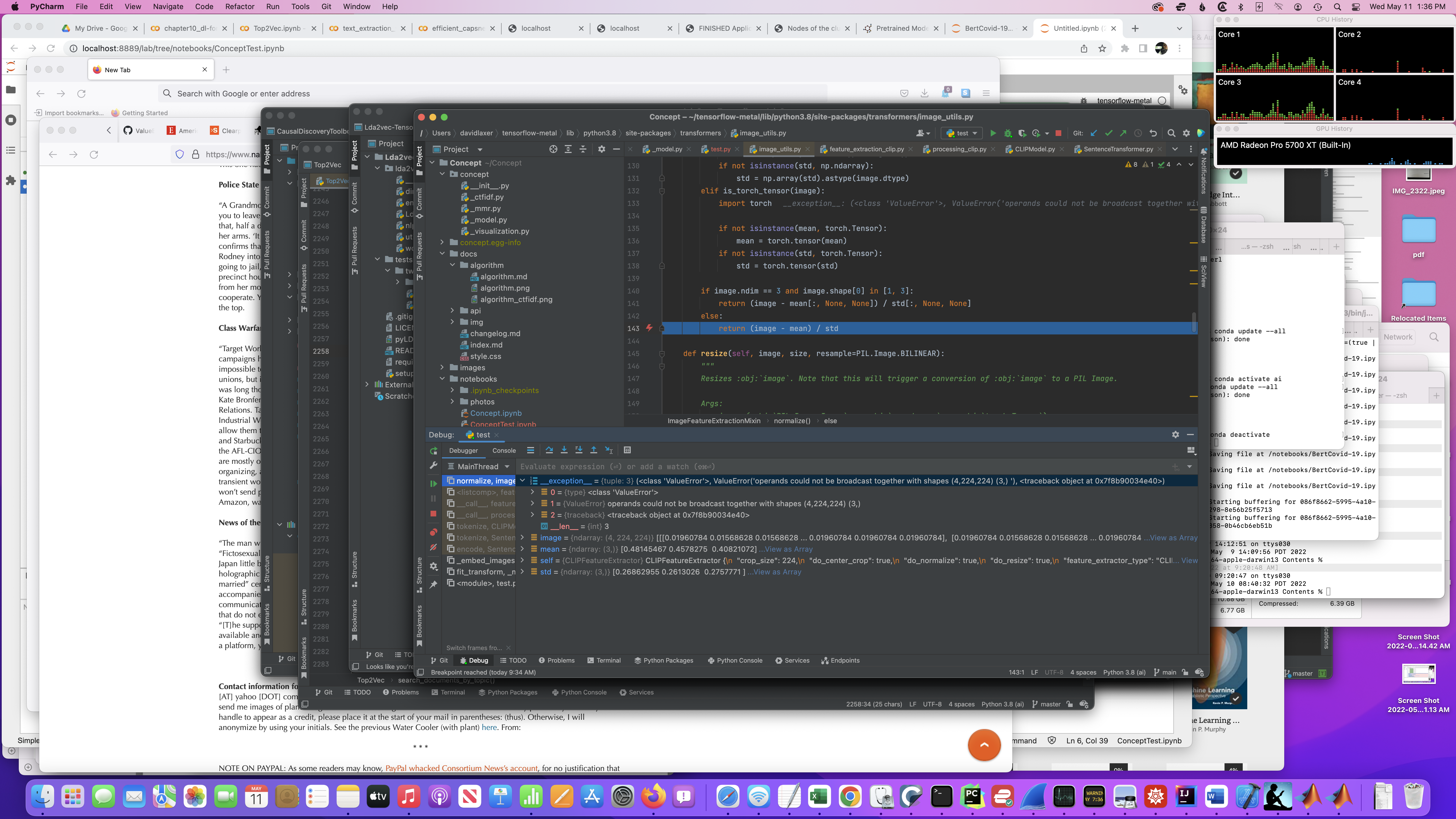
  • ValueError: operands could not be broadcast together with shapes (4,224,224) (3,)

    ValueError: operands could not be broadcast together with shapes (4,224,224) (3,)

    Running a Concept example on OS S Monterey 12.3.1 ...Transformers/Image_utils #143: return (image - mean) / std

    image is (4,224,224) mean is (3,) std is (3,) Screen Shot 2022-05-11 at 1 36 11 PM
    Python 3.8.13 
    % pip show tensorflow_macos
    WARNING: Ignoring invalid distribution -umpy (/Users/davidlaxer/tensorflow-metal/lib/python3.8/site-packages)
    Name: tensorflow-macos
    Version: 2.8.0
    Summary: TensorFlow is an open source machine learning framework for everyone.
    Home-page: https://www.tensorflow.org/
    Author: Google Inc.
    Author-email: [email protected]
    License: Apache 2.0
    Location: /Users/davidlaxer/tensorflow-metal/lib/python3.8/site-packages
    Requires: absl-py, astunparse, flatbuffers, gast, google-pasta, grpcio, h5py, keras, keras-preprocessing, libclang, numpy, opt-einsum, protobuf, setuptools, six, tensorboard, termcolor, tf-estimator-nightly, typing-extensions, wrapt
    Required-by: 
    
    pip show sentence_transformers
    WARNING: Ignoring invalid distribution -umpy (/Users/davidlaxer/tensorflow-metal/lib/python3.8/site-packages)
    Name: sentence-transformers
    Version: 2.1.0
    Summary: Sentence Embeddings using BERT / RoBERTa / XLM-R
    Home-page: https://github.com/UKPLab/sentence-transformers
    Author: Nils Reimers
    Author-email: [email protected]
    License: Apache License 2.0
    Location: /Users/davidlaxer/tensorflow-metal/lib/python3.8/site-packages
    Requires: huggingface-hub, nltk, numpy, scikit-learn, scipy, sentencepiece, tokenizers, torch, torchvision, tqdm, transformers
    Required-by: bertopic, concept
    
    % pip show transformers
    WARNING: Ignoring invalid distribution -umpy (/Users/davidlaxer/tensorflow-metal/lib/python3.8/site-packages)
    Name: transformers
    Version: 4.11.3
    Summary: State-of-the-art Natural Language Processing for TensorFlow 2.0 and PyTorch
    Home-page: https://github.com/huggingface/transformers
    Author: Thomas Wolf, Lysandre Debut, Victor Sanh, Julien Chaumond, Sam Shleifer, Patrick von Platen, Sylvain Gugger, Suraj Patil, Stas Bekman, Google AI Language Team Authors, Open AI team Authors, Facebook AI Authors, Carnegie Mellon University Authors
    Author-email: [email protected]
    License: Apache
    Location: /Users/davidlaxer/tensorflow-metal/lib/python3.8/site-packages
    Requires: filelock, huggingface-hub, numpy, packaging, pyyaml, regex, requests, sacremoses, tokenizers, tqdm
    Required-by: sentence-transformers


    Here's the code:

    import os
    import glob
    import zipfile
    from tqdm import tqdm
    from sentence_transformers import util
    
    # 25k images from Unsplash
    img_folder = 'photos/'
    if not os.path.exists(img_folder) or len(os.listdir(img_folder)) == 0:
        os.makedirs(img_folder, exist_ok=True)
    
        photo_filename = 'unsplash-25k-photos.zip'
        if not os.path.exists(photo_filename):  # Download dataset if does not exist
            util.http_get('http://sbert.net/datasets/' + photo_filename, photo_filename)
    
        # Extract all images
        with zipfile.ZipFile(photo_filename, 'r') as zf:
            for member in tqdm(zf.infolist(), desc='Extracting'):
                zf.extract(member, img_folder)
    img_names = list(glob.glob('photos/*.jpg'))
    
    from concept import ConceptModel
    concept_model = ConceptModel()
    concepts = concept_model.fit_transform(img_names)
    
    B/s]
      0%|                                                   | 0/196 [00:00<?, ?it/s]/Users/davidlaxer/tensorflow-metal/lib/python3.8/site-packages/transformers/feature_extraction_utils.py:158: UserWarning: Creating a tensor from a list of numpy.ndarrays is extremely slow. Please consider converting the list to a single numpy.ndarray with numpy.array() before converting to a tensor. (Triggered internally at  ../torch/csrc/utils/tensor_new.cpp:201.)
      tensor = as_tensor(value)
      5%|█▉                                         | 9/196 [02:21<48:54, 15.69s/it]
    ---------------------------------------------------------------------------
    ValueError                                Traceback (most recent call last)
    Input In [2], in <cell line: 3>()
          1 from concept import ConceptModel
          2 concept_model = ConceptModel()
    ----> 3 concepts = concept_model.fit_transform(img_names)
    
    File ~/Concept/concept/_model.py:120, in ConceptModel.fit_transform(self, images, docs, image_names, image_embeddings)
        118 # Calculate image embeddings if not already generated
        119 if image_embeddings is None:
    --> 120     image_embeddings = self._embed_images(images)
        122 # Reduce dimensionality and cluster images into concepts
        123 reduced_embeddings = self._reduce_dimensionality(image_embeddings)
    
    File ~/Concept/concept/_model.py:224, in ConceptModel._embed_images(self, images)
        221 end_index = (i * batch_size) + batch_size
        223 images_to_embed = [Image.open(filepath) for filepath in images[start_index:end_index]]
    --> 224 img_emb = self.embedding_model.encode(images_to_embed, show_progress_bar=False)
        225 embeddings.extend(img_emb.tolist())
        227 # Close images
    
    File ~/tensorflow-metal/lib/python3.8/site-packages/sentence_transformers/SentenceTransformer.py:153, in SentenceTransformer.encode(self, sentences, batch_size, show_progress_bar, output_value, convert_to_numpy, convert_to_tensor, device, normalize_embeddings)
        151 for start_index in trange(0, len(sentences), batch_size, desc="Batches", disable=not show_progress_bar):
        152     sentences_batch = sentences_sorted[start_index:start_index+batch_size]
    --> 153     features = self.tokenize(sentences_batch)
        154     features = batch_to_device(features, device)
        156     with torch.no_grad():
    
    File ~/tensorflow-metal/lib/python3.8/site-packages/sentence_transformers/SentenceTransformer.py:311, in SentenceTransformer.tokenize(self, texts)
        307 def tokenize(self, texts: Union[List[str], List[Dict], List[Tuple[str, str]]]):
        308     """
        309     Tokenizes the texts
        310     """
    --> 311     return self._first_module().tokenize(texts)
    
    File ~/tensorflow-metal/lib/python3.8/site-packages/sentence_transformers/models/CLIPModel.py:71, in CLIPModel.tokenize(self, texts)
         68 if len(images) == 0:
         69     images = None
    ---> 71 inputs = self.processor(text=texts_values, images=images, return_tensors="pt", padding=True)
         72 inputs['image_text_info'] = image_text_info
         73 return inputs
    
    File ~/tensorflow-metal/lib/python3.8/site-packages/transformers/models/clip/processing_clip.py:148, in CLIPProcessor.__call__(self, text, images, return_tensors, **kwargs)
        145     encoding = self.tokenizer(text, return_tensors=return_tensors, **kwargs)
        147 if images is not None:
    --> 148     image_features = self.feature_extractor(images, return_tensors=return_tensors, **kwargs)
        150 if text is not None and images is not None:
        151     encoding["pixel_values"] = image_features.pixel_values
    
    File ~/tensorflow-metal/lib/python3.8/site-packages/transformers/models/clip/feature_extraction_clip.py:150, in CLIPFeatureExtractor.__call__(self, images, return_tensors, **kwargs)
        148     images = [self.center_crop(image, self.crop_size) for image in images]
        149 if self.do_normalize:
    --> 150     images = [self.normalize(image=image, mean=self.image_mean, std=self.image_std) for image in images]
        152 # return as BatchFeature
        153 data = {"pixel_values": images}
    
    File ~/tensorflow-metal/lib/python3.8/site-packages/transformers/models/clip/feature_extraction_clip.py:150, in <listcomp>(.0)
        148     images = [self.center_crop(image, self.crop_size) for image in images]
        149 if self.do_normalize:
    --> 150     images = [self.normalize(image=image, mean=self.image_mean, std=self.image_std) for image in images]
        152 # return as BatchFeature
        153 data = {"pixel_values": images}
    
    File ~/tensorflow-metal/lib/python3.8/site-packages/transformers/image_utils.py:143, in ImageFeatureExtractionMixin.normalize(self, image, mean, std)
        141     return (image - mean[:, None, None]) / std[:, None, None]
        142 else:
    --> 143     return (image - mean) / std
    
    ValueError: operands could not be broadcast together with shapes (4,224,224) (3,) 


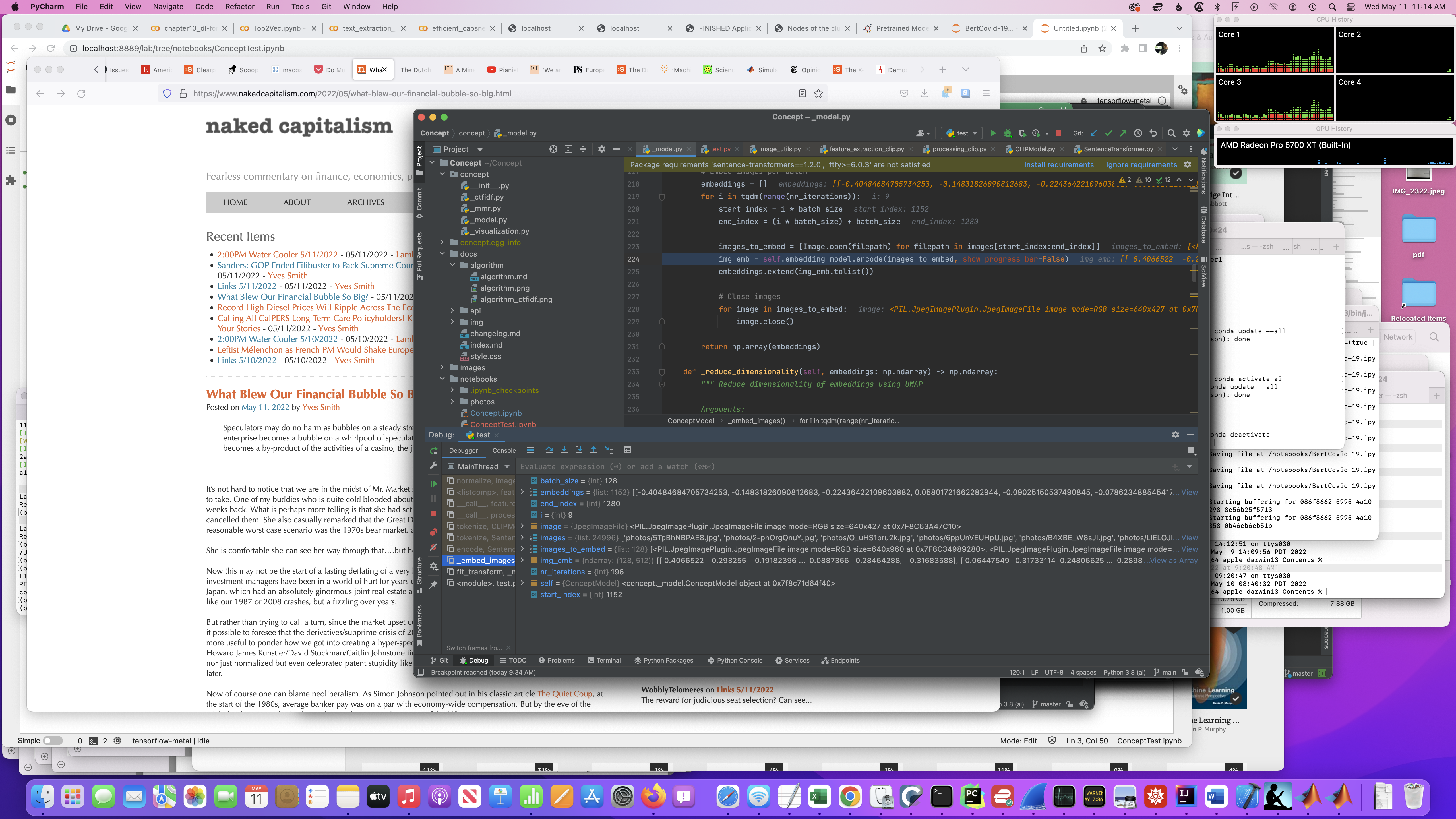
    The exception is in the normalize() function ... I believe in the 9th Pil image: Screen Shot 2022-05-11 at 11 14 42 AM
    opened by dbl001 9
  • OSError: [Errno 24] Too many open files: 'photos/icnZ2R8PcDs.jpg'

    OSError: [Errno 24] Too many open files: 'photos/icnZ2R8PcDs.jpg'

    What do recommend setting max_open_files to?

    images = [Image.open("photos/"+filepath) for filepath in tqdm(img_names[:5000])]
    image_names = img_names[:5000]
    image_embeddings = img_embeddings[:5000]
    
    54%|███████████████████▍                | 2693/5000 [00:00<00:00, 13545.87it/s]
    ---------------------------------------------------------------------------
    OSError                                   Traceback (most recent call last)
    Input In [4], in <cell line: 1>()
    ----> 1 images = [Image.open("photos/"+filepath) for filepath in tqdm(img_names[:5000])]
          2 image_names = img_names[:5000]
          3 image_embeddings = img_embeddings[:5000]
    
    Input In [4], in <listcomp>(.0)
    ----> 1 images = [Image.open("photos/"+filepath) for filepath in tqdm(img_names[:5000])]
          2 image_names = img_names[:5000]
          3 image_embeddings = img_embeddings[:5000]
    
    File ~/tensorflow-metal/lib/python3.8/site-packages/PIL/Image.py:2968, in open(fp, mode, formats)
       2965     filename = fp
       2967 if filename:
    -> 2968     fp = builtins.open(filename, "rb")
       2969     exclusive_fp = True
       2971 try:
    
    OSError: [Errno 24] Too many open files: 'photos/icnZ2R8PcDs.jpg'
    
    % ulimit -a
    -t: cpu time (seconds)              unlimited
    -f: file size (blocks)              unlimited
    -d: data seg size (kbytes)          unlimited
    -s: stack size (kbytes)             8192
    -c: core file size (blocks)         0
    -v: address space (kbytes)          unlimited
    -l: locked-in-memory size (kbytes)  unlimited
    -u: processes                       11136
    -n: file descriptors                8192
    (base) [email protected]_64-apple-darwin13 notebooks % 
    
    
    opened by dbl001 3
  • Questions

    Questions

    Hello,

    Thank you for sharing you great work. I'd like to have a better understanding of the "fit_transform" function.

    How do you intend to use the parameter "image_names" ? For instance, i'd like to classify facebook posts. Does it means that I can pass posts messages with images embeddings to improve topics results ? Can you share any example of code using this parameter ?

    Is it possible to return top keywords describing each topic ? As far as I understand your code 'fit_transform' returns only the list of topic predictions.

    Thank you very much

    opened by erwanlenagard 4
Releases(v0.2.1)
  • v0.2.1(Nov 5, 2021)

  • v0.2.0(Nov 2, 2021)

    Added c-TF-IDF as an algorithm to extract textual representations from images.

    from concept import ConceptModel
    
    concept_model = ConceptModel(ctfidf=True)
    concepts = concept_model.fit_transform(img_names, docs=docs)
    

    From the textual and visual embeddings, we use cosine similarity to find the best matching words for each image. Then, after clustering the images, we combine all words in a cluster into a single documents. Finally, c-TF-IDF is used to find the best words for each concept cluster.

    The benefit of this method is that it takes the entire cluster structure into account when creating the representations. This is not the case when we only consider words close to the concept embedding.

    Source code(tar.gz)
    Source code(zip)
  • v0.1.1(Nov 1, 2021)

  • v0.1.0(Oct 27, 2021)

    • Update Readme with a small example
    • Create documentation page: https://maartengr.github.io/Concept/
    • Fix fit not working properly
    • Better visualization of resulting concepts
    Source code(tar.gz)
    Source code(zip)
Owner
Maarten Grootendorst
Data Scientist | Psychologist
Maarten Grootendorst
Smart discord chatbot integrated with Dialogflow to manage different classrooms and assist in teaching!

smart-school-chatbot Smart discord chatbot integrated with Dialogflow to interact with students naturally and manage different classes in a school. De

Tom Huynh 5 Oct 24, 2022
Develop open-source Python Arabic NLP libraries that the Arab world will easily use in all Natural Language Processing applications

Develop open-source Python Arabic NLP libraries that the Arab world will easily use in all Natural Language Processing applications

BADER ALABDAN 2 Oct 22, 2022
💬 Open source machine learning framework to automate text- and voice-based conversations: NLU, dialogue management, connect to Slack, Facebook, and more - Create chatbots and voice assistants

Rasa Open Source Rasa is an open source machine learning framework to automate text-and voice-based conversations. With Rasa, you can build contextual

Rasa 15.3k Jan 03, 2023
Transformer related optimization, including BERT, GPT

This repository provides a script and recipe to run the highly optimized transformer-based encoder and decoder component, and it is tested and maintained by NVIDIA.

NVIDIA Corporation 1.7k Jan 04, 2023
ConvBERT: Improving BERT with Span-based Dynamic Convolution

ConvBERT Introduction In this repo, we introduce a new architecture ConvBERT for pre-training based language model. The code is tested on a V100 GPU.

YITUTech 237 Dec 10, 2022
Abhijith Neil Abraham 2 Nov 05, 2021
PocketSphinx is a lightweight speech recognition engine, specifically tuned for handheld and mobile devices, though it works equally well on the desktop

molten A minimal, extensible, fast and productive API framework for Python 3. Changelog: https://moltenframework.com/changelog.html Community: https:/

3.2k Dec 28, 2022
Ptorch NLU, a Chinese text classification and sequence annotation toolkit, supports multi class and multi label classification tasks of Chinese long text and short text, and supports sequence annotation tasks such as Chinese named entity recognition, part of speech tagging and word segmentation.

Pytorch-NLU,一个中文文本分类、序列标注工具包,支持中文长文本、短文本的多类、多标签分类任务,支持中文命名实体识别、词性标注、分词等序列标注任务。 Ptorch NLU, a Chinese text classification and sequence annotation toolkit, supports multi class and multi label classifi

186 Dec 24, 2022
Pytorch-Named-Entity-Recognition-with-BERT

BERT NER Use google BERT to do CoNLL-2003 NER ! Train model using Python and Inference using C++ ALBERT-TF2.0 BERT-NER-TENSORFLOW-2.0 BERT-SQuAD Requi

Kamal Raj 1.1k Dec 25, 2022
숭실대학교 컴퓨터학부 전공종합설계프로젝트

✨ 시각장애인을 위한 버스도착 알림 장치 ✨ 👀 개요 현대 사회에서 대중교통 위치 정보를 이용하여 사람들이 간단하게 이용할 대중교통의 정보를 얻고 쉽게 대중교통을 이용할 수 있다. 해당 정보는 각종 어플리케이션과 대중교통 이용시설에서 위치 정보를 제공하고 있지만 시각

taegyun 3 Jan 25, 2022
Tevatron is a simple and efficient toolkit for training and running dense retrievers with deep language models.

Tevatron Tevatron is a simple and efficient toolkit for training and running dense retrievers with deep language models. The toolkit has a modularized

texttron 193 Jan 04, 2023
基于Transformer的单模型、多尺度的VAE模型

UniVAE 基于Transformer的单模型、多尺度的VAE模型 介绍 https://kexue.fm/archives/8475 依赖 需要大于0.10.6版本的bert4keras(当前还没有推到pypi上,可以直接从GitHub上clone最新版)。 引用 @misc{univae,

苏剑林(Jianlin Su) 49 Aug 24, 2022
Simple, Pythonic, text processing--Sentiment analysis, part-of-speech tagging, noun phrase extraction, translation, and more.

TextBlob: Simplified Text Processing Homepage: https://textblob.readthedocs.io/ TextBlob is a Python (2 and 3) library for processing textual data. It

Steven Loria 8.4k Dec 26, 2022
A Flask Sentiment Analysis API, with visual implementation

The Sentiment Analysis Api was created using python flask module,it allows users to parse a text or sentence throught the (?text) arguement, then view the sentiment analysis of that sentence. It can

Ifechukwudeni Oweh 10 Jul 17, 2022
Library for fast text representation and classification.

fastText fastText is a library for efficient learning of word representations and sentence classification. Table of contents Resources Models Suppleme

Facebook Research 24.1k Jan 05, 2023
NewsMTSC: (Multi-)Target-dependent Sentiment Classification in News Articles

NewsMTSC: (Multi-)Target-dependent Sentiment Classification in News Articles NewsMTSC is a dataset for target-dependent sentiment classification (TSC)

Felix Hamborg 79 Dec 30, 2022
spaCy plugin for Transformers , Udify, ELmo, etc.

Camphr - spaCy plugin for Transformers, Udify, Elmo, etc. Camphr is a Natural Language Processing library that helps in seamless integration for a wid

342 Nov 21, 2022
Extract city and country mentions from Text like GeoText without regex, but FlashText, a Aho-Corasick implementation.

flashgeotext ⚡ 🌍 Extract and count countries and cities (+their synonyms) from text, like GeoText on steroids using FlashText, a Aho-Corasick impleme

Ben 57 Dec 16, 2022
Facilitating the design, comparison and sharing of deep text matching models.

MatchZoo Facilitating the design, comparison and sharing of deep text matching models. MatchZoo 是一个通用的文本匹配工具包,它旨在方便大家快速的实现、比较、以及分享最新的深度文本匹配模型。 🔥 News

Neural Text Matching Community 3.7k Jan 02, 2023
Modular and extensible speech recognition library leveraging pytorch-lightning and hydra.

Lightning ASR Modular and extensible speech recognition library leveraging pytorch-lightning and hydra What is Lightning ASR • Installation • Get Star

Soohwan Kim 40 Sep 19, 2022