Awesome Django Markdown Editor, supported for Bootstrap & Semantic-UI

Overview

martor pypi version paypal donation

license python version django version build

Martor is a Markdown Editor plugin for Django, supported for Bootstrap & Semantic-UI.

Features

  • Live Preview
  • Integrated with Ace Editor
  • Supported with Bootstrap and Semantic-UI
  • Supported Multiple Fields fixed this issue
  • Upload Images to imgur.com (via API) and custom uploader
  • Direct Mention users @[username] - (requires user to logged in).
  • Supports embed/iframe video from (Youtube, Vimeo, Dailymotion, Yahoo, Veoh, & Metacafe)
  • Spellchecking (only supports US English at this time)
  • Emoji :emoji_name: + Cheat sheets
  • Martor Commands Reference
  • Supports Django Admin
  • Toolbar Buttons
  • Highlight pre

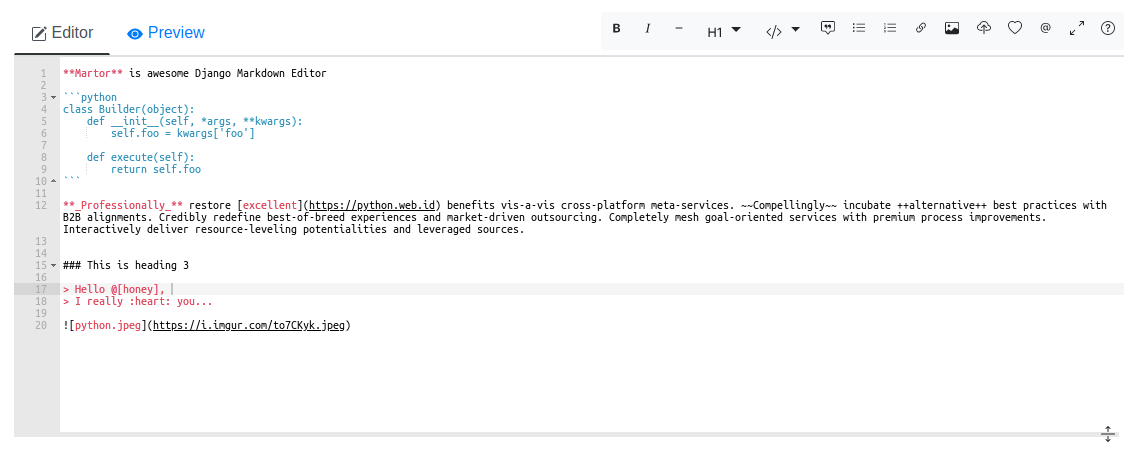
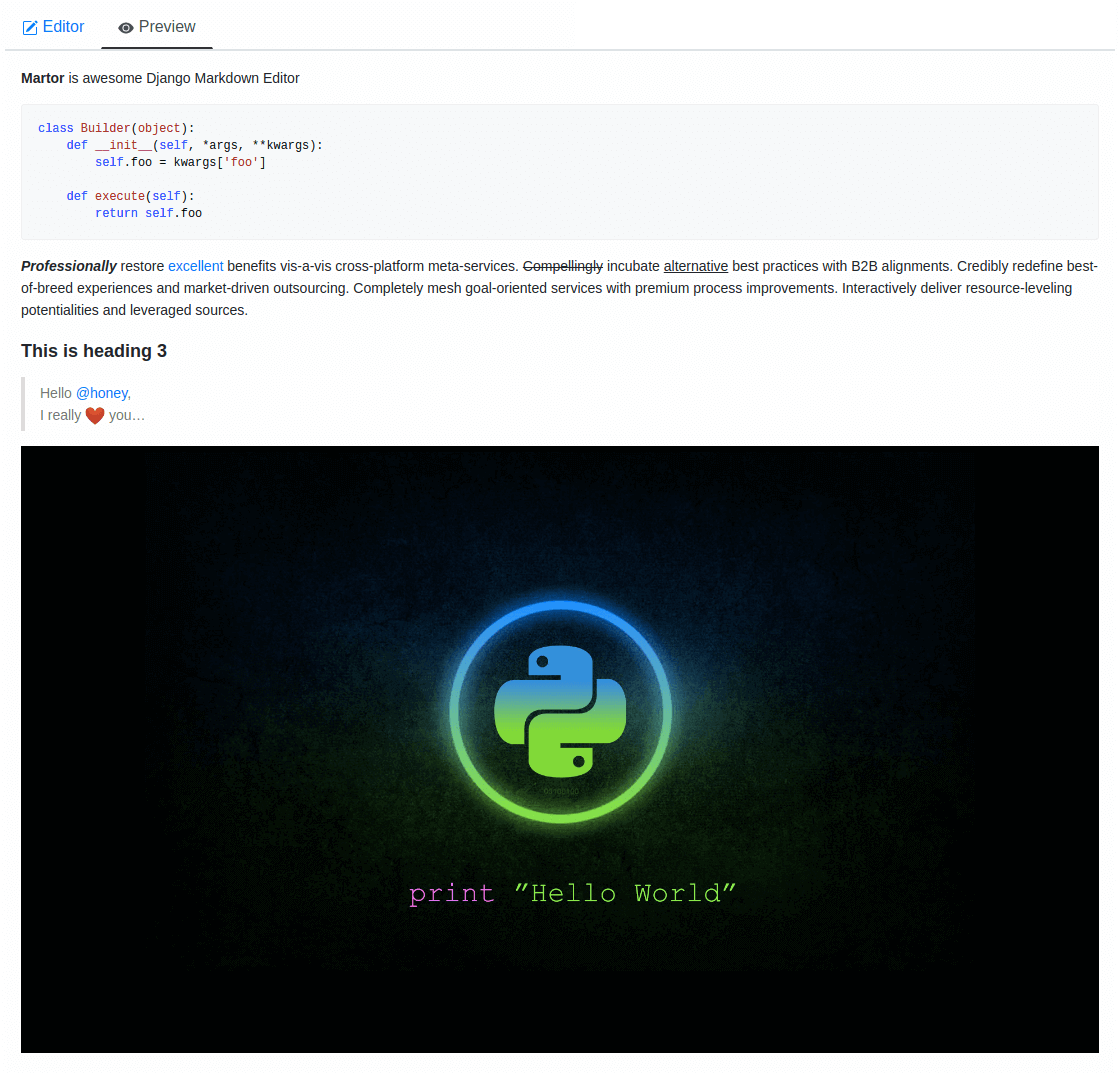
Preview

editor

preview

Requirements

  • Django>=2.0
  • Markdown>=3.0
  • requests>=2.12.4

Installation

Martor is available directly from PyPI:

1. Installing the package.

$ pip install martor

2. Don't forget to add 'martor' to your 'INSTALLED_APPS' setting (without migrations).

# settings.py
INSTALLED_APPS = [
    ....
    'martor',
]

3. Add url pattern to your urls.py.

# urls.py
# django >= 2.0
urlpatterns = [
    ...
    path('martor/', include('martor.urls')),
]

# django <= 1.9
urlpatterns = [
    ...
    url(r'^martor/', include('martor.urls')),
]

4. Collect martor's static files in your STATIC_ROOT folder.

./manage.py collectstatic

Setting Configurations settings.py

Please register your application at https://api.imgur.com/oauth2/addclient to get IMGUR_CLIENT_ID and IMGUR_API_KEY.

# Choices are: "semantic", "bootstrap"
MARTOR_THEME = 'bootstrap'

# Global martor settings
# Input: string boolean, `true/false`
MARTOR_ENABLE_CONFIGS = {
    'emoji': 'true',        # to enable/disable emoji icons.
    'imgur': 'true',        # to enable/disable imgur/custom uploader.
    'mention': 'false',     # to enable/disable mention
    'jquery': 'true',       # to include/revoke jquery (require for admin default django)
    'living': 'false',      # to enable/disable live updates in preview
    'spellcheck': 'false',  # to enable/disable spellcheck in form textareas
    'hljs': 'true',         # to enable/disable hljs highlighting in preview
}

# To show the toolbar buttons
MARTOR_TOOLBAR_BUTTONS = [
    'bold', 'italic', 'horizontal', 'heading', 'pre-code',
    'blockquote', 'unordered-list', 'ordered-list',
    'link', 'image-link', 'image-upload', 'emoji',
    'direct-mention', 'toggle-maximize', 'help'
]

# To setup the martor editor with title label or not (default is False)
MARTOR_ENABLE_LABEL = False

# Imgur API Keys
MARTOR_IMGUR_CLIENT_ID = 'your-client-id'
MARTOR_IMGUR_API_KEY   = 'your-api-key'

# Markdownify
MARTOR_MARKDOWNIFY_FUNCTION = 'martor.utils.markdownify' # default
MARTOR_MARKDOWNIFY_URL = '/martor/markdownify/' # default

# Markdown extensions (default)
MARTOR_MARKDOWN_EXTENSIONS = [
    'markdown.extensions.extra',
    'markdown.extensions.nl2br',
    'markdown.extensions.smarty',
    'markdown.extensions.fenced_code',

    # Custom markdown extensions.
    'martor.extensions.urlize',
    'martor.extensions.del_ins',      # ~~strikethrough~~ and ++underscores++
    'martor.extensions.mention',      # to parse markdown mention
    'martor.extensions.emoji',        # to parse markdown emoji
    'martor.extensions.mdx_video',    # to parse embed/iframe video
    'martor.extensions.escape_html',  # to handle the XSS vulnerabilities
]

# Markdown Extensions Configs
MARTOR_MARKDOWN_EXTENSION_CONFIGS = {}

# Markdown urls
MARTOR_UPLOAD_URL = '/martor/uploader/' # default
MARTOR_SEARCH_USERS_URL = '/martor/search-user/' # default

# Markdown Extensions
# MARTOR_MARKDOWN_BASE_EMOJI_URL = 'https://www.webfx.com/tools/emoji-cheat-sheet/graphics/emojis/'     # from webfx
MARTOR_MARKDOWN_BASE_EMOJI_URL = 'https://github.githubassets.com/images/icons/emoji/'                  # default from github
MARTOR_MARKDOWN_BASE_MENTION_URL = 'https://python.web.id/author/'                                      # please change this to your domain

# If you need to use your own themed "bootstrap" or "semantic ui" dependency
# replace the values with the file in your static files dir
MARTOR_ALTERNATIVE_JS_FILE_THEME = "semantic-themed/semantic.min.js"   # default None
MARTOR_ALTERNATIVE_CSS_FILE_THEME = "semantic-themed/semantic.min.css" # default None
MARTOR_ALTERNATIVE_JQUERY_JS_FILE = "jquery/dist/jquery.min.js"        # default None

Check this setting is not set else csrf will not be sent over ajax calls:

CSRF_COOKIE_HTTPONLY = False

Usage

Model

from django.db import models
from martor.models import MartorField

class Post(models.Model):
    description = MartorField()

Form

from django import forms
from martor.fields import MartorFormField

class PostForm(forms.Form):
    description = MartorFormField()

Admin

from django.db import models
from django.contrib import admin

from martor.widgets import AdminMartorWidget

from yourapp.models import YourModel

class YourModelAdmin(admin.ModelAdmin):
    formfield_overrides = {
        models.TextField: {'widget': AdminMartorWidget},
    }

admin.site.register(YourModel, YourModelAdmin)

Template Renderer

Simply safely parse markdown content as html ouput by loading templatetags from martor/templatetags/martortags.py.

{% load martortags %}
{{ field_name|safe_markdown }}

# example
{{ post.description|safe_markdown }}

Don't miss to include the required css & js files before use. You can take a look at this folder martor_demo/app/templates for more details. The below example is a one of the way to implement it when you choose the MARTOR_THEME = 'bootstrap':

{% extends "bootstrap/base.html" %}
{% load static %}
{% load martortags %}

{% block css %}
  <link href="{% static 'plugins/css/ace.min.css' %}" type="text/css" media="all" rel="stylesheet" />
  <link href="{% static 'martor/css/martor.bootstrap.min.css' %}" type="text/css" media="all" rel="stylesheet" />
{% endblock %}

{% block content %}
  <div class="martor-preview">
    <h1>Title: {{ post.title }}</h1>
    <p><b>Description:</b></p>
    <hr />
    {{ post.description|safe_markdown }}
  </div>
{% endblock %}

{% block js %}
  <script type="text/javascript" src="{% static 'plugins/js/highlight.min.js' %}"></script>
  <script>
    $('.martor-preview pre').each(function(i, block){
        hljs.highlightBlock(block);
    });
  </script>
{% endblock %}

Template Editor Form

Different with Template Renderer, the Template Editor Form have more css & javascript dependencies.

{% extends "bootstrap/base.html" %}
{% load static %}

{% block css %}
  <link href="{% static 'plugins/css/ace.min.css' %}" type="text/css" media="all" rel="stylesheet" />
  <link href="{% static 'plugins/css/resizable.min.css' %}" type="text/css" media="all" rel="stylesheet" />
  <link href="{% static 'martor/css/martor.bootstrap.min.css' %}" type="text/css" media="all" rel="stylesheet" />
{% endblock %}

{% block content %}
  <form class="form" method="post">{% csrf_token %}
    <div class="form-group">
      {{ form.title }}
    </div>
    <div class="form-group">
      {{ form.description }}
    </div>
    <div class="form-group">
      <button class="btn btn-success">
        <i class="save icon"></i> Save Post
      </button>
    </div>
  </form>
{% endblock %}

{% block js %}
  <script type="text/javascript" src="{% static 'plugins/js/ace.js' %}"></script>
  <script type="text/javascript" src="{% static 'plugins/js/mode-markdown.js' %}"></script>
  <script type="text/javascript" src="{% static 'plugins/js/ext-language_tools.js' %}"></script>
  <script type="text/javascript" src="{% static 'plugins/js/theme-github.js' %}"></script>
  <script type="text/javascript" src="{% static 'plugins/js/typo.js' %}"></script>
  <script type="text/javascript" src="{% static 'plugins/js/spellcheck.js' %}"></script>
  <script type="text/javascript" src="{% static 'plugins/js/highlight.min.js' %}"></script>
  <script type="text/javascript" src="{% static 'plugins/js/resizable.min.js' %}"></script>
  <script type="text/javascript" src="{% static 'plugins/js/emojis.min.js' %}"></script>
  <script type="text/javascript" src="{% static 'martor/js/martor.bootstrap.min.js' %}"></script>
{% endblock %}

Custom Uploader

If you want to save the images uploaded to your storage, Martor also provides a way to handle this. Please checkout this WIKI

Test Martor from this Repository

Assuming you are already setup with a virtual enviroment (virtualenv):

$ git clone https://github.com/agusmakmun/django-markdown-editor.git
$ cd django-markdown-editor/ && python setup.py install
$ cd martor_demo/
$ python manage.py makemigrations && python manage.py migrate
$ python manage.py runserver

Checkout at http://127.0.0.1:8000/simple-form/ on your browser.

Martor Commands Reference
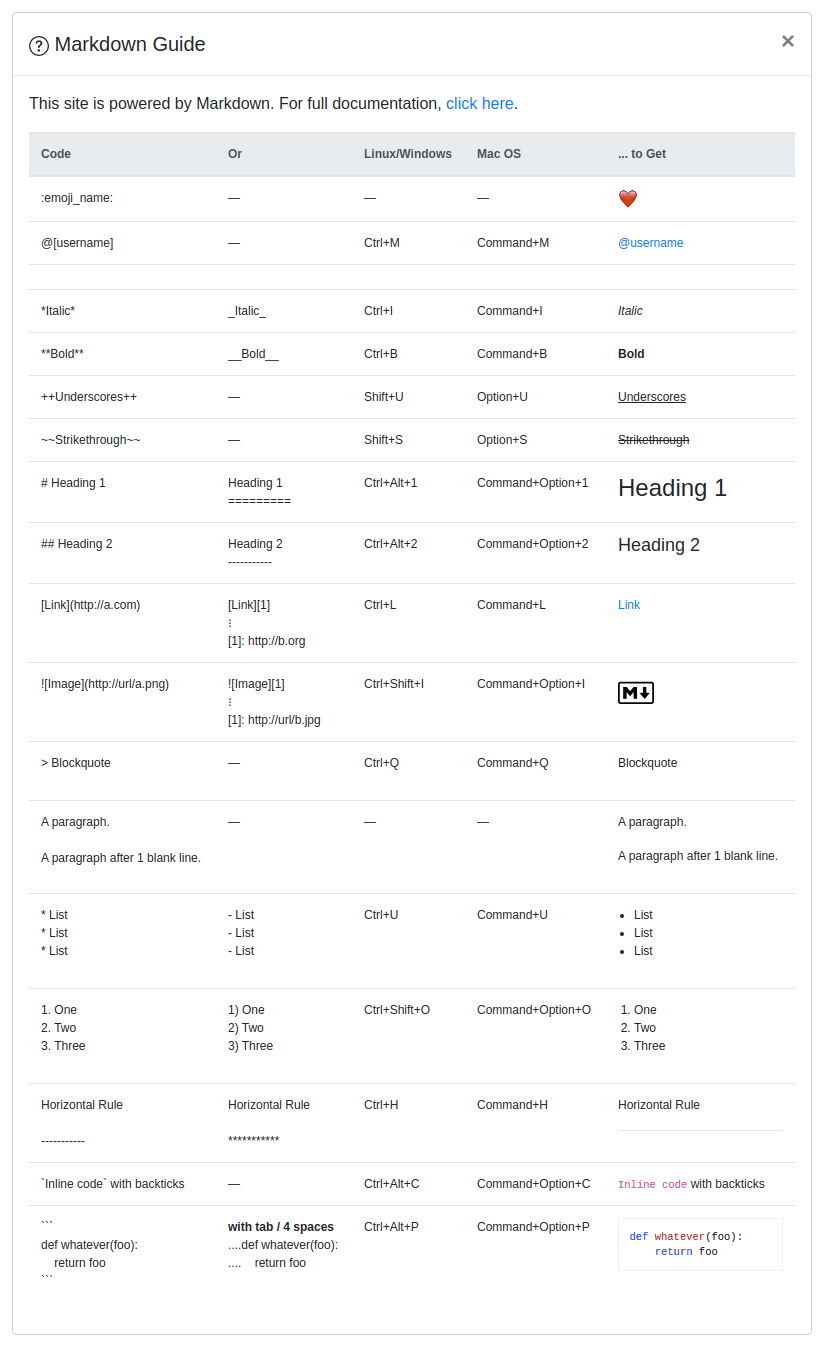
command refference

Notes

Martor was inspired by these great projects: django-markdownx, Python Markdown and Online reStructuredText editor.


Comments
  • Semantic conflicts with bootstrap

    Semantic conflicts with bootstrap

    This uses semantic.js if you install on a site with bootstrap it breaks dialog boxes becuase they have the same .dialog js methods and similar styles.

    Is there a way to fix this with out changing an entire site to use bootstraps no conflict mode ?

    currently i have had to remove semantic.js to make dialogs work on my site any better solution ?

    I am currently trying to integrate this into django wiki i have a PR with my current progress if interested.

    https://github.com/django-wiki/django-wiki/pull/709

    enhancement help wanted 
    opened by olymk2 16
  • Martor crashes with Markdown 3

    Martor crashes with Markdown 3

    Log:

    Traceback (most recent call last):
      File "/usr/local/lib/python3.6/site-packages/django/core/handlers/exception.py", line 35, in inner
        response = get_response(request)
      File "/usr/local/lib/python3.6/site-packages/django/core/handlers/base.py", line 158, in _get_response
        response = self.process_exception_by_middleware(e, request)
      File "/usr/local/lib/python3.6/site-packages/django/core/handlers/base.py", line 156, in _get_response
        response = response.render()
      File "/usr/local/lib/python3.6/site-packages/django/template/response.py", line 106, in render
        self.content = self.rendered_content
      File "/usr/local/lib/python3.6/site-packages/django/template/response.py", line 83, in rendered_content
        content = template.render(context, self._request)
      File "/usr/local/lib/python3.6/site-packages/django/template/backends/django.py", line 61, in render
        return self.template.render(context)
      File "/usr/local/lib/python3.6/site-packages/django/template/base.py", line 175, in render
        return self._render(context)
      File "/usr/local/lib/python3.6/site-packages/django/template/base.py", line 167, in _render
        return self.nodelist.render(context)
      File "/usr/local/lib/python3.6/site-packages/django/template/base.py", line 943, in render
        bit = node.render_annotated(context)
      File "/usr/local/lib/python3.6/site-packages/django/template/base.py", line 910, in render_annotated
        return self.render(context)
      File "/usr/local/lib/python3.6/site-packages/django/template/loader_tags.py", line 155, in render
        return compiled_parent._render(context)
      File "/usr/local/lib/python3.6/site-packages/django/template/base.py", line 167, in _render
        return self.nodelist.render(context)
      File "/usr/local/lib/python3.6/site-packages/django/template/base.py", line 943, in render
        bit = node.render_annotated(context)
      File "/usr/local/lib/python3.6/site-packages/django/template/base.py", line 910, in render_annotated
        return self.render(context)
      File "/usr/local/lib/python3.6/site-packages/django/template/loader_tags.py", line 155, in render
        return compiled_parent._render(context)
      File "/usr/local/lib/python3.6/site-packages/django/template/base.py", line 167, in _render
        return self.nodelist.render(context)
      File "/usr/local/lib/python3.6/site-packages/django/template/base.py", line 943, in render
        bit = node.render_annotated(context)
      File "/usr/local/lib/python3.6/site-packages/django/template/base.py", line 910, in render_annotated
        return self.render(context)
      File "/usr/local/lib/python3.6/site-packages/django/template/defaulttags.py", line 517, in render
        return self.nodelist.render(context)
      File "/usr/local/lib/python3.6/site-packages/django/template/base.py", line 943, in render
        bit = node.render_annotated(context)
      File "/usr/local/lib/python3.6/site-packages/django/template/base.py", line 910, in render_annotated
        return self.render(context)
      File "/usr/local/lib/python3.6/site-packages/django/template/loader_tags.py", line 67, in render
        result = block.nodelist.render(context)
      File "/usr/local/lib/python3.6/site-packages/django/template/base.py", line 943, in render
        bit = node.render_annotated(context)
      File "/usr/local/lib/python3.6/site-packages/django/template/base.py", line 910, in render_annotated
        return self.render(context)
      File "/usr/local/lib/python3.6/site-packages/django/template/loader_tags.py", line 67, in render
        result = block.nodelist.render(context)
      File "/usr/local/lib/python3.6/site-packages/django/template/base.py", line 943, in render
        bit = node.render_annotated(context)
      File "/usr/local/lib/python3.6/site-packages/django/template/base.py", line 910, in render_annotated
        return self.render(context)
      File "/usr/local/lib/python3.6/site-packages/django/template/base.py", line 993, in render
        output = self.filter_expression.resolve(context)
      File "/usr/local/lib/python3.6/site-packages/django/template/base.py", line 703, in resolve
        new_obj = func(obj, *arg_vals)
      File "/usr/local/lib/python3.6/site-packages/martor/templatetags/martortags.py", line 21, in safe_markdown
        return mark_safe(markdownify(field_name))
      File "/usr/local/lib/python3.6/site-packages/martor/utils.py", line 28, in markdownify
        extension_configs=MARTOR_MARKDOWN_EXTENSION_CONFIGS
      File "/usr/local/lib/python3.6/site-packages/markdown/core.py", line 390, in markdown
        md = Markdown(**kwargs)
      File "/usr/local/lib/python3.6/site-packages/markdown/core.py", line 100, in __init__
        configs=kwargs.get('extension_configs', {}))
      File "/usr/local/lib/python3.6/site-packages/markdown/core.py", line 126, in registerExtensions
        ext = self.build_extension(ext, configs.get(ext, {}))
      File "/usr/local/lib/python3.6/site-packages/markdown/core.py", line 181, in build_extension
        return module.makeExtension(**configs)
      File "/usr/local/lib/python3.6/site-packages/martor/extensions/del_ins.py", line 48, in makeExtension
        return DelInsExtension(configs=dict(configs))
      File "/usr/local/lib/python3.6/site-packages/markdown/extensions/__init__.py", line 42, in __init__
        self.setConfigs(kwargs)
      File "/usr/local/lib/python3.6/site-packages/markdown/extensions/__init__.py", line 73, in setConfigs
        self.setConfig(key, value)
      File "/usr/local/lib/python3.6/site-packages/markdown/extensions/__init__.py", line 61, in setConfig
        if isinstance(self.config[key][0], bool):
    KeyError: 'configs'
    

    Downgrading to Markdown 2.6.11 fixed the problem for me.

    opened by lubo 10
  • HTML Code getting removed.

    HTML Code getting removed.

    Whenever any HTML Code is written inside the editor it is being removed as [HTML_REMOVED]. Ideally, this should not happen. Can you please have a look into it.

    opened by astikanand 10
  • Markdown widget becomes unresponsive when a model has multiple DraceditorField

    Markdown widget becomes unresponsive when a model has multiple DraceditorField

    Hello,

    I just found this plugin and it is just what I need -congratulations for the good work ;)-, after installing and setting up some fields to DraceditorField() I entered the django admin panel and found the following error.

    While in a model if you have only just 1 DraceditorField, the widget works as expected

    1field markdown

    But in the moment that in a same model two DraceditorFields are added when entering admin panel one of the widgets become unresponsive and duplicated with information of the previous field, and of course it is impossible to edit its content also. Try it by yourself, declare a model with two DraceditorField.

    See how 2nd Markdown editor looks weird in the following image:

    2 fields

    Do you have a guess on why this is happening? Could be easy for you to fix it?

    bug help wanted 
    opened by gomezjdaniel 9
  • Preview not working

    Preview not working

    Instead of getting a preview, it just looks exactly like the raw text in the editor box.

    models.py:

    class Question(models.Model, HitCountMixin):
        title = models.CharField(max_length=200, blank=False)
        description = MartorField()
    

    forms.py

    class QuestionForm(forms.ModelForm):
        class Meta:
            model = Question
            fields = ['title', 'description']
            widgets = {
                'description': AdminMartorWidget,
            }
        def __init__(self, *args, **kwargs):
            self.user = kwargs.pop('user')
            super(QuestionForm, self).__init__(*args, **kwargs)
            self.fields['description'] = MartorFormField()
    

    EDIT My new form looks like this:

    class QuestionForm(forms.ModelForm):
        class Meta:
            model = Question
            fields = ['title', 'description']
    
        def __init__(self, *args, **kwargs):
            self.user = kwargs.pop('user')
            super(QuestionForm, self).__init__(*args, **kwargs)
            self.fields['description'] = MartorFormField()
    

    image

    opened by jdhurwitz 7
  • XSS via href content

    XSS via href content

    The bug reported here https://github.com/agusmakmun/django-markdown-editor/issues/173 can be extended to an href content with small syntax changes.

    Steps to reproduce

    1. editor insert: [testlinkxss](" onmouseover=alert(document.domain) l)
    2. preview will result in:

      <a href="" onmouseover="alert(document.domain)" l"="">testlinkxss

    3. go with the mouse over will trigger the payload.
    Screenshot 2022-05-23 at 16 25 26 Screenshot 2022-05-23 at 16 25 15
    opened by Arkango 6
  • Semantic css is missing its image assets

    Semantic css is missing its image assets

    when trying to run collectstatic with the gzip storage engine, it errors when processing semantic.min.css.

    because the flags.png file is not present so it fails to compress and stops the collect static process.

    Its looking for a child path of the below in the css file.

    themes/default/assets/images/flags.png

    opened by olymk2 6
  • XSS using javascript: URLs

    XSS using javascript: URLs

    javascript: urls can cause cross site scripting

    Steps to reproduce

    1. paste this in your editor [aaaa](javascript:alert(1))
    2. preview it
    3. click on aaaa

    The fix would be only allowing https?:// urls or maybe a small whitelist.

    opened by wfinn 5
  •  i cant display fields with inline - django admin

    i cant display fields with inline - django admin

    the bug has not been fixed yet, i cant display fields with inline. #148

    fieldsets = (
            (
                None,
                {
                    'fields': (
                        (
                            'status',
                            'published_at',
                        ),
                        'title'
                    ),
                },
            ),
            # (
            #     'Content',
            #     {'fields': ('content',)},       # martor
            # ),
        )
    

    does not work when martor editor is active.

    Details

    • OS (Operating System) version: MacOS
    • Browser and browser version: Chrome 89
    • Django version: 3.1.7
    • Martor version: 1.6.0
    bug help wanted 
    opened by niturk 5
  • live preview not showing up in django admin

    live preview not showing up in django admin

    Hi, i found a problem here.

    during production (i deployed on pythonanywhere), the preview editor doesn't appear in django admin, but it works fine if i run it on local. I've already collect martor's static and i've convinced that the path to static martor directory is correct but, still the preview editor doesnt work.

    opened by sodrooome 5
  • Demo application - martor_demo not working!

    Demo application - martor_demo not working!

    Here's the complete trace on running the command python manage.py check:

    Traceback (most recent call last):
      File "manage.py", line 15, in <module>
        execute_from_command_line(sys.argv)
      File "/home/alfarhanzahedi/Projects/django/django-markdown-editor/venv/lib/python3.7/site-packages/Django-3.0b1-py3.7.egg/django/core/management/__init__.py", line 401, in execute_from_command_line
        utility.execute()
      File "/home/alfarhanzahedi/Projects/django/django-markdown-editor/venv/lib/python3.7/site-packages/Django-3.0b1-py3.7.egg/django/core/management/__init__.py", line 377, in execute
        django.setup()
      File "/home/alfarhanzahedi/Projects/django/django-markdown-editor/venv/lib/python3.7/site-packages/Django-3.0b1-py3.7.egg/django/__init__.py", line 24, in setup
        apps.populate(settings.INSTALLED_APPS)
      File "/home/alfarhanzahedi/Projects/django/django-markdown-editor/venv/lib/python3.7/site-packages/Django-3.0b1-py3.7.egg/django/apps/registry.py", line 114, in populate
        app_config.import_models()
      File "/home/alfarhanzahedi/Projects/django/django-markdown-editor/venv/lib/python3.7/site-packages/Django-3.0b1-py3.7.egg/django/apps/config.py", line 211, in import_models
        self.models_module = import_module(models_module_name)
      File "/home/alfarhanzahedi/Projects/django/django-markdown-editor/venv/lib/python3.7/importlib/__init__.py", line 127, in import_module
        return _bootstrap._gcd_import(name[level:], package, level)
      File "<frozen importlib._bootstrap>", line 1006, in _gcd_import
      File "<frozen importlib._bootstrap>", line 983, in _find_and_load
      File "<frozen importlib._bootstrap>", line 967, in _find_and_load_unlocked
      File "<frozen importlib._bootstrap>", line 677, in _load_unlocked
      File "<frozen importlib._bootstrap_external>", line 728, in exec_module
      File "<frozen importlib._bootstrap>", line 219, in _call_with_frames_removed
      File "/home/alfarhanzahedi/Projects/django/django-markdown-editor/venv/lib/python3.7/site-packages/martor-1.4.4-py3.7.egg/martor/models.py", line 3, in <module>
        from .fields import MartorFormField
      File "/home/alfarhanzahedi/Projects/django/django-markdown-editor/venv/lib/python3.7/site-packages/martor-1.4.4-py3.7.egg/martor/fields.py", line 4, in <module>
        from .widgets import (MartorWidget, AdminMartorWidget)
      File "/home/alfarhanzahedi/Projects/django/django-markdown-editor/venv/lib/python3.7/site-packages/martor-1.4.4-py3.7.egg/martor/widgets.py", line 14, in <module>
        class MartorWidget(forms.Textarea):
      File "/home/alfarhanzahedi/Projects/django/django-markdown-editor/venv/lib/python3.7/site-packages/martor-1.4.4-py3.7.egg/martor/widgets.py", line 51, in MartorWidget
        class Media:
      File "/home/alfarhanzahedi/Projects/django/django-markdown-editor/venv/lib/python3.7/site-packages/martor-1.4.4-py3.7.egg/martor/widgets.py", line 73, in Media
        if MARTOR_ENABLE_CONFIGS['spellcheck'] == 'true':
    KeyError: 'spellcheck'
    
    opened by alfarhanzahedi 5
  • safe_markdown throw KeyError exception

    safe_markdown throw KeyError exception

    This content throws a KeyError exception when template using safe_markdown

    int[] values = new int[] { 0, 12, 44, 36, 92, 54, 13, 8 };
    IEnumerable<int> result =
        from v in values
        where v < 37
        orderby -v
        select v;
    

    <div>{{ object.content|safe_markdown }}</div>

    Details

    • OS (Operating System) version: macOS Monterey 12.6.1
    • Browser and browser version: 107.0.5304.110 (正式版本) (x86_64)
    • Django version: 4.0.2
    • Martor version & theme: 1.6.15 bootstrap

    Steps to reproduce

    1. Write markdown content as shown above
    2. Template output content with safe_markdown filter
    3. Browse url with markdown template
    截圖 2022-11-25 上午5 52 29
    opened by enjoy-software 0
  • Youtube embed not rendering in Safari

    Youtube embed not rendering in Safari

    Details

    • OS (Operating System) version: macOS 12.5.1 (Monterey)
    • Browser and browser version: Safari 16.0
    • Django version: 4.1.2
    • Martor version & theme: 1.6.14 with Bootstrap theme

    Steps to reproduce

    1. In Safari: In the Simple Form demo, just pasting a Youtube url in the markdown editor, renders an empty iframe.
    Screen Shot 2022-10-12 at 3 23 49 PM
    1. As you can see, the the src parameter is set without the protocol string (https).

    2. This works fine in Chrome (106.0.5249.103) and Firefox (v 105.0.3)

    I know this is a bug report, but in case it helps, I made the following changes to the mdx_video.py file

    1. In the extendMarkdown function, I changed the regular expression to capture the protocol along with the youtubeid parameter. So the code was change from r"([^(]|^)https?://www\.youtube\.com/watch\?\S*v=(?P<youtubeid>\S[^&/]+)" TO r"([^(]|^)(?P<protocol>(https?))://www\.youtube\.com/watch\?\S*v=(?P<youtubeid>\S[^&/]+)"

    2. In the Youtube class, I changed the code from

    class Youtube(markdown.inlinepatterns.Pattern):
        def handleMatch(self, m):
            if self.ext.config["youtube_nocookie"][0]:
                url = "//www.youtube-nocookie.com/embed/%s" % m.group("youtubeid")
            else:
                url = "//www.youtube.com/embed/%s" % m.group("youtubeid")
            width = self.ext.config["youtube_width"][0]
            height = self.ext.config["youtube_height"][0]
            return render_iframe(url, width, height)
    

    TO the version below that just uses the protocol parameter

    class Youtube(markdown.inlinepatterns.Pattern):
        def handleMatch(self, m):
            if self.ext.config["youtube_nocookie"][0]:
                url = "{0}://www.youtube-nocookie.com/embed/{1}".format(m.group("protocol"), m.group("youtubeid"))
            else:
                url = "{0}://www.youtube.com/embed/{1}".format(m.group("protocol"), m.group("youtubeid"))
    

    Finally, thank you so much for your work/plugin. It has been incredibly helpful. If you take pull requests, I'd be happy to make the changes for your review.

    opened by Amartya 1
  • CSS styles are conflicting with Django Admin

    CSS styles are conflicting with Django Admin

    When loading martor in the admin, it loads CSS rules which overrides many admin styles. For example, when using bootstrap theme, it causes collapsible fieldsets to be completely hidden:

    .collapse:not(.show) {
        display: none;
    }
    

    Even when using the "semantic" theme, there are many style definitions that are not namespaced, and causes default admin styles to be overriden, for example, h2 headings look way to big because of this rule in martor-admin.css:

    h2 {
        font-size: 16px!important;
        margin: 1em 0 0.5em 0!important;
    }
    

    I'm assuming these style definitions are only meant for the preview. If that's the case, then they should be namespaced to the preview box.

    opened by bendavis78 3
  • Preview fails due to missing CSRF token

    Preview fails due to missing CSRF token

    When selecting preview tab in admin, it says "Nothing to preview". The console output shows the following::

    WARNING django.security.csrf: Forbidden (CSRF token missing or incorrect.): /martor/markdownify/ 
    
    • Django version: 2.2.12
    • Martor version: 1.6.13
    opened by bendavis78 1
  • Bootstrap collapse class overrides Django class

    Bootstrap collapse class overrides Django class

    Details

    • OS (Operating System) version: Debian Bullseye
    • Browser and browser version: Chrome 100
    • Django version: 3.2
    • Martor version & theme: 1.6.13

    Steps to reproduce

    1. Define inline class class ObjectInline(GenericTabularInline): model = Object classes = ("collapse",)

    2. Bootstrap rule overrides Django css and Inline becomes not colapsed but invisible.

    .collapse:not(.show) {
        display: none;
    }
    
    opened by 13hakta 0
  • Newer Django dark mode looks horrible when combined with Martor

    Newer Django dark mode looks horrible when combined with Martor

    The newer version of Django where the admin supports auto dark mode, it looks quite bad when dark mode is initiated on admin pages that have martor fields.

    It looks like everything still functions, it just looks bad.

    opened by yatahaze 1
Releases(v1.6.15)
Owner
Linux, Python & Django Enthusiast past @titipbeliin @doaai
Django React Flight Rezervation

Django Intro & Installation python -m venv venv source ./venv/Scripts/activate pip install Django pip install djangorestframework pip install python-d

HILMI SARIOGLU 2 May 26, 2022
APIs for a Chat app. Written with Django Rest framework and Django channels.

ChatAPI APIs for a Chat app. Written with Django Rest framework and Django channels. The documentation for the http end points can be found here This

Victor Aderibigbe 18 Sep 09, 2022
DRF_commands is a Django package that helps you to create django rest framework endpoints faster using manage.py.

DRF_commands is a Django package that helps you to create django rest framework endpoints faster using manage.py.

Mokrani Yacine 2 Sep 28, 2022
PEP-484 stubs for Django

pep484 stubs for Django This package contains type stubs and a custom mypy plugin to provide more precise static types and type inference for Django f

TypedDjango 1.1k Dec 30, 2022
A Django Webapp performing CRUD operations on Library Database.

CRUD operations - Django Library Database A Django Webapp performing CRUD operations on Library Database. Tools & Technologies used: Django MongoDB HT

1 Dec 05, 2021
A generic system for filtering Django QuerySets based on user selections

Django Filter Django-filter is a reusable Django application allowing users to declaratively add dynamic QuerySet filtering from URL parameters. Full

Carlton Gibson 3.9k Jan 03, 2023
Website desenvolvido em Django para gerenciamento e upload de arquivos (.pdf).

Website para Gerenciamento de Arquivos Features Esta é uma aplicação full stack web construída para desenvolver habilidades com o framework Django. O

Alinne Grazielle 8 Sep 22, 2022
Wagtail - Vue - Django : The initial environment of full-stack local dev web app with wagtail and vue

Wagtail - Vue - Django : The initial environment of full-stack local dev web app with wagtail and vue. A demo to show how to use .vue files inside django app.

Quang PHAM 2 Oct 20, 2022
django-dashing is a customisable, modular dashboard application framework for Django to visualize interesting data about your project. Inspired in the dashboard framework Dashing

django-dashing django-dashing is a customisable, modular dashboard application framework for Django to visualize interesting data about your project.

talPor Solutions 703 Dec 22, 2022
Mobile Detect is a lightweight Python package for detecting mobile devices (including tablets).

Django Mobile Detector Mobile Detect is a lightweight Python package for detecting mobile devices (including tablets). It uses the User-Agent string c

Botir 6 Aug 31, 2022
django CMS Association 1.6k Jan 06, 2023
This is a repository for collecting global custom management extensions for the Django Framework.

Django Extensions Django Extensions is a collection of custom extensions for the Django Framework. Getting Started The easiest way to figure out what

Django Extensions 6k Dec 26, 2022
Django Serverless Cron - Run cron jobs easily in a serverless environment

Django Serverless Cron - Run cron jobs easily in a serverless environment

Paul Onteri 41 Dec 16, 2022
DCM is a set of tools that helps you to keep your data in your Django Models consistent.

Django Consistency Model DCM is a set of tools that helps you to keep your data in your Django Models consistent. Motivation You have a lot of legacy

Occipital 59 Dec 21, 2022
Use minify-html, the extremely fast HTML + JS + CSS minifier, with Django.

django-minify-html Use minify-html, the extremely fast HTML + JS + CSS minifier, with Django. Requirements Python 3.8 to 3.10 supported. Django 2.2 to

Adam Johnson 60 Dec 28, 2022
Django API creation with signed requests utilizing forms for validation.

django-formapi Create JSON API:s with HMAC authentication and Django form-validation. Version compatibility See Travis-CI page for actual test results

5 Monkeys 34 Apr 04, 2022
Loguru is an exceeding easy way to do logging in Python

Django Easy Logging Easy Django logging with Loguru Loguru is an exceeding easy way to do logging in Python. django-easy-logging makes it exceedingly

Neutron Sync 8 Oct 17, 2022
Simple reproduction of connection leak with celery/django/gevent

Redis connection leak with celery/django/gevent Reproduces celery issue at https://github.com/celery/celery/issues/6819 using gevented django web serv

2 Apr 03, 2022
Django web apps for managing schedules.

skdue Description Skdue is a web application that makes your life easier by helping you manage your schedule. With the ability which allows you to cre

Patkamon_Awai 1 Jun 30, 2022
A set of high-level abstractions for Django forms

django-formtools Django's "formtools" is a set of high-level abstractions for Django forms. Currently for form previews and multi-step forms. This cod

Jazzband 621 Dec 30, 2022