CLI program that allows you to change your Alacritty config with one command without editing the config file.

Overview

Pycritty

Change your alacritty config on the fly!
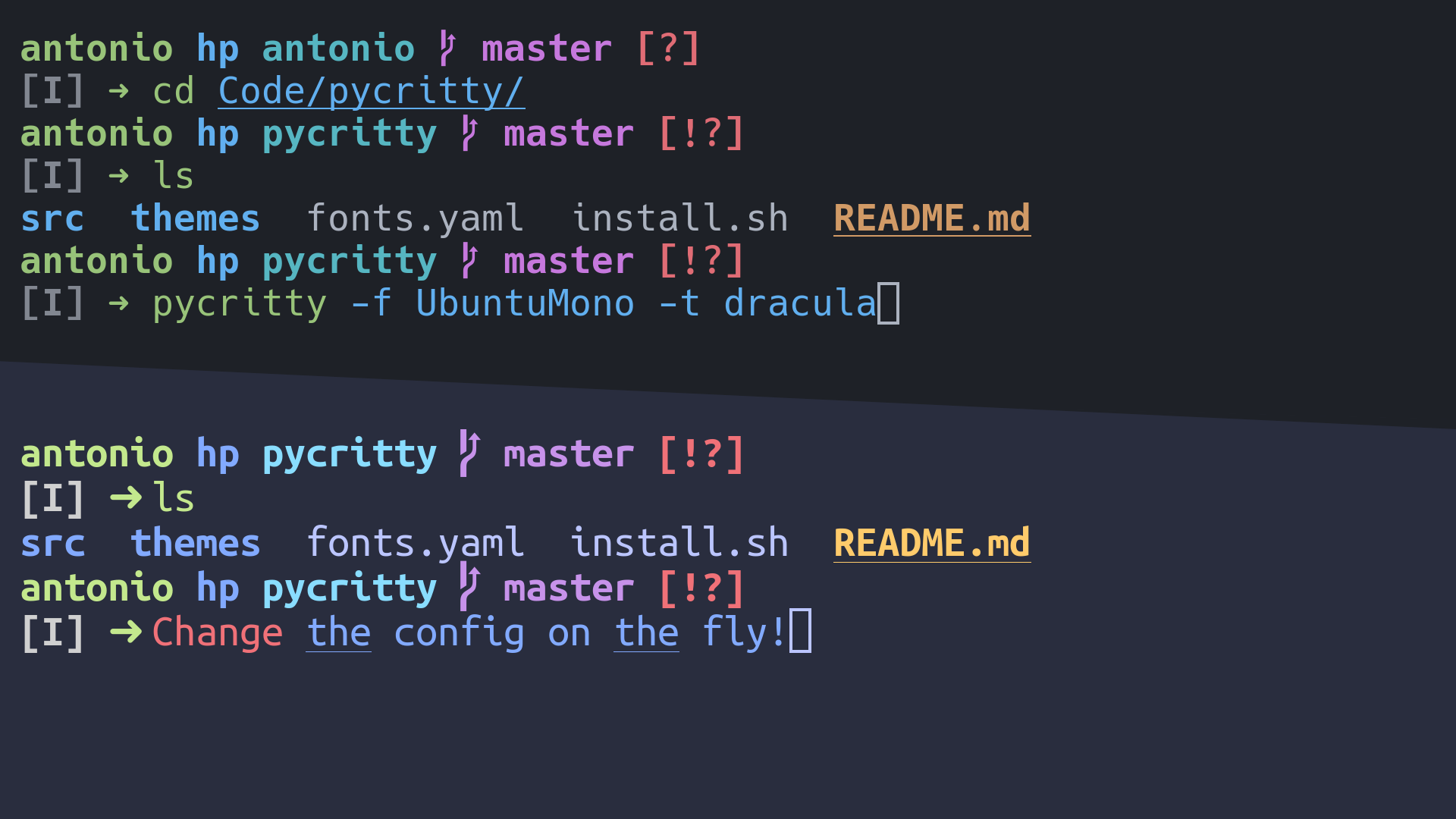
Preview Image

Installation:

pip install pycritty

By default, only the program itself will be installed, but you can install default themes from config/themes:

pip install --install-option="--themes=onedark,dracula,nord" pycritty

Or if you want them all:

pip install --install-option="--themes=all" pycritty

Make sure to have ~/.local/bin directory in your $PATH, otherwise your shell won't find the pycritty command. Add this line to your ~/.xprofile if you haven't already:

export PATH=$HOME/.local/bin:$PATH

Usage:

Change your current config:

pycritty --font UbuntuMono --size 14 --opacity 0.95

Save multiple configs and reuse them later:

pycritty save ThisConfig
pycritty load AnotherConfig

Install themes and configs from URLs:

pycritty install -t https://raw.githubusercontent.com/antoniosarosi/pycritty/master/config/themes/breeze.yaml
pycritty -t breeze
pycritty install -c -n SomeCoolConfig https://raw.githubusercontent.com/antoniosarosi/dotfiles/master/.config/alacritty/config.yaml
pycritty load SomeCoolConfig

Check help for all available options:

pycritty -h
# pycritty subcomand -h
pycritty save -h

Fonts Config

Fonts are configured in ~/.config/alacritty/fonts.yaml with this format:

fonts:
    Alias: Font Name

When applied using pycritty -f Alias, the previous format will be converted into the alacritty equivalent:

font:
    normal:
        family: Font Name
    italic:
        family: Font Name
    bold:
        family: Font Name

You can also specify a different font for each font type:

fonts:
    Alias:
        normal: Normal Font Name
        bold: Bold Font Name
        italic: Italic Font Name

Note that the fonts must be installed on your system.

Theme Config

You can make your own custom themes by creating new theme files with the correct format, ~/.config/alacritty/themes/custom.yaml should look like this:

colors:
    # Default colors
    primary:
        background: '0x292d3e'
        foreground: '0xbbc5ff'
    # Normal colors
    normal:
        black:   '0x101010'
        red:     '0xf07178'
        green:   '0xc3e88d'
        yellow:  '0xffcb6b'
        blue:    '0x82aaff'
        magenta: '0xc792ea'
        cyan:    '0x89ddff'
        white:   '0xd0d0d0'
    # Bright colors
    bright:
        black:   '0x434758'
        red:     '0xff8b92'
        green:   '0xddffa7'
        yellow:  '0xffe585'
        blue:    '0x9cc4ff'
        magenta: '0xe1acff'
        cyan:    '0xa3f7ff'
        white:   '0xffffff'

Then you can apply it using the name of the file:

pycritty -t custom

Custom scripts

If you want to apply different configs programmatically, you can either use the CLI in a shell script or use pycritty as a python module:

#!/bin/python3

# Dummy script that changes the theme every 5 minutes

from time import sleep
from pycritty.commands import Pycritty, ListResource


def main():
    ls = ListResource()
    conf = Pycritty()
    while True:
        for theme in ls.list_themes():
            conf.change_theme(theme)  # or conf.set(theme=theme)
            conf.apply()
            sleep(300)


if __name__ == '__main__':
    main()

Shell equivalent:

#!/bin/bash

while :; do
    # Same as pycritty ls --themes --iterable
    for theme in $(pycritty ls -ti); do
        pycritty -t $theme
        sleep 300
    done
done
You might also like...
Spotify Offline is a command line tool that allows one to download Spotify playlists in MP3 format.

Spotify Offline v0.0.2 listen to your favorite spotify songs, offline Overview Spotify Offline (spotifyoffline) is a command line tool that allows one

This is a CLI program which can help you generate your own QR Code.

Python-QR-code-generator This is a CLI program which can help you generate your own QR Code. Single.py This will allow you only to input a single mess

Command line tool to automate transforming the effects of one color profile to another, possibly more standard one.

Finished rendering the frames of that animation, and now the colors look washed out and ugly? This terminal program will solve exactly that.

Limit your docker image size with a simple CLI command. Perfect to be used inside your CI process.

docker-image-size-limit Limit your docker image size with a simple CLI command. Perfect to be used inside your CI process. Read the announcing post. I

Zero-config CLI for TypeScript package development

Despite all the recent hype, setting up a new TypeScript (x React) library can be tough. Between Rollup, Jest, tsconfig, Yarn resolutions, ESLint, and

Program Command Line Interface (CLI) Sederhana: Pemesanan Nasi Goreng Hekel

Program ini merupakan aplikasi yang berjalan di dalam command line (terminal). Program ini menggunakan built-in library python yaitu argparse yang dapat menerima parameter saat program ini dijalankan melalui terminal atau CLI.

A simple automation script that logs into your kra account and files your taxes with one command

EASY_TAX A simple automation script that logs into your kra account and files your taxes with one command Currently works for Chrome users. Will creat

inklayers is a command line program that exports layers from an SVG file.

inklayers is a command line program that exports layers from an SVG file. It can be used to create slide shows by editing a single SVG file.

A command-line tool to upload local files and pastebin pastes to your mega account, without signing in anywhere

A command-line tool to upload local files and pastebin pastes to your mega account, without signing in anywhere

Comments
  • I'm not able to run pycritty, relative imports error and not set pycritty as env variable

    I'm not able to run pycritty, relative imports error and not set pycritty as env variable

    First of all, when I run the command for install everything (pip install --install-option="--themes=all" pycritty) I have no errors but pycritty is not defined as an env variable. I go to the installation path in my case .local/lib/python3.9/site-packages/pycritty and try to run it as a normal python program (python main.py --font UbuntuMono --size 14 --opacity 0.95) And this is the error that shows me, it's like can't do relative imports: Screenshot_17

    I tried to add Pycritty Error on main class for removing the import, but shows the same error with other relative import.

    Any idea about why this is not working well?

    OS: Garuda (based on Arch) Desktop: Qtile

    opened by JarssS8 4
  • [PATCH] Add integration pipeline

    [PATCH] Add integration pipeline

    Add integration pipeline for pull request, this pipeline will run mypy, flake8 and unit tests. I also fixed some files to make the pipeline succeed. Pipeline tested in fork: Screenshot_2022-03-03_00-19-38

    opened by niconunez96 0
  • [PATCH] Add unit testing proposal

    [PATCH] Add unit testing proposal

    Adding a starting test suite only for Cli class and ls functions The idea is to have a test suite that will be triggered on an integration pipeline on every pull request along with mypy checks.

    opened by niconunez96 0
  • Changed deprecated option background_opacity to window.opacity

    Changed deprecated option background_opacity to window.opacity

    In Alacritty Version 0.10.0, the option "background_opacity" in the "alacritty.yml" customization config file is deprecated. This commit fixes the warning raised by this update and updates it to the recommended.

    opened by T1erno 0
Releases(v0.4.0)
Owner
Antonio Sarosi
Average Hacker
Antonio Sarosi
Create argparse subcommands with decorators.

python-argparse-subdec This is a very simple Python package that allows one to create argparse's subcommands via function decorators. Usage Create a S

Gustavo José de Sousa 7 Oct 21, 2022
Interact with Replit remotely with the Replit CLI

Replit CLI pip install repl-cli Welcome to Replit CLI! With the Replit CLI Application, you can work with your repls locally, including clone, pull,

Shuchir Jain 4 Aug 18, 2022
Plumbum: Shell Combinators

Plumbum: Shell Combinators Ever wished the compactness of shell scripts be put into a real programming language? Say hello to Plumbum Shell Combinator

Tomer Filiba 2.5k Dec 28, 2022
Limit your docker image size with a simple CLI command. Perfect to be used inside your CI process.

docker-image-size-limit Limit your docker image size with a simple CLI command. Perfect to be used inside your CI process. Read the announcing post. I

wemake.services 102 Dec 14, 2022
Another (unofficial) Qt CLI Installer on multi-platforms

Another Qt installer(aqt) Release: Documentation: Test status: and Coverage: This is a utility alternative to the official graphical Qt installer, for

Hiroshi Miura 528 Jan 02, 2023
Command Line Based Todo Script

Todo-CLI Features Full-Fledged Command Line Based Todo List with the following features planned: Interactive Interface OS Notifications Save and Remov

DSC IIEST 5 Nov 17, 2021
Objexplore is an interactive Python object explorer for the terminal.

Objexplore is an interactive Python object explorer for the terminal. Use it while debugging, or exploring a new library, or whatever! 9D1FAC73-B2A5-4

kylepollina 249 Dec 23, 2022
Custom 64 bit shellcode encoder that evades detection and removes some common badchars (\x00\x0a\x0d\x20)

x64-shellcode-encoder Custom 64 bit shellcode encoder that evades detection and removes some common badchars (\x00\x0a\x0d\x20) Usage Using a generato

Cole Houston 2 Jan 26, 2022
(BionicLambda Universal SHell) A simple shell made in Python. Docs and possible C port incoming.

blush 😳 (BionicLambda Universal SHell) A simple shell made in Python. Docs and possible C port incoming. Note: The Linux executables were made on Ubu

3 Jun 30, 2021
Shazam is a Command Line Application that checks the integrity of the file by comparing it with a given hash.

SHAZAM - Check the file's integrity Shazam is a Command Line Application that checks the integrity of the file by comparing it with a given hash. Crea

Anaxímeno Brito 1 Aug 21, 2022
🖥️ A cross-platform modern shell.

Ergonomica WARNING: master on this repository is not the same as a stable release! Currently, this software is purely experimental, as I am cleaning i

813 Dec 27, 2022
A terminal tool for git. When we use git, do you feel very uncomfortable with too long commands

PIGIT A terminal tool for git. When we use git, do you feel very uncomfortable with too long commands. For example: git status --short, this project c

Zachary 1 Apr 09, 2022
Command-line tool to use LNURL with your LND instance

Sprint planner Sprint planner is a Python script for planning your Jira tasks based on your calendar availability. Installation Use the package manage

Djuri Baars 6 Jan 14, 2022
Rdwcli - Car list cli app with python

Rdwcli - Car list cli app with python

Arie Twigt 1 Feb 02, 2022
Code for "Salient Deconvolutional Networks, Aravindh Mahendran, Andrea Vedaldi, ECCV 2016"

deconvnet_analysis Code for "Salient Deconvolutional Networks, Aravindh Mahendran, Andrea Vedaldi, ECCV 2016" Parts of this code Generate figures in t

Aravindh Mahendran 12 Jan 25, 2021
Doing set operations on files considered as sets of lines

CLI tool that can be used to do set operations like union on files considering them as a set of lines. Notes It ignores all empty lines with whitespac

Partho 11 Sep 06, 2022
A Bot Which Send Automatically Commands To Karuta Hub to Gain it's Currency

A Bot Which Send Automatically Commands To Karuta Hub to Gain it's Currency

HarshalWaykole 1 Feb 09, 2022
A command line application, written in Python, for interacting with Spotify.

spotify-py-cli A command line application, written in Python, for interacting with Spotify. The primary purpose behind developing this app was to gain

Drew Loukusa 0 Oct 07, 2021
A mini command line tool to spellcheck text files using tadqeek.alsharekh.org

tadqeek_sakhr A mini command line tool to spellcheck text files using tadqeek.alsharekh.org Usage usage: python tadqeek_sakhr.py [-h] -i INPUT [-o OUT

Youssif Shaaban Alsager 5 Dec 11, 2022
A multipurpose discord bot with more than 220 commands

Welcome WM Bot A advanced bot with more than 220 commands to fit your needs Explore the commands » View Demo · Report Bug · Request Feature Table of C

Wasi Master 12 Dec 16, 2022