Ipylivebash - Run shell script in Jupyter with live output

Overview

ipylivebash

ipylivebash is a library to run shell script in Jupyter with live output.

Example

%%livebash --save log.txt --save-timestamp

find .

Run find . and show the output in the Jupyter notebook and also save to log-${current_timestamp}.txt

%%livebash --ask-confirm --notify
set -e
deploy_script

Before running the deploy_script show a panel to ask for confirmation. Once it is finished, show a notification.

Features

  1. Run shell script in Jupyter with live output
  2. The output in the notebook cell is not saved in the notebook by default
  3. Support to save the output to a file. If the file already exists, it will pick another name automatically.
  4. Support to show a confirmation UI before executing the script
  5. Support to send a notification when the script finishes.

Usage

usage: livebash [-h] [--save OUTPUT_FILE] [--save-timestamp]
                [--line-limit LINE_LIMIT] [--height HEIGHT] [--ask-confirm]
                [--notify] [--keep-cell-output]

optional arguments:
  -h, --help
  --save OUTPUT_FILE    Save output to a file
  --save-timestamp      Add timestamp to the output file name
  --line-limit LINE_LIMIT
                        Restrict the no. of lines to be shown
  --height HEIGHT       Set the height of the output cell
  --ask-confirm         Ask for confirmation before execution
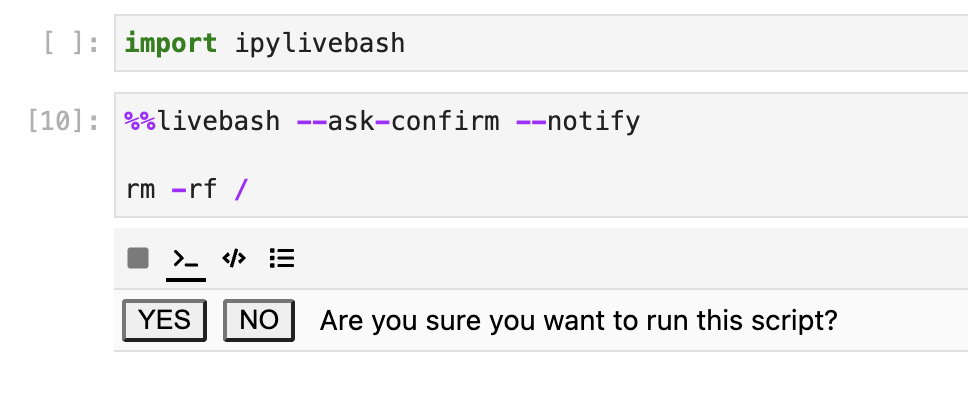
  --notify              Send a notification when the script finished
  --keep-cell-output    Keep the cell output

Options

--save OUTPUT_FILE

Save the output to a file.

If the file name already exists, it will add a suffix to avoid overriding the original file.

--save-timestamp

Add timestamp to the output file name.

--line-limit LINE_LIMIT

If the no. of line output exceed the limit, it may be truncated. It will show the last 5 lines only.

--height HEIGHT

Set the height of the output cell

--ask-confirm

Ask for confirmation before execution

ask_confirm.png (392×80)

--notify

Send a notification when the script finished

--keep-cell-output

Keep the cell output such that it could be saved together with the notebook. It can't be used with other options like --line-limit.

Installation

You can install using pip:

pip install ipylivebash

If you are using Jupyter Notebook 5.2 or earlier, you may also need to enable the nbextension:

jupyter nbextension enable --py [--sys-prefix|--user|--system] ipylivebash

Development Installation

Create a dev environment:

conda create -n ipylivebash-dev -c conda-forge nodejs yarn python jupyterlab
conda activate ipylivebash-dev

Install the python. This will also build the TS package.

pip install -e ".[test, examples]"

When developing your extensions, you need to manually enable your extensions with the notebook / lab frontend. For lab, this is done by the command:

jupyter labextension develop --overwrite .
yarn run build

For classic notebook, you need to run:

jupyter nbextension install --sys-prefix --symlink --overwrite --py ipylivebash
jupyter nbextension enable --sys-prefix --py ipylivebash

Note that the --symlink flag doesn't work on Windows, so you will here have to run the install command every time that you rebuild your extension. For certain installations you might also need another flag instead of --sys-prefix, but we won't cover the meaning of those flags here.

How to see your changes

Typescript:

If you use JupyterLab to develop then you can watch the source directory and run JupyterLab at the same time in different terminals to watch for changes in the extension's source and automatically rebuild the widget.

# Watch the source directory in one terminal, automatically rebuilding when needed
yarn run watch
# Run JupyterLab in another terminal
jupyter lab

After a change wait for the build to finish and then refresh your browser and the changes should take effect.

Python:

If you make a change to the python code then you will need to restart the notebook kernel to have it take effect.

You might also like...
Output Analyzer for you terminal commands

Output analyzer (OZER) You can specify a few words inside config.yaml file and specify the color you want to be used. installing: Install command usin

Python Processing Tool for Vasp Ipnut/Output

PivotPy A Python Processing Tool for Vasp Input/Output. A CLI is available in Powershell, see Vasp2Visual. stylea{text-decoration: none !important;c

Runs a command in P4wnP1 and displays the output on OLED screen (SH1106)

p4wnp1-oled-terminal Runs a command in P4wnP1 and displays the output on OLED screen (SH1106) Works on Raspberry Pi Zero 2 W Tested successfully on RP

Tablicate - Python library for easy table creation and output to terminal

Tablicate Tablicate - Python library for easy table creation and output to terminal Features Column-wise justification alignment (left, right, center)

Format click help output nicely with rich.

rich-click Format click help output nicely with Rich. Click is a "Python package for creating beautiful command line interfaces". Rich is a "Python li

xonsh is a Python-powered, cross-platform, Unix-gazing shell

xonsh is a Python-powered, cross-platform, Unix-gazing shell language and command prompt.

adds flavor of interactive filtering to the traditional pipe concept of UNIX shell

percol __ ____ ___ ______________ / / / __ \/ _ \/ ___/ ___/ __ \/ / / /_/ / __/ / / /__/ /_/ / / / .__

xonsh is a Python-powered, cross-platform, Unix-gazing shell language and command prompt.

xonsh xonsh is a Python-powered, cross-platform, Unix-gazing shell language and command prompt. The language is a superset of Python 3.6+ with additio

Fetch is use to get information about anything on the shell using Wikipedia.

Fetch Search wikipedia article on command line [Why This?] [Support the Project] [Installation] [Configuration] Why this? Fetch helps you to quickly l

Comments
  • Problem in kubectl outputs

    Problem in kubectl outputs

    HI,

    first of all: thanks for this extesion, it helps a lot.

    But there seems to be an issue if the output comes too fast or something. It might be the debouncing? The output is only printed after I terminate the line or a new pod is created.

    %%livebash
    kubectl get pods -w
    

    It works if I use the following code:

    import subprocess
    import shlex
    def run_command(command):
        process = subprocess.Popen(shlex.split(command), stdout=subprocess.PIPE)
        while True:
            output = process.stdout.readline()
            if output == '' and process.poll() is not None:
                break
            if output:
                print(output.strip().decode("utf-8") )
        rc = process.poll()
        return rc
    
    run_command("kubectl get pods -w")
    
    opened by smerschjohann 2
Releases(release/0.1.2)
Owner
Ben Lau
Full Stack Developer
Ben Lau
Apple Silicon 'top' CLI

asitop pip install asitop What A nvtop/htop style/inspired command line tool for Apple Silicon (aka M1) Macs. Note that it requires sudo to run due to

Timothy Liu 1.2k Dec 31, 2022
Command line client for Audience Insights

Dynamics 365 Audience Insights CLI The AuI CLI is a command line tool for Dynamics 365 Audience Insights. It is based on the customerinsights Python l

Microsoft 8 Jan 09, 2023
texel - Command line interface for reading spreadsheets inside terminal

texel - Command line interface for reading spreadsheets inside terminal. Sometimes, you have to deal with spreadsheets. Those are sad times. Fortunate

128 Dec 19, 2022
Textual: a TUI (Text User Interface) framework for Python inspired by modern web development

Textual Textual is a TUI (Text User Interface) framework for Python inspired by

17.1k Jan 04, 2023
Just a shell writed on Python

HIGHSHELL (also hSH or HS) Just a shell writed on Python Send bug report • How to use the shell • Broked features • Licenses How to use the shell Inst

0LungSkill0 2 Jan 04, 2022
A simple CLI tool for tracking Pikud Ha'oref alarms.

Pikud Ha'oref Alarm Tracking A simple CLI tool for tracking Pikud Ha'oref alarms. Polls the unofficial API endpoint every second for incoming alarms.

Yuval Adam 24 Oct 10, 2022
PipeCat - A command line Youtube music player written in python.

A command line Youtube music player written in python. It's an app written for Linux. It also supports offline playlists that are stored in a

34 Nov 27, 2022
Simple CLI for managing Postgres databases in Flask.

Overview Simple CLI that provides the following commands: flask psql create flask psql init flask psql drop flask psql setup: create → init flask psql

Daniel Reeves 21 Oct 03, 2022
Official AIdea command line tool

AIdea CLI Official AIdea command line tool for https://aidea-web.tw. Installation Make sure you have installed both Python 3 and pip package manager.

AIdea 5 Dec 15, 2021
Python remote shell.

Python remote shell.

Steven 9 Oct 17, 2022
🎮 An easy to use tool to change the mapping of your input device buttons.

Input Remapper Formerly Key Mapper An easy to use tool to change the mapping of your input device buttons. Supports mice, keyboards, gamepads, X11, Wa

Tobi 1.9k Jan 05, 2023
CPOST is a CLI tool to assist with the proper sizing of Clara Deploy pipelines

CPOST (Clara Pipeline Operator Sizing Tool) Tool to measure resource usage of Clara Platform pipeline operators Cpost is a tool that will help you run

NVIDIA Corporation 5 Sep 27, 2021
A Command Line Error Parser Built using Python.

"Stalk Overflow with debuggy" Error Parser Everything is done in Python so it's extremely easy to install and use. Supports Python 3. Debuggy is used

Derhnyel 22 Nov 10, 2022
'rl_UK' is an open-source command-line tool in Python for calculating the shortest path between BUS stop sequences in the UK

'rl_UK' is an open-source command-line tool in Python for calculating the shortest path between BUS stop sequences in the UK. As input files, it uses an ATCO-CIF file and 'OS Open Roads' dataset from

Nesh P. 0 Feb 16, 2022
py-image-dedup is a tool to sort out or remove duplicates within a photo library

py-image-dedup is a tool to sort out or remove duplicates within a photo library. Unlike most other solutions, py-image-dedup intentionally uses an approximate image comparison to also detect duplica

Markus Ressel 96 Jan 02, 2023
CLI tool to computes CO2 emissions of HPC computations following green-algorithms.org methodology

gqueue gqueue is a CLI (command line interface) tool that computes carbon footprint of HPC computations on clusters running slurm. It follows the meth

4 Dec 10, 2021
A terminal slots programme in PY

PYSlots PyPI and Test PyPI External Links PyPI Test PyPI Install Look directly at the bugs! Version pip install pyslots "Don't look directly at the bu

Luke Batema 4 Nov 30, 2022
Squirrel - A cli program to track writing progress

Squirrel Very much a WIP project squirrel is a command line program that tracks you writing progress and gives you useful information and cute and pic

3 Mar 23, 2022
A simple CLI based any Download Tool, that find files and let you stream or download thorugh WebTorrent CLI or Aria or any command tool

Privateer A simple CLI based any Download Tool, that find files and let you stream or download thorugh WebTorrent CLI or Aria or any command tool How

Shreyash Chavan 2 Apr 04, 2022
Hurry is a CLI tool to speed setting up MoniGoMani HyperStrategy & co. #freqtrade #hyperopting #trading #strategy

Hurry is a CLI tool to speed setting up MoniGoMani HyperStrategy & co. #freqtrade #hyperopting #trading #strategy

10 Dec 29, 2022