File and Image Management Application for django

Overview

Django Filer

pypi build coverage

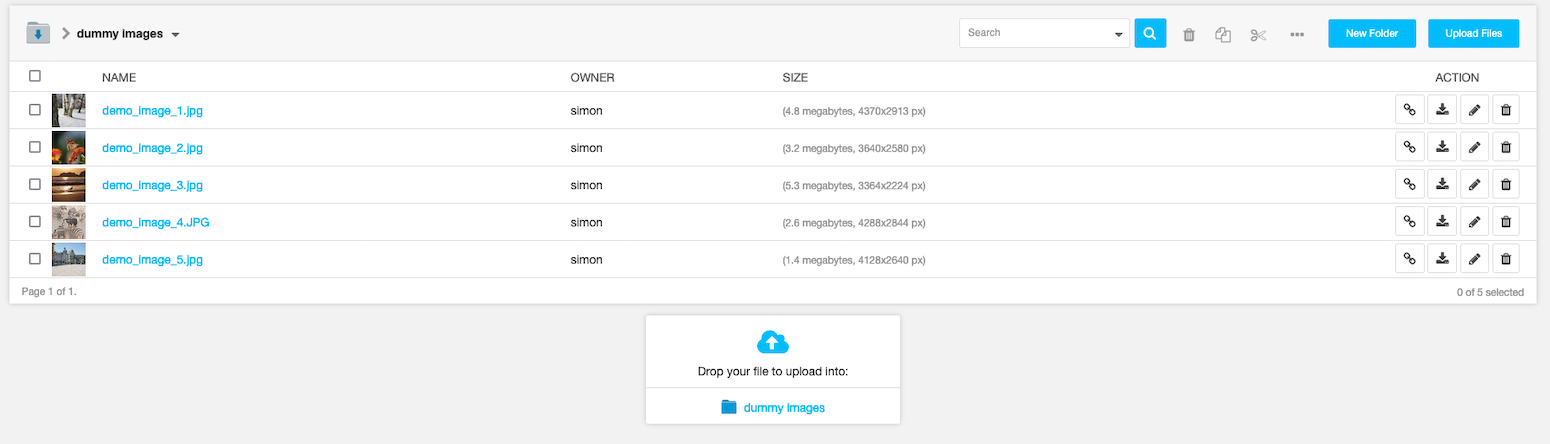
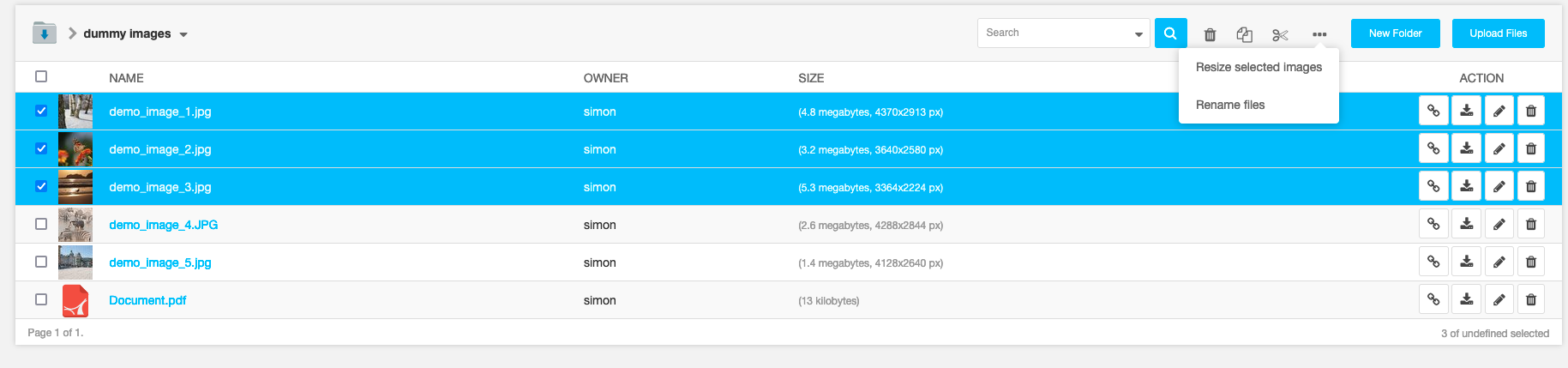
django Filer is a file management application for django that makes handling of files and images a breeze.

https://raw.githubusercontent.com/divio/django-filer/master/docs/_static/filer_2.png https://raw.githubusercontent.com/divio/django-filer/master/docs/_static/filer_3.png
https://raw.githubusercontent.com/divio/django-filer/master/docs/_static/detail_image.png https://raw.githubusercontent.com/divio/django-filer/master/docs/_static/detail_file.png
https://raw.githubusercontent.com/divio/django-filer/master/docs/_static/file_picker_1.png https://raw.githubusercontent.com/divio/django-filer/master/docs/_static/file_picker_3.png

Contributing

This is a an open-source project. We'll be delighted to receive your feedback in the form of issues and pull requests. Before submitting your pull request, please review our contribution guidelines.

We're grateful to all contributors who have helped create and maintain this package. Contributors are listed at the contributors section.

One of the easiest contributions you can make is helping to translate this addon on Transifex.

Documentation

Please head over to the separate documentation for all the details on how to install, configure and use django-filer.

python django

Comments
  • added management command

    added management command

    Can this command be useful?

    It sometimes happens, that I have orphaned files in my folder filer_public, which do not have any associated meta data. With ./manage.py orphaned_files we can list them, and with ./manage.py orphaned_files --delete we can delete them.

    opened by jrief 31
  • Easier File and Image model fields usage

    Easier File and Image model fields usage

    With this pull request, when a dev define an Image's foeignKey, he can configure :

    • available mimetypes via the FileMimetypeValidator : takes a list of allowed mime subtypes (e.g: image/jpeg) and/or mimetypes (e.g: image/*)
    • choose which upload method is available when the widget will be displayed (by default : old method is activated (file lookup). the second one is "direct upload" : a simple "browse" button : when we choose a file, ajax upload is performed. Both methods can be enabled together : choose a file from the website ou on the PC)
    • default folder where the file will be uploaded : when direct upload is enabled and the user upload a file, the new file will be linked to the configured folder. It's done by sending a folder "key" which must be a class method of a DefaultFolderGetter child. This method takes the request and must return a folder.

    Tests for "dynamic" folder destination and mimetype detections have been added. If you think this pull request is usefull and mergeable, I'll add:

    • documentation
    • tests for third party models with File/Image foreign keys.
    • direct_upload will also send a "related_field" data of this format : "model_name.field_name" (e.g: 'News.illustration'). direct_upload's view will be able to retrieve validators associated to this field and reject files during the ajax upload and not only when the object (the news) is saved.

    Simple usage exemple:

    #my_news_app/models.py
    # [...] imports and other required things...
    
    class News(NewsboxBase):
        illustration = FilerImageField(
            verbose_name=_('illustration'), 
            default_direct_upload_enabled=True, 
            #add a "browse" button with ajax upload
            default_file_lookup_enabled=False, 
            #remove the file lookup link. The user will only have a browse button to add new files
            direct_upload_folder_key='USER_OWN_FOLDER', 
            #file will be uploaded in a specifc folder owned by the authenticated user
            validators=[FileMimetypeValidator(['image/png', 'image/jpeg'])], 
            #only jpeg and PNG are allowed
            null=True, blank=True)
    
    #my_news_app/utils.py
    from filer.utils.folders import DefaultFolderGetter
    
    class MyCustomFolderGetter(DefaultFolderGetter)
        @classmethod
        def USER_OWN_FOLDER(cls, request):
            if not request.user.is_authenticated():
                return None
            folder = Folder.objects.filter(owner=request.user, parent_id=USERS_FOLDER_PK)[0:1]
            if not folder:
                folder = Folder()
                folder.name = request.user.username
                folder.parent_id = USERS_FOLDER_PK
                folder.owner = request.user
                folder.save()
            else:
                folder = folder[0]
            return folder
    
    #project/settings.py
    
    FILER_DEFAULT_FOLDER_GETTER = 'my_news_app.utils.MyCustomFolderGetter'
    
    stale 
    opened by DylannCordel 25
  • easy-thumbnails < 2.4 breaks in Django 1.11

    easy-thumbnails < 2.4 breaks in Django 1.11

    easy-thumbnails<2.4 breaks in Django 1.11 and above. I get the following error:

    Traceback (most recent call last):
      File "manage.py", line 22, in <module>
        execute_from_command_line(sys.argv)
      File "C:\Users\aksha\Anaconda3\envs\root35\lib\site-packages\django\core\management\__init__.py", line 363, in execute_from_command_line
        utility.execute()
      File "C:\Users\aksha\Anaconda3\envs\root35\lib\site-packages\django\core\management\__init__.py", line 337, in execute
        django.setup()
      File "C:\Users\aksha\Anaconda3\envs\root35\lib\site-packages\django\__init__.py", line 27, in setup
        apps.populate(settings.INSTALLED_APPS)
      File "C:\Users\aksha\Anaconda3\envs\root35\lib\site-packages\django\apps\registry.py", line 108, in populate
        app_config.import_models()
      File "C:\Users\aksha\Anaconda3\envs\root35\lib\site-packages\django\apps\config.py", line 202, in import_models
        self.models_module = import_module(models_module_name)
      File "C:\Users\aksha\Anaconda3\envs\root35\lib\importlib\__init__.py", line 126, in import_module
        return _bootstrap._gcd_import(name[level:], package, level)
      File "<frozen importlib._bootstrap>", line 986, in _gcd_import
      File "<frozen importlib._bootstrap>", line 969, in _find_and_load
      File "<frozen importlib._bootstrap>", line 958, in _find_and_load_unlocked
      File "<frozen importlib._bootstrap>", line 673, in _load_unlocked
      File "<frozen importlib._bootstrap_external>", line 665, in exec_module
      File "<frozen importlib._bootstrap>", line 222, in _call_with_frames_removed
      File "C:\Users\aksha\Anaconda3\envs\root35\lib\site-packages\easy_thumbnails\models.py", line 6, in <module>
        from easy_thumbnails import utils, signal_handlers
      File "C:\Users\aksha\Anaconda3\envs\root35\lib\site-packages\easy_thumbnails\utils.py", line 15, in <module>
        from easy_thumbnails.conf import settings
      File "C:\Users\aksha\Anaconda3\envs\root35\lib\site-packages\easy_thumbnails\conf.py", line 334, in <module>
        settings = Settings()
      File "C:\Users\aksha\Anaconda3\envs\root35\lib\site-packages\easy_thumbnails\conf.py", line 21, in __init__
        super(AppSettings, self).__init__(*args, **kwargs)
    TypeError: __init__() missing 1 required positional argument: 'settings_module'
    

    You might want to update the dependencies.

    Update

    If you update the package, Django-filer generates the thumbnails but does not show it on the admin page.

    opened by akshaybabloo 21
  • mezzanine 4.1 + autocomplete 2.3 + filer 1.1

    mezzanine 4.1 + autocomplete 2.3 + filer 1.1

    Hi, I'm facing a jQuery hell with mezzanine + autocomplete-light.

    The constatations :

    • I'm in a mezzanine admin change view, which has
      • an autocomplete field
      • a filer (image) field
    • The mezzanine left menu shows quickly, then it hides imself : is created, but I'm not able to view it.
    • The autocomplete field doen't not work : the actual value is shown, but I can't change it.
    • The filer works perfectly... but I'm pretty sure it has taken the jquery namespace for himself...

    TypeError: $ is undefined

    If I load a jQ before the autocomplete_light/static.html I have another error : TypeError: $(...).yourlabsWidget is not a function

    I've tracked the jQ versions used, and autocomplete is loaded in a version on jQ, but launched (through $(document).ready()) through the filer version of jQ, the one from filer. I've tried to noConflict the jQ before autocomplete loadings, but for none..

    Could you help me with this issue ? Thanks for your help !

    How can I

    opened by frague59 21
  • document file serving in development

    document file serving in development

    hint at docs on djangoproject about serving MEDIA_ROOT (http://readthedocs.org/docs/django-filer/en/latest/installation.html#permissions-on-files)

    Original Issue reported by @webmaven: /media/ URLs don't work for local development

    I'm not sure exactly what to do about this, but if there is a solution to getting /media/ URLs to work correctly when running locally (ie. with ./manage.py runserver), documenting it would be a very good idea.

    opened by webmaven 21
  • Making File fields (name, description, etc.) translatable

    Making File fields (name, description, etc.) translatable

    I need to have translations for File.name, File.description and for BaseImage.default_alt_text/default_caption. I am using django-parler, which plays nice with django-polymorphic and such and is very clean and interoperable (as opposed to django-hvad for example). My initial approach was to create a translated File model and custom image model with mentioned fields as translated fields. The problem is that django-parler is unable to redefine existing fields (due to django model metaclass limitations), so the only way is to create those fields with different names. But in that case I would have a very messy solution and I would have to fix various filer views, etc. This is the code:

    from filer.models import File
    from parler.models import TranslatableModel, TranslatedFields
    class TransFile(File, TranslatableModel):
        translations = TranslatedFields(
            name = models.CharField(max_length=255, default='', blank=True, verbose_name=_('name')),
            description = models.TextField(null=True, blank=True, verbose_name=_('description'))
        )
    

    So my question is: would you consider making filer models translatable by default and pulling django-parler in as a dependency? I will do this anyway, but I don't want my solution to be fork-only. Any suggestions?

    stale 
    opened by skirsdeda 20
  • Django-filer renders incorrectly in admin site

    Django-filer renders incorrectly in admin site

    After following the installation instructions on django-filer docs website, I started the development server on my local machine and tested out if everything works. However when I open django admin site and click on filer folders, I can see that the form is not rendering correctly. The whole #content div is aligned to the right site, and the .breadcrumbs-container-inner is a mess. I am using Django 1.9.8 and Django-filer 1.2.4. I attach screen shots of what I get.(Full-window size, and small size window). Is that a bug of django-filer? Can anyone reproduce the problem, or have had similar problems in the past? How can I fix this? Screenshot #1 Screenshot #2

    stale 
    opened by an0o0nym 19
  • Make Image model swappable using a Meta.swappable option

    Make Image model swappable using a Meta.swappable option

    Custom Image models are still problematic mostly because of issues with migrations. This is because Image model swappability implementation in filer is sort of broken by design :) I propose switching to a standard Django way for model swapping - Meta.swappable option.

    The branch in it's current form is already working but I'm marking is as a Work in progress because there are some problems:

    • FILER_IMAGE_MODEL setting now uses django content type instead of full python path to model. This breaks compatibility, however it's very easy to fix.
    • FILER_FILE_MODELS setting default is currently broken for the same reason. I think it would be a good idea to switch FILER_FILE_MODELS setting to content type syntax as well but this is not for me to decide.
    opened by skirsdeda 18
  • Easy Thumbnails 2.8 and django Filer 2.1.2

    Easy Thumbnails 2.8 and django Filer 2.1.2

    Testing filer 2.1.2 out specifically for svg support in djangoCMS 3.9.0 - out of the box I'm not seeing thumbnails for the svg files, which is incredibly helpful in admin "folders" ->folder contents list view. Easy Thumbnails talks about setting a THUMBNAIL_ALIASES var in settings, but it also looks like it works with a template tag - so that would have to be baked into filer beforehand. Am I missing something for out of the box thumbnails for svg files? All migrations ran, etc.

    stale 
    opened by pdbethke 16
  • Proposal: Enable duplicate detection

    Proposal: Enable duplicate detection

    Wanted to gauge interest in adding duplicate file detection.

    If enabled (an opt-in setting e.g. settings.FILER_PREVENT_DUPLICATES), when a user uploads a file (whether drag and drop, CMS filer plugin, or regular upload in the admin) it would detect if that file already exists and instead of saving the file, would redirect the user to the existing copy of the file.

    This would only catch duplicate files uploaded after this feature was enabled, so a bonus feature would be to expose functionality to 'find duplicates', no additional functionality. 'Merging' duplicates could be complicated depending on how the site uses files so should likely be a manual process.

    How does this help? In my case we have many files which we want to show up in site search results. It's easy enough to do a distinct filter on the sha1 when indexing the content to prevent duplicates from appearing in search, but it's not predictable which file the user should edit the title/description to change the search result text. We'd like to prevent duplicate uploads altogether for this project. An upside is savings on storage space.

    If there's interest in this, I'll move forward with a pull request. I would like to have this feature in a project I'm working on but wanted to get feedback on suitability for this project first. If the flow described above is not suitable, are there other acceptable ways to expose the duplicate detection functionality available on FileManager to end users?

    Thanks!

    stale 
    opened by jsma 16
  • Admin images and folder empty, data still present

    Admin images and folder empty, data still present

    I've run into a problem where the filer admin files and folders are no longer visible. I traced it back to a change from version 0.9.5 to 0.9.6.

    This is how the admin looks in 0.9.5: filer_0 9 5 (edited image to remove user data)

    This is how the admin looks in 0.9.6: filer_0 9 6 Note that in the second image the folders are no longer showing visible, but it does however state that there are 4 folders in the view.

    I've encountered the issue on two different machines and disabling django-suit didn't seem to solve te problem. A set of the installed packages for the none working setup:

    Django==1.5.9 django-filer==0.9.6 django-suit==0.2.9 django-autocomplete-light==1.4.14 South django-compressor (only used for css in admin)

    The autocomplete light javascript throws an error "Uncaught TypeError: undefined is not a function widget.js:343". But it does so in both the working and broken version. I think this is unrelated and is caused by loading jquery in the wrong order (jquery, autocomplete.js, jquery, filer.js).

    Using an older version is a good enough fix at the moment for us, but I hope this helps somebody else.

    opened by RRMoelker 16
  • Exception Type: PolymorphicTypeInvalid at /homepage Exception Value: ContentType 37

    Exception Type: PolymorphicTypeInvalid at /homepage Exception Value: ContentType 37

    What is the best way to move all folders and files from mysql to postgresql? I've tried to do it on many different ways but the result is always the same when I try to enter Filer app on admin:

    Exception Type: PolymorphicTypeInvalid at /hal/homepage Exception Value: ContentType 37

    How can I correctly connect all my images in my newly created database?

    opened by aspf23 0
  • Add CodeQL workflow for GitHub code scanning

    Add CodeQL workflow for GitHub code scanning

    Hi django-cms/django-filer!

    This is a one-off automatically generated pull request from LGTM.com :robot:. You might have heard that we’ve integrated LGTM’s underlying CodeQL analysis engine natively into GitHub. The result is GitHub code scanning!

    With LGTM fully integrated into code scanning, we are focused on improving CodeQL within the native GitHub code scanning experience. In order to take advantage of current and future improvements to our analysis capabilities, we suggest you enable code scanning on your repository. Please take a look at our blog post for more information.

    This pull request enables code scanning by adding an auto-generated codeql.yml workflow file for GitHub Actions to your repository — take a look! We tested it before opening this pull request, so all should be working :heavy_check_mark:. In fact, you might already have seen some alerts appear on this pull request!

    Where needed and if possible, we’ve adjusted the configuration to the needs of your particular repository. But of course, you should feel free to tweak it further! Check this page for detailed documentation.

    Questions? Check out the FAQ below!

    FAQ

    Click here to expand the FAQ section

    How often will the code scanning analysis run?

    By default, code scanning will trigger a scan with the CodeQL engine on the following events:

    • On every pull request — to flag up potential security problems for you to investigate before merging a PR.
    • On every push to your default branch and other protected branches — this keeps the analysis results on your repository’s Security tab up to date.
    • Once a week at a fixed time — to make sure you benefit from the latest updated security analysis even when no code was committed or PRs were opened.

    What will this cost?

    Nothing! The CodeQL engine will run inside GitHub Actions, making use of your unlimited free compute minutes for public repositories.

    What types of problems does CodeQL find?

    The CodeQL engine that powers GitHub code scanning is the exact same engine that powers LGTM.com. The exact set of rules has been tweaked slightly, but you should see almost exactly the same types of alerts as you were used to on LGTM.com: we’ve enabled the security-and-quality query suite for you.

    How do I upgrade my CodeQL engine?

    No need! New versions of the CodeQL analysis are constantly deployed on GitHub.com; your repository will automatically benefit from the most recently released version.

    The analysis doesn’t seem to be working

    If you get an error in GitHub Actions that indicates that CodeQL wasn’t able to analyze your code, please follow the instructions here to debug the analysis.

    How do I disable LGTM.com?

    If you have LGTM’s automatic pull request analysis enabled, then you can follow these steps to disable the LGTM pull request analysis. You don’t actually need to remove your repository from LGTM.com; it will automatically be removed in the next few months as part of the deprecation of LGTM.com (more info here).

    Which source code hosting platforms does code scanning support?

    GitHub code scanning is deeply integrated within GitHub itself. If you’d like to scan source code that is hosted elsewhere, we suggest that you create a mirror of that code on GitHub.

    How do I know this PR is legitimate?

    This PR is filed by the official LGTM.com GitHub App, in line with the deprecation timeline that was announced on the official GitHub Blog. The proposed GitHub Action workflow uses the official open source GitHub CodeQL Action. If you have any other questions or concerns, please join the discussion here in the official GitHub community!

    I have another question / how do I get in touch?

    Please join the discussion here to ask further questions and send us suggestions!

    opened by lgtm-com[bot] 0
  • Choose file popup doesn't select image, it exits with no image selected

    Choose file popup doesn't select image, it exits with no image selected

    Choose file popup doesn't select image with Django 4.1.1. I kept downgrading based on django-filer dependency and the following worked.

    Downgrading to 2.2.2 selected Django 4.0.7 - this worked Upgrading to 2.2.3 and forcing Django 4.0.7 - this worked and one I'm currently using

    Don't upgrade to to 2.2.3 and forcing Django 4.1.1 - this is broken

    opened by ivandir 5
  • [bug] focal point, data-ratio localized with comma in admin for languages with comma as decimal separator

    [bug] focal point, data-ratio localized with comma in admin for languages with comma as decimal separator

    how to reproduce

    • install django 3.2.15 and django-filer 2.2.3, but it's probably the same for other versions
    • create a new django project
    • change settings.py to have LANGUAGE_CODE = 'de'
    • go to admin, upload some image
    • in the edit form of an image data-ratio renders floating point number with a comma
    • javascript treats this number as integer and ignores the decimal part
    • point of interest and subject location have wrong values

    history

    Looks like it was fixed years ago https://github.com/django-cms/django-filer/commit/f9a59acb4acbf58ed75ca62d5d46c79630893638#diff-413510b65e311ed6e4685ed9b2532e35a47c9fcfd8a4b39d8c0d1544515d1030

    Probably this commit broke it https://github.com/django-cms/django-filer/commit/fde463c13d694289d9ed3198ab098a7375e6d5ad#diff-1bb0ad12f90a5c8b52c698d1f453bd576a02b107f8a3687fc320ce54265c770a

    possible solution

    use {{ sidebar_image_ratio|unlocalize }} in file_icon.html template

    stale 
    opened by damosc 1
  • feat: open edit file popup from file widget

    feat: open edit file popup from file widget

    Description

    Add an edit button to file widget which open the edit file popup.

    2022-07-25_103457

    There is a UI change the pencil button now open the edit file popup. The existing lookup button now has a file icon.

    Related resources

    • https://discourse.django-cms.org/t/allow-to-enter-edit-form-of-django-filers-file-from-widget/238

    Checklist

    • [x] I have opened this pull request against master
    • [x] I have added or modified the tests when changing logic
    • [x] I have followed the conventional commits guidelines to add meaningful information into the changelog
    • [x] I have read the contribution guidelines and I have joined #workgroup-pr-review on Slack to find a “pr review buddy” who is going to review my pull request.
    opened by fabien-michel 4
  • feat: add canonical URL slug on files

    feat: add canonical URL slug on files

    Description

    Add a canonical URL slug as an alternative to numbered canonical URL 2022-07-25_100055

    Related resources

    • https://discourse.django-cms.org/t/add-a-canonical-slug-to-django-filers-files/237/2

    Checklist

    • [x] I have opened this pull request against master
    • [x] I have added or modified the tests when changing logic
    • [x] I have followed the conventional commits guidelines to add meaningful information into the changelog
    • [x] I have read the contribution guidelines and I have joined #workgroup-pr-review on Slack to find a “pr review buddy” who is going to review my pull request.
    stale 
    opened by fabien-michel 2
Releases(2.2.3)
  • 2.2.2(Aug 2, 2022)

  • 2.2.1(Jun 5, 2022)

    What's Changed

    • fix: Define a default_auto_field on the app config by @marksweb in https://github.com/django-cms/django-filer/pull/1294
    • Bump to 2.2.1 by @marksweb in https://github.com/django-cms/django-filer/pull/1295

    Full Changelog: https://github.com/django-cms/django-filer/compare/2.2...2.2.1

    Source code(tar.gz)
    Source code(zip)
  • 2.2(Apr 20, 2022)

    • Improve the list view of Folder permissions.
    • Fix: Folder permissions were disabled for descendants, if parent folder has type set to CHILDREN.
    • The input field for Folder changes from a standard HTML select element to a very wide autocomplete field, showing the complete path in Filer.
    • Fix: Upload invalid SVG file.
    • Add support for Python-3.10.
    • Switch theme for readthedocs to Furo.
    • Fix: 404 error when serving thumbnail.
    • Experimental support for Django-4.
    Source code(tar.gz)
    Source code(zip)
Owner
django CMS Association
The django CMS Association coordinates and funds the long-term development of the django CMS platform. Join us!
django CMS Association
Projeto Crud Django and Mongo

Projeto-Crud_Django_and_Mongo Configuração para rodar o projeto Download Project

Samuel Fernandes Oliveira 2 Jan 24, 2022
https://django-storages.readthedocs.io/

Installation Installing from PyPI is as easy as doing: pip install django-storages If you'd prefer to install from source (maybe there is a bugfix in

Josh Schneier 2.3k Jan 06, 2023
An airlines clone website with django

abc_airlines is a clone website of an airlines system the way it works is that first you add flights to the website then the users can search flights

milad 1 Nov 16, 2021
This is a Django app that uses numerous Google APIs such as reCAPTURE, maps and waypoints

Django project that uses Googles APIs to auto populate fields, display maps and routes for multiple waypoints

Bobby Stearman 57 Dec 03, 2022
Django app for handling the server headers required for Cross-Origin Resource Sharing (CORS)

django-cors-headers A Django App that adds Cross-Origin Resource Sharing (CORS) headers to responses. This allows in-browser requests to your Django a

Adam Johnson 4.8k Jan 03, 2023
Dashboad Full Stack utilizando o Django.

Dashboard FullStack completa Projeto finalizado | Informações Cadastro de cliente Menu interatico mostrando quantidade de pessoas bloqueadas, liberada

Lucas Silva 1 Dec 15, 2021
The friendly PIL fork (Python Imaging Library)

Pillow Python Imaging Library (Fork) Pillow is the friendly PIL fork by Alex Clark and Contributors. PIL is the Python Imaging Library by Fredrik Lund

Pillow 10.4k Jan 03, 2023
Fast / fuzzy PostgreSQL counts for Django

Created by Stephen McDonald Introduction Up until PostgreSQL 9.2, COUNT queries generally required scanning every row in a database table. With millio

stephenmcd 85 Oct 25, 2021
Pipeline is an asset packaging library for Django.

Pipeline Pipeline is an asset packaging library for Django, providing both CSS and JavaScript concatenation and compression, built-in JavaScript templ

Jazzband 1.4k Jan 03, 2023
A simple Django middleware for Duo V4 2-factor authentication.

django-duo-universal-auth A lightweight middleware application that adds a layer on top of any number of existing authentication backends, enabling 2F

Adam Angle 1 Jan 10, 2022
A simple demonstration of how a django-based website can be set up for local development with microk8s

Django with MicroK8s Start Building Your Project This project provides a Django web app running as a single node Kubernetes cluster in microk8s. It is

Noah Jacobson 19 Oct 22, 2022
Neighbourhood - A python-django web app to help the residence of a given neighborhood know their surrounding better

Neighbourhood A python-django web app to help the residence of a given neighborh

Levy Omolo 4 Aug 25, 2022
Yet another Django audit log app, hopefully the simplest one.

django-easy-audit Yet another Django audit log app, hopefully the easiest one. This app allows you to keep track of every action taken by your users.

Natán 510 Jan 02, 2023
Dynamic, database-driven Django forms

Django Dataforms django-dataforms is a wrapper for the Django forms API that lets you dynamically define forms in a database, rather than hard-coding

35 Dec 16, 2022
Актуальный сборник шаблонов для создания проектов и приложений на Django

О чем этот проект Этот репозиторий с шаблонами для быстрого создания Django проекта. В шаблоне проекта настроены следующий технологий: Django gunicorn

Denis Kustov 16 Oct 20, 2022
Automatic class scheduler for Texas A&M written with Python+Django and React+Typescript

Rev Registration Description Rev Registration is an automatic class scheduler for Texas A&M, aimed at easing the process of course registration by gen

Aggie Coding Club 21 Nov 15, 2022
This is a sample Django Form.

Sample FORM Installation guide Clone repository git clone https://github.com/Ritabratadas343/SampleForm.git cd to repository. Create a virtualenv by f

Ritabrata Das 1 Nov 05, 2021
The best way to have DRY Django forms. The app provides a tag and filter that lets you quickly render forms in a div format while providing an enormous amount of capability to configure and control the rendered HTML.

django-crispy-forms The best way to have Django DRY forms. Build programmatic reusable layouts out of components, having full control of the rendered

4.6k Jan 07, 2023
Use heroicons in your Django and Jinja templates.

heroicons Use heroicons in your Django and Jinja templates. Requirements Python 3.6 to 3.9 supported. Django 2.2 to 3.2 supported. Are your tests slow

Adam Johnson 52 Dec 14, 2022
Management commands to help backup and restore your project database and media files

Django Database Backup This Django application provides management commands to help backup and restore your project database and media files with vari

687 Jan 04, 2023