BoxToolBox is a simple python application built around the openCV library

Overview

BoxToolBox

BoxToolBox is a simple python application built around the openCV library. It is not a full featured application to guide you through the whole process. It is a missing piece in your toolchain between Lightroom and Photoshop. You still need to take you box pictures as straight as possible with the same camera settings and pre-process them to match the lighting.

It will help you to

  • correct perspective of the source photos
  • quickly test the layout and arrangement
  • place photos to correct location
  • generate grid to recolor or use as mask to hide the seams

It will not

  • unify brightness and colors of source photos
  • magically correct photos taken from bad perspective
  • assemble final picture

How to install (Linux)

Just clone or download this repository and run the main script. You will also need opencv installed.

pip install opencv-python
git clone https://github.com/fhorinek/BoxToolBox.git
cd BoxToolBox
python BoxToolBox.py

How to install (Windows)

Just download and execute pre-built exe file

It will trigger Windows protection, you need to click on more info and run anyway

How to use it

Here is a quick start video on youtube
BoxToolBox quick tutorial

Perspective editor

One window acts as input for defining box corners and the second window shows transformation previu. Controls on the second window sets transformed image width and height. The resolution for the final picture will be Width * Grid W x Height * Grid H. Margin define how much of the image will be preserved around the defined box. Preview scale will define size of the temporary pictures used in layout editor. Smaller scale will make the editor go faster, larger scale will provide better quality.

norm

Controls:

  • Mouse wheel - zoom
  • Left button - Pan
  • Middle button - Select point
  • N key and M key - Open previous and next image
  • Q - Close editor

Normally you only need to define a transformation box for the first photo. The transformation will be applied to all following pictures. If you bump the camera during the session you can find the first image that is affected and redefine the transformation box. All following images will use that correction.

Layout editor

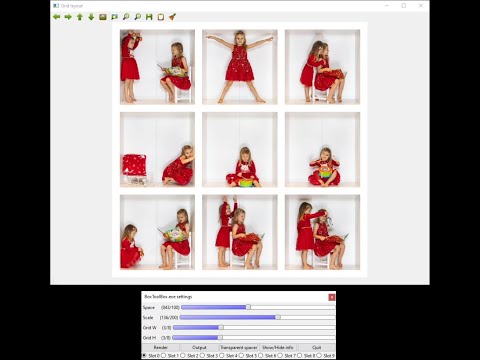
You can use this window to compose the final image. Here you can change geometry for the final image. Set scaling and spacing for the images. You can use Transparent spacer to define a very precise scale.

layout

If the settings window is not visible press Ctrl-P.

Controls:

  • Mouse wheel - zoom
  • Left button - Pan
  • Drag picture - Swap images
  • N key and M key - set previous and next image
  • E key - Open perspective editor for image
  • C key - Toggle Crop or Full flag for image
  • S key - Show full image with marker lines
  • Q key - Close editor
  • Render - Show final image in full resolution
  • Output - Render final image in layers

Use different slots to experiment with multiple layouts and geometries.

Output

Output for the image will consist of multiple images placed inside the directory slot_n. Photos in images will be placed to correct location on transparent background. You will also find the generated grid image. Import these images as layers to any photo editor to compose the final image.

gimp

Disclaimer

This tool is my hobby project, done in my free time for my personal use. However I think that other people might find it useful so I made extra steps to make it more friendly and easier to install. If you found a bug or want something to add, feel free to open an issue. Pull requests are also welcomed!

If you found it useful and want to thank me, you can buy me a bear :-)

Owner
František Horínek
František Horínek
Zoom , GoogleMeets에서 Vtuber 데뷔하기

EasyVtuber Facial landmark와 GAN을 이용한 Character Face Generation Google Meets, Zoom 등에서 자신만의 웹툰, 만화 캐릭터로 대화해보세요! 악세사리는 어느정도 추가해도 잘 작동해요! 안타깝게도 RTX 2070

Gunwoo Han 140 Dec 23, 2022
Face Detection with DLIB

Face Detection with DLIB In this project, we have detected our face with dlib and opencv libraries. Setup This Project Install DLIB & OpenCV You can i

Can 2 Jan 16, 2022
Deskewing images with slanted content

skew_correction De-skewing images with slanted content by finding the deviation using Canny Edge Detection. To Run: In python 3.6, from deskew import

13 Aug 27, 2022
CellProfiler is a open-source application for biological image analysis

CellProfiler is a free open-source software designed to enable biologists without training in computer vision or programming to quantitatively measure phenotypes from thousands of images automaticall

CellProfiler 732 Dec 23, 2022
Simple app for visual editing of Page XML files

Name nw-page-editor - Simple app for visual editing of Page XML files. Version: 2021.02.22 Description nw-page-editor is an application for viewing/ed

Mauricio Villegas 27 Jun 20, 2022
A machine learning software for extracting information from scholarly documents

GROBID GROBID documentation Visit the GROBID documentation for more detailed information. Summary GROBID (or Grobid, but not GroBid nor GroBiD) means

Patrice Lopez 1.9k Jan 08, 2023
Convert PDF/Image to TXT using EasyOcr - the best OCR engine available!

PDFImage2TXT - DOWNLOAD INSTALLER HERE What can you do with it? Convert scanned PDFs to TXT. Convert scanned Documents to TXT. No coding required!! In

Hans Alemão 2 Feb 22, 2022
2 telegram-bots: for image recognition and for text generation

💻 📱 Telegram_Bots 🔎 & 📖 2 telegram-bots: for image recognition and for text generation. About Image recognition bot: User sends a photo and bot de

Marina Polukoshko 1 Jan 27, 2022
Multi-choice answer sheet correction system using computer vision with opencv & python.

Multi choice answer correction 🔴 5 answer sheet samples with a specific solution for detecting answers and sheet correction. 🔴 By running the soluti

Reza Firouzi 7 Mar 07, 2022
Text to QR-CODE

QR CODE GENERATO USING PYTHON Author : RAFIK BOUDALIA. Installation Use the package manager pip to install foobar. pip install pyqrcode Usage from tki

Rafik Boudalia 2 Oct 13, 2021
ERQA - Edge Restoration Quality Assessment

ERQA - a full-reference quality metric designed to analyze how good image and video restoration methods (SR, deblurring, denoising, etc) are restoring real details.

MSU Video Group 27 Dec 17, 2022
Validate and transform various OCR file formats (hOCR, ALTO, PAGE, FineReader)

ocr-fileformat Validate and transform between OCR file formats (hOCR, ALTO, PAGE, FineReader) Installation Docker System-wide Usage CLI GUI API Transf

Universitätsbibliothek Mannheim 152 Dec 20, 2022
MeshToGeotiff - A fast Python algorithm to convert a 3D mesh into a GeoTIFF

MeshToGeotiff - A fast Python algorithm to convert a 3D mesh into a GeoTIFF Python class for converting (very fast) 3D Meshes/Surfaces to Raster DEMs

8 Sep 10, 2022
Using Opencv ,based on Augmental Reality(AR) and will show the feature matching of image and then by finding its matching

Using Opencv ,this project is based on Augmental Reality(AR) and will show the feature matching of image and then by finding its matching ,it will just mask that image . This project ,if used in cctv

1 Feb 13, 2022
Code for CVPR2021 paper "Learning Salient Boundary Feature for Anchor-free Temporal Action Localization"

AFSD: Learning Salient Boundary Feature for Anchor-free Temporal Action Localization This is an official implementation in PyTorch of AFSD. Our paper

Tencent YouTu Research 146 Dec 24, 2022
Textboxes_plusplus implementation with Tensorflow (python)

TextBoxes++-TensorFlow TextBoxes++ re-implementation using tensorflow. This project is greatly inspired by slim project And many functions are modifie

81 Dec 07, 2022
Creating of virtual elements of the graphical interface using opencv and mediapipe.

Virtual GUI Creating of virtual elements of the graphical interface using opencv and mediapipe. Element GUI Output Description Button By default the b

Aleksei 4 Jun 16, 2022
Official code for ROCA: Robust CAD Model Retrieval and Alignment from a Single Image (CVPR 2022)

ROCA: Robust CAD Model Alignment and Retrieval from a Single Image (CVPR 2022) Code release of our paper ROCA. Check out our video, paper, and website

123 Dec 25, 2022
Distilling Knowledge via Knowledge Review, CVPR 2021

ReviewKD Distilling Knowledge via Knowledge Review Pengguang Chen, Shu Liu, Hengshuang Zhao, Jiaya Jia This project provides an implementation for the

DV Lab 194 Dec 28, 2022
Solution for Problem 1 by team codesquad for AIDL 2020. Uses ML Kit for OCR and OpenCV for image processing

CodeSquad PS1 Solution for Problem Statement 1 for AIDL 2020 conducted by @unifynd technologies. Problem Given images of bills/invoices, the task was

Burhanuddin Udaipurwala 111 Nov 27, 2022