Raspberry Pi Pico as a Rubber Ducky

Overview

Raspberry-Pi-Pico-as-a-Rubber-Ducky

2022-02-09-16-58-32_Trim

Kurulum

  1. Raspberry Pi Pico cihazınız için CircuitPython'u indirin.
  2. Boot düğmesine basılı tutarken cihazı bir USB bağlantı noktasına takın ve cihazı taktıktan sonra boot tuşundan elinizi çekin. Bunun sonucunda "RPI-RP2" adlı çıkarılabilir bir medya aygıtı karşınıza çıkacaktır.
  3. İndirdiğiniz .uf2 dosyasını Pico'nun (RPI-RP2) ana dizinine kopyalayın. Bir süre sonra cihaz yeniden başlayacak ve 1-2 saniye sonra CIRCUITPY adında çıkarılabilir bir medya aygıtı olarak karşınıza çıkacaktır.
  4. Ardından adafruit-circuitpython-bundle-7.x-mpy-YYYYMMDD.zip dosyasını indirin ve cihazın dışına çıkarın.
  5. adafruit-circuitpython-bundle-7.x-mpy-YYYYMMDD klasörü altındaki "lib" klasörüne gidin ve "adafruit_hid'i" Raspberry Pi Pico'nuzdaki lib klasörüne kopyalayın.
  6. Buradaki sayfaya giderek CTRL + S tuşlarına basın ve dosyayı Pico'nun içerisinde bulunan code.py dosyasının üzerine yazarak Raspberry Pi Pico'nun ana dizinine "code.py" olarak kaydedin.
  7. Buradaki linkten bir script bulun veya kendi Rubber Ducky scriptinizi oluşturun ve "payload.dd" olarak kaydedin.
  8. Dikkat edin, son işlemden sonra cihaz yeniden başlatılacak ve yarım saniye sonra komut dosyası (payload.dd) çalışacaktır.

USB Etkinleştirme/Devre Dışı Bırakma

Pico'nun gizlilik amacıyla bir USB depolama aygıtı gibi görünmemesine istiyorsanız;

  1. Cihazı USB bağlantı noktasına takın.
  2. "boot.py" dosyasını Pico'nun (RPI-RP2) ana dizinine kopyalayın.
  3. payload.dd dosyanızı da Pico'ya (RPI-RP2) kopyalayın.
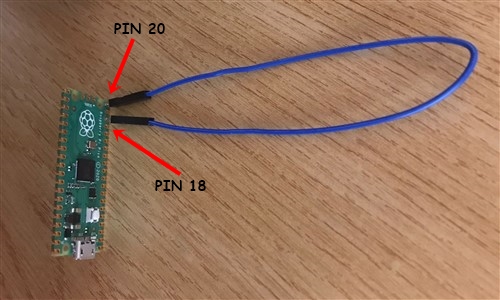
  4. Pico'yu bilgisayarınızdan çıkarın. Pin 18 ve pin 20 arasına bir jumper kablosu bağlayın. Bu durum Pico üzerinde bir kısa devre yaratacaktır ve hedef bilgisayara takıldığında Pico'nun bir USB sürücüsü olarak görünmesini engelleyecek.
  5. Tekrar programlamak için (Payload'ınızı güncellemek için) jumper kabloyu çıkarın ve PC'nize yeniden bağlayın. Varsayılan modda, USB depolama aygıtı aktif durumda olacaktır.
1

Klavye Düzenlerini Değiştirme

Varsayılan modda klavye düzeni İngilizce'dir. Bunu değiştirmek isterseniz;

  1. https://kbdlayout.info/ sayfasından istediğiniz klavye düzenini bularak üzerine tıklayın ve linki kopyalayıp https://www.neradoc.me/layouts/ sayfasındaki kutucuğa yapıştırın. Ardından "Make Zip Bundle Links" butonuna tıklayın.
  2. Ardından "Download the zip file (.py)" butonuna tıklayın.
  3. İndirilen dosyanın içerisinden kendize uygun olan klavye düzeninin dosyalarını Pico'nuzun içerisindeki lib klasörü altına kopyalayın (ben Türkçe Q klavye düzenini tercih ediyorum);
  • keyboard_layout.mpy
  • keyboard_layout_win_tuq.mpy
  • keycode_win_tuq.mpy

2

Dil Dosyanızı Kullanmak için Pico Kodunuzu Değiştirin

Pico içerisindeki "code.py" dosyasını açın ve içerisindeki şu kodu;

from adafruit_hid.keyboard_layout_us import KeyboardLayoutUS as KeyboardLayout
from adafruit_hid.keycode import Keycode

aşağıdaki kod ile değiştirin;

from keyboard_layout_win_tuq import KeyboardLayout
from keycode_win_tuq import Keycode
Owner
Furkan Enes POLATOĞLU
Cyber Security Researcher, SOC Analyst, CENG, YnVsbGV0cHJvb2Y=
Furkan Enes POLATOĞLU
A custom mechanical keyboard inspired by the CFTKB Mysterium

Env-KB A custom mechanical keyboard inspired by the CFTKB Mysterium Build Guide and Parts List What is to do? Right now for the first 5 PCBs I have, i

EnviousData 203 Jan 04, 2023
Scripts for measuring and displaying thermal behavior on Voron 3D printers

Thermal Profiling Measuring gantry deflection and frame expansion This script runs a series of defined homing and probing routines designed to charact

Jon Sanders 30 Nov 27, 2022
Get the AltAz coordinates for a given object using astropy and output on a OLED screen.

Star Coordinates Get the AltAz coordinates for a given object using astropy and output on a OLED screen. As a very very newcomer to the astronomy scen

Craig Cmehil 1 Jan 31, 2022
🏡 My Home Assistant Configs. Be sure to 🌟 my repo to follow the updates!

Home Assistant Configuration Here's my Home Assistant configuration. I have installed HA on a Lenovo ThinkCentre M93P Tiny with an Intel Dual-Core i5-

iLyas Bakouch 25 Dec 30, 2022
🐱🖨Cat printer is a portable thermal printer sold on AliExpress for around $20.

Cat printer is a portable thermal printer sold on AliExpress for around $20. This repository contains Python code for talking to the cat printer over

671 Jan 05, 2023
I made this so I can control my Tapo L510 light bulb and Govee H6159 light strip using the PyP100 module and the Govee public API

TAPO-And-Govee-Controller I made this so I can control my Tapo L510 light bulb and Govee H6159 light strip using the PyP100 module and the Govee publi

James Westhead 0 Nov 23, 2021
Using a raspberry pi, we listen to the coffee machine and count the number of coffee consumption

A typical datarootsian consumes high-quality fresh coffee in their office environment. The board of dataroots had a very critical decision by the end of 2021-Q2 regarding coffee consumption.

dataroots 51 Nov 21, 2022
A python project based on a TV show Wheel of Fortune

Wheel-of-Fortune-using-Python Wheel of Fortune in python this game is the hands-on project in Python 3 Programming Specialization offered By Universit

Eszter Pai 1 Jan 03, 2022
Python Keylogger for Linux

A keylogger is a program that records your keystrokes, this program saves them in a .txt file on your local computer and, after 30 seconds (or as long as you want), it will close the .txt file and se

Darío Mazzitelli 4 Jul 31, 2021
A simple program to make MSI Modern 15 speaker and microphone mute led work.

MSI Modern 15 sound led fixup for linux A simple program to fix the MSI Modern 15 speaker and microphone mute LEDs. Installation Requirements pulsectl

Seyed Danial Movahed 4 Oct 18, 2022
Run this code to blink your ThinkPad LED with a hidden mysterious Morse code! ;)

TMorse Run this code to blink your ThinkPad LED with a hidden mysterious Morse code! ;) Compatible with python3.9+. No third-party library is required

Mahyar 2 Jul 11, 2022
Minimal and clean dashboard to visualize some stats of Pi-Hole with an E-Ink display attached to your Raspberry Pi

Clean Dashboard for Pi-Hole Minimal and clean dashboard to visualize some stats of Pi-Hole with an E-Ink display attached to your Raspberry Pi.

Alessio Santoru 104 Dec 14, 2022
This repository contains all the code and files needed to simulate the notspot quadrupedal robot using Gazebo and ROS.

Notspot robot simulation - Python version This repository contains all the files and code needed to simulate the notspot quadrupedal robot using Gazeb

50 Sep 26, 2022
Python implementation of ZMP Preview Control approach for biped robot control.

ZMP Preview Control This is the Python implementation of ZMP Preview Control app

Chaobin 24 Dec 19, 2022
Pure micropython ESP32 SPI driver for sdcard and screen at the same SPI bus

micropython-esp32-spi-sdcard-and-screen-driver Proof of concept of Pure micropython espidf SPI driver for sdcard with screen at the same SPI bus (exam

Thomas Favennec 7 Mar 14, 2022
Mycodo is open source software for the Raspberry Pi that couples inputs and outputs in interesting ways to sense and manipulate the environment.

Mycodo Environmental Regulation System Latest version: 8.12.9 Mycodo is open source software for the Raspberry Pi that couples inputs and outputs in i

Kyle Gabriel 2.3k Dec 29, 2022
Example code to sending USB Gadget multimedia keys via Python

Send Multimedia USB HID Keys via Python As an USB Gadget in Linux This gives a simple script with zero dependencies that can easily run on any Linux d

DevOps Nirvana 2 Jan 02, 2023
Home Assistant custom integration to fetch data from Powerpal

Powerpal custom component for Home Assistant Component to integrate with powerpal. This repository and integration is not affiliated with Powerpal. Th

Lawrence 32 Jan 07, 2023
Various programs in Atari BASIC for #FujiNet for Atari 8-bit

FujiNet Various programs in Atari BASIC for #FujiNet for Atari 8-bit FujiNet-3D Tic Tac Toe In 1978, Scott Adams wrote a 3-D Tic Tac Toe game, for pla

Kay Savetz 2 Jan 01, 2022
Code reimplementation of some papers published in SAIL-Lab

SAIL SAIL-Lab统一代码库 Motivation 创建这个项目的动机最早来源于实验室组内成员相互Debug代码的时候遇到的麻烦。

Jianwen Chen 8 Nov 15, 2022