logzero


Robust and effective logging for Python 2 and 3.
- Documentation: https://logzero.readthedocs.io
- GitHub: https://github.com/metachris/logzero
Features
- Easy logging to console and/or (rotating) file.
- Provides a fully configured standard Python logger object.
- JSON logging (with integrated python-json-logger)
- Pretty formatting, including level-specific colors in the console.
- No dependencies
- Windows color output supported by colorama
- Robust against str/bytes encoding problems, works with all kinds of character encodings and special characters.
- Multiple loggers can write to the same logfile (also across multiple Python files and processes).
- Global default logger with logzero.logger and custom loggers with logzero.setup_logger(..).
- Compatible with Python 2 and 3.
- All contained in a single file.
- Licensed under the MIT license.
- Heavily inspired by the Tornado web framework.
Installation:
python -m pip install logzero
Example Usage
from logzero import logger

logger.debug("hello")
logger.info("info")
logger.warning("warn")
logger.error("error")

# This is how you'd log an exception
try:
    raise Exception("this is a demo exception")
except Exception as e:
    logger.exception(e)

# JSON logging
import logzero
logzero.json()

logger.info("JSON test")

# Start writing into a logfile
logzero.logfile("/tmp/logzero-demo.log")

# Set a minimum loglevel
logzero.loglevel(logzero.WARNING)
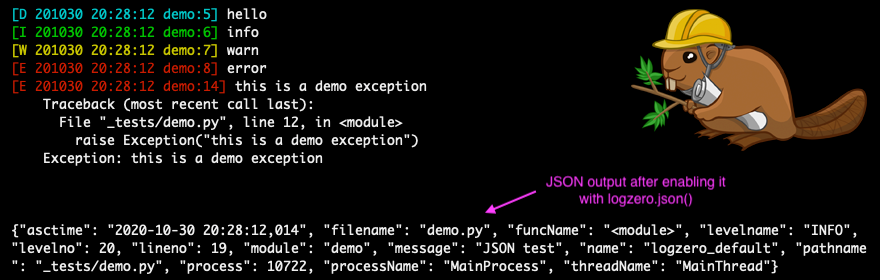
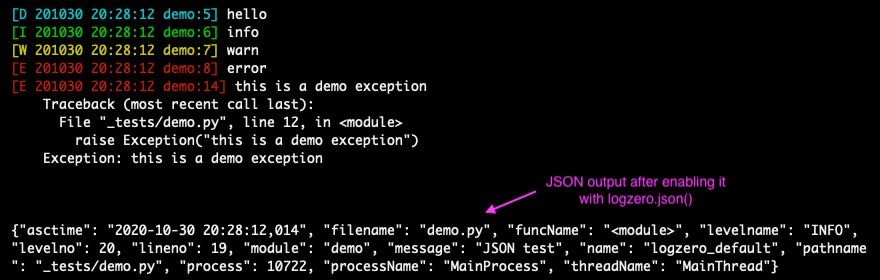
This is the output:
Note: You can find more examples in the documentation: https://logzero.readthedocs.io
JSON logging
JSON logging can be enabled for the default logger with logzero.json(), or with setup_logger(json=True) for custom loggers:
>>> logzero.json() >>> logger.info("test") {"asctime": "2020-10-21 10:42:45,808", "filename": "" , "funcName": "" , "levelname": "INFO", "levelno": 20, "lineno": 1, "module": "" , "message": "test", "name": "logzero_default", "pathname": "" , "process": 76179, "processName": "MainProcess", "threadName": "MainThread"} >>> my_logger = setup_logger(json=True) >>> my_logger.info("test") {"asctime": "2020-10-21 10:42:45,808", "filename": "" , "funcName": "" , "levelname": "INFO", "levelno": 20, "lineno": 1, "module": "" , "message": "test", "name": "logzero_default", "pathname": "" , "process": 76179, "processName": "MainProcess", "threadName": "MainThread"}
The logged JSON object has these fields:
{
  "asctime": "2020-10-21 10:43:40,765",
  "filename": "test.py",
  "funcName": "test_this",
  "levelname": "INFO",
  "levelno": 20,
  "lineno": 9,
  "module": "test",
  "message": "info",
  "name": "logzero",
  "pathname": "_tests/test.py",
  "process": 76204,
  "processName": "MainProcess",
  "threadName": "MainThread"
}
Exceptions logged with logger.exception(e) have these additional JSON fields:
{
  "levelname": "ERROR",
  "levelno": 40,
  "message": "this is a demo exception",
  "exc_info": "Traceback (most recent call last):\n  File \"_tests/test.py\", line 15, in test_this\n    raise Exception(\"this is a demo exception\")\nException: this is a demo exception"
}
Take a look at the documentation for more information and examples:
- Documentation: https://logzero.readthedocs.io.
Installation
Install logzero with pip:
python -m pip install logzero
Here's how you setup a virtualenv and download and run the demo:
# Create and activate a virtualenv in ./venv/
python3 -m venv venv
. venv/bin/activate

# Install logzero
python -m pip install logzero

# Download and run demo.py
wget https://raw.githubusercontent.com/metachris/logzero/master/examples/demo.py
python demo.py
If you don't have pip installed, this Python installation guide can guide you through the process.
Alternatively, if you use the Anaconda distribution:
$ conda config --add channels conda-forge
$ conda install logzero
You can also install logzero from the public Github repo:
$ git clone https://github.com/metachris/logzero.git
$ cd logzero
$ python setup.py install
Contributors
- Chris Hager
- carlodr
- Brian Lenz
- David Martin
- Zakaria Zajac (creator of python-json-logger)
Development
Getting started
$ git clone https://github.com/metachris/logzero.git
$ cd logzero

# Activate virtualenv
$ python3 -m venv venv
$ . venv/bin/activate

# Install main and dev dependencies
$ pip install -e .
$ pip install -r requirements_dev.txt

# Run the tests
$ make test

# Run the linter
$ make lint

# Generate the docs (will auto-open in Chrome)
$ make docs

# You can enable watching mode to automatically rebuild on changes:
$ make servedocs
To test with Python 2.7, you can use Docker:
docker run --rm -it -v /Users/chris/stream/logzero:/mnt python:2.7 /bin/bash
Now you have a shell with the current directory mounted into /mnt/ inside the container.
Notes
- pytest is the test runner
- CI is run with Github actions.
- Download stats: https://pepy.tech/project/logzero
Changelog
See the changelog here: https://github.com/metachris/logzero/blob/master/HISTORY.md
Feedback
All kinds of feedback and contributions are welcome.
- Create an issue
- Create a pull request
- @metachris


 2 Jul 06, 2022
 4 Nov 08, 2021
 2.4k Dec 25, 2022
 23 Oct 04, 2021
 15 Dec 16, 2022
 102 Dec 22, 2022
 13.7k Jan 02, 2023
 1 Jan 10, 2022
 1 Nov 15, 2021
 1 Nov 23, 2022
 176 Jan 01, 2023
 56 Jan 03, 2023
 3 Sep 28, 2021
 2 Oct 02, 2022
 15 Dec 29, 2022
 778 Dec 26, 2022
 2 Jan 05, 2022
 1 Nov 16, 2021
 41.5k Jan 07, 2023
 23.7k Jan 01, 2023