Blender addon that simplifies access to useful operators and adds missing functionality

Overview

image

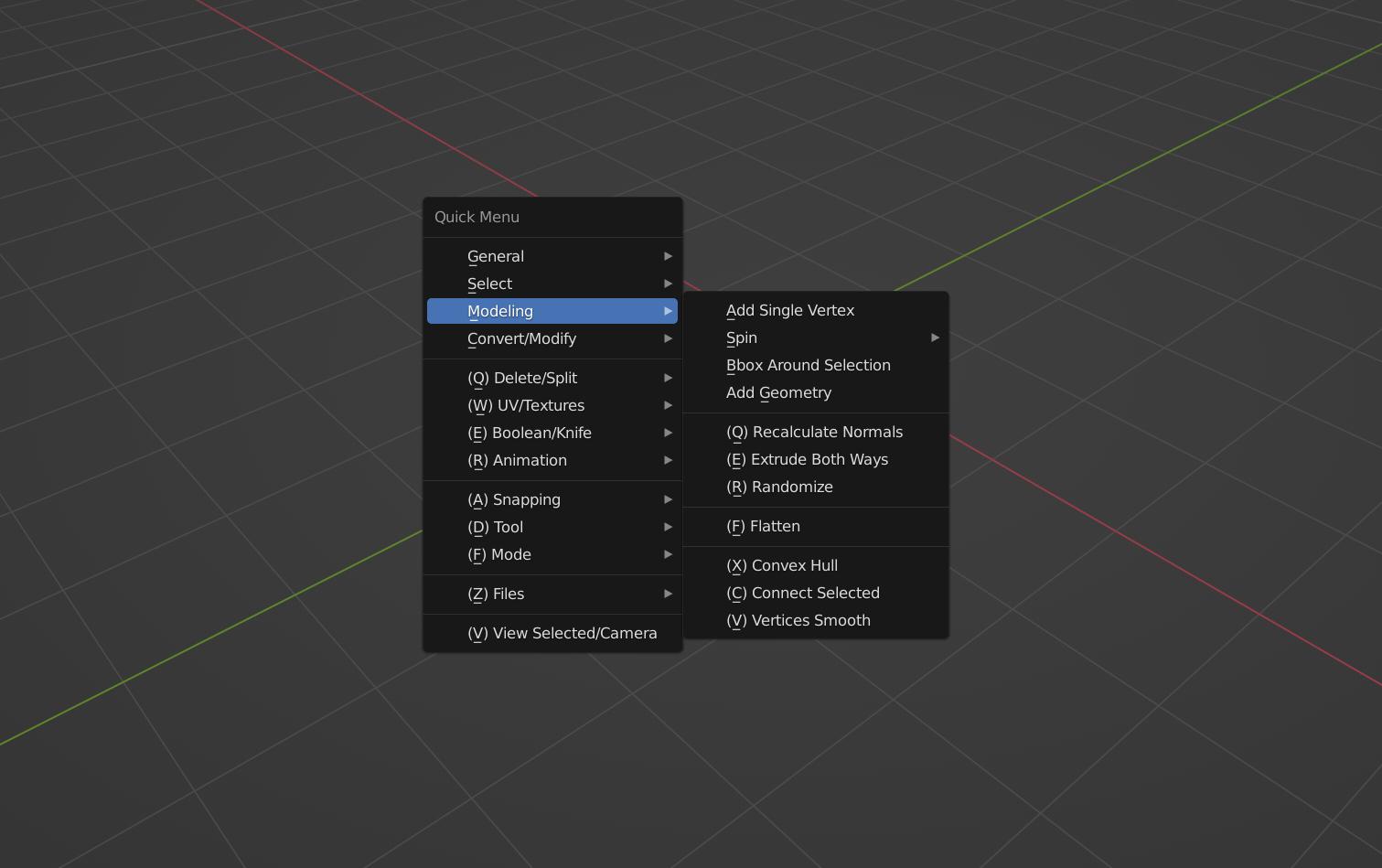
Quick Menu is a Blender addon that simplifies common tasks

Compatible with Blender 3.x.x

Install through Edit -> Preferences -> Addons -> Install... -> Select quick_menu.py.

Press D to open the menu.

Every operator is described in the manual.

Join our DISCORD for discussion.

The addon was initially made only with personal use in mind and therefore is not customizable. However, it adds some new operators that some people may find useful. It also simplifies access to some operators and settings. Blender is already very hotkey-friendly, but:

  1. Some useful operators are hard to reach, some take several mouse clicks. Some things you can't even fix with editing the keymap (snapping options for example). Quick Menu is optimized for accelerator keys, meaning all of the operators are accessible with just your left hand. All of them follow the pattern d + {key near d} + {key near d} . I took into consideration how easy it is to press them as well, combinations that are used frequently have some rolling finger motion in them.

  2. Blender doesn't really offer anything that would automate repeating tasks, like macros or whatever. Some of the operators do multiple things at once if it makes sense. Which effectively adds new functionality to Blender.

  3. Blender's defaults don't always make sense for my workflow, and a lot of the operators could be context-dependent. A lot of operators address this by calling existing Blender operators with proper settings. For example, I believe that "Shade Smooth", "Origin To (whatever)", operators that add modifiers and booleans should work regardless of what mode you're in. I believe that Separate/Join should be one button. The same is true for Region To Loop/Loop To Region, Add Mirror/Apply Mirror, etc. I believe that some operators (like mirror) should take into consideration your camera orientation when initially setting the axis. The list goes on. The addon is very opinionated.

This addon is the result of over a year of brainstorming on the effectiveness of modeling/texturing workflow and testing tools on small projects. I'm trying to keep it lightweight. If something seems missing from it, there's a high chance that the reason for it is that Blender already has built-in tools that allow to do it easily, or the use-case for it is very rare.

This addon is designed to be as unintrusive and minimalistic as possible. All of the operators are in just one menu. There's no UI other than that, which makes it easy to use. It also only takes one hotkey. It can be changed in the addon's preferences, but I recommend D.

This addon is a single-file addon for now, and it will probably stay that way because it simplifies development (reloading addons consisting of multiple files is not as straightforward as just pressing Alt+R, Alt+P in Blender's text editor).

Some tools

Here are some examples of tools that Quick Menu has. Keep in mind that this is not a complete list of operators, but rather a small showcase of what kind of things the addon is capable of. Only some modeling tools are listed, but the addon also has some operators for UVs, textures, export, etc. Check out the manual for the complete list.

Convert To Curve d41

Allows to create tubes out of selected edges with either round or square cross-section. Can be used without leaving edit mode. Usage: d+4+1

curve.mp4

Add geometry d34

Creates a circle or a square aligned to the selected face. Usage: d+3+5. Press shift to make a square

addgeometry.mp4

Loop/Region d23

Like some other Quick Menu operators (for example Separate/Join) it unifies multiple existing Blender operators into one. So instead of having to remember two separate hotkeys for Select Loop Inner Region and Select Boundary Loop, you can now just press d+2+3, and the addon will decide what to do depending on what mode you're in

loopregion.mp4

Bbox around selection d33

Creates a bounding box around selected elements in edit mode. Can also create a bounding plane/line, depending on the selection. Usage: d+3+3

bbox.mp4

Booleans de1, de2, de3

Context-dependent boolean, works in both object and edit mode. This operator will pre-scale selection by a small margin before applying boolean to avoid problems with coplanar faces. Works well with Blender's existing Add Cube tool (dd1). Usage: d+e+1 for union, d+e+2 for difference, d+e+3 for intersection

boolean.mp4

Connect d3c

Connects selected isolated islands with an edge. Will make a face if more than 2 islands are selected. Usage: d+3+c

connect.mp4

Flatten d3f

A faster way to flatten compared to s+{axis}+0+enter. This operator is view-dependent. Usage: d+3+f

flatten.mp4

Randomize d3r

Randomize operator that works in both object and edit mode (on separate islands). Usage: d+3+r

randomize.mp4

Spin d32

Effectively presets for the existing spin operator. Usage: d+3+2

spin.mp4

Plane Intersect Island deq

A view-dependent operator that cuts an island with a plane that goes through the center of the active element and is oriented towards the viewport camera (Snapped to 90 degrees by default). Convenient for cutting through complex meshes with ngons. Usage: d+e+q

planeintersectisland.mp4

Projection Intersect der

Projects selected elements to unselected. Just like the previous one, this operator is view-dependent. Flattens selection before projecting. Usage: d+e+r

projectionintersect.mp4

Knife Intersect dee

Similar to Blender's Intersect (Knife) (Ctrl+F+K), but removes the original geometry. Usage: d+e+e

knifeintersect.mp4
Comments
  • Array count issue

    Array count issue

    Issue: addon for arrays work incorrect. When you press counts more, it adds new array modifier with more counts in addition to previous one. When you press less counts, it add new array modifier with less counts in addition to previous one. 1 - 2 - 3 - 4 - 3 - 2 - 1 - 1, and in total: 7 array modifiers.

    Version: Blender 3.3.0 LTS (Steam version)

    How to recreate:

    1. In EDIT mode select mesh or part.
    2. To see the bug: open modifiers property menu.
    3. D-4-A to set array.
    4. in pop-up menu (same as F9) set count 2 or more by pressing arrows. 4.1) I check init.py, and there count number is 3 by default but in blender it is 1 (so, maybe, v3.3.0 is the reason)
    5. pressing opposite arrows to decrease numbers.

    Result: new array modifier is adding to modifiers' stack and affect on mesh.

    https://user-images.githubusercontent.com/60898828/189495750-d34d7c14-9e1e-4511-b61e-933a20b9dbeb.mp4

    opened by DesLandysh 0
  • I'm getting an error on create curves feature

    I'm getting an error on create curves feature

    When I try to create a curve I get an error.

    Python: Traceback (most recent call last): File "/Users/user/Library/Application Support/Blender/3.1/scripts/addons/quickmenu-main/init.py", line 789, in invoke return self.execute(context) File "/Users/user/Library/Application Support/Blender/3.1/scripts/addons/quickmenu-main/init.py", line 810, in execute self.resolution = max(1, (calculate_number_of_vertices_by_radius(self.depth, subsurf) / 2 - 3)) File "/Applications/Blender.app/Contents/Resources/3.1/scripts/modules/bpy_types.py", line 778, in setattr return setattr(properties, attr, value) TypeError: bpy_struct: item.attr = val: QM_OT_convert.resolution expected an int type, not float

    location: :-1

    opened by Nestlium 0
  • D-3-4 scale down (mouse to the left) throws error

    D-3-4 scale down (mouse to the left) throws error

    Blender 3.0.1

    Error: Python: Traceback (most recent call last):
      File "D:\Blender Assets\addons\quickmenu-main\__init__.py", line 645, in modal
        return modal_run(self, context, event, True)
      File "D:\Blender Assets\addons\quickmenu-main\__init__.py", line 184, in modal_run
        if hasattr(operator, 'on_modal_run'): operator.on_modal_run(context, event)
      File "D:\Blender Assets\addons\quickmenu-main\__init__.py", line 624, in on_modal_run
        self.execute(context)
      File "D:\Blender Assets\addons\quickmenu-main\__init__.py", line 661, in execute
        self.add_geometry()
      File "D:\Blender Assets\addons\quickmenu-main\__init__.py", line 656, in add_geometry
        self.vertices = calculate_number_of_vertices_by_radius(self.radius)
      File "D:\Blender Assets\addons\quickmenu-main\__init__.py", line 104, in calculate_number_of_vertices_by_radius
        return max(6, grid_snap(2, math.log(1 + 0.03 + 0.4 * radius) * RADIUS_TO_VERTICES))
    ValueError: math domain error
    
    opened by iperson 0
  • Error handling

    Error handling

    Having trouble reproducing this one. I think it was D-4-3, but could not repeat.

    location: <unknown location>:-1
    Error: Python: Traceback (most recent call last):
      File "D:\Blender Assets\addons\quickmenu-main\__init__.py", line 881, in execute
        execute_in_mode('OBJECT', fn)
      File "D:\Blender Assets\addons\quickmenu-main\__init__.py", line 92, in execute_in_mode
        result = callback()
      File "D:\Blender Assets\addons\quickmenu-main\__init__.py", line 880, in fn
        bpy.ops.object.convert(target='MESH')
      File "C:\Program Files\Blender Foundation\Blender 3.0\3.0\scripts\modules\bpy\ops.py", line 132, in __call__
        ret = _op_call(self.idname_py(), None, kw)
    RuntimeError: Operator bpy.ops.object.convert.poll() failed, context is incorrect
    
    opened by iperson 0
  • Addon does not show up after install

    Addon does not show up after install

    I'm on an M1 Max Mac running the Blender 3.1 beta on MacOS Monterrey. I downloaded the latest version and Installed it as per the documentation. The addon does not show up after restarting blender, nor in the Addon list in the preferences.

    I've tried selecting a cube, pressing D 4 5 ( and other combinations ) but no menu shows up.

    opened by SkelegonDK 3
Releases(v2.4.3)
Owner
passivestar
passivestar
GMHI: Gut Microbiome Health Index

GMHI: Gut Microbiome Health Index Description Gut Microbiome Health Index (GMHI)

Daniel Chang 2 Jun 30, 2022
A refresher for PowerBI Desktop documents

PowerBI_Refresher-NPP Informació Per executar el programa s'ha de tenir instalat el python versio 3 o mes. Requeriments a requirements.txt. El fitxer

Nil Pujol 1 May 02, 2022
This script can be used to get unlimited Gb for WARP.

Warp-Unlimited-GB This script can be used to get unlimited Gb for WARP. How to use Change the value of the 'referrer' to warp id of yours You can down

Anix Sam Saji 1 Feb 14, 2022
Projects using the Tkinter module in Python!

Tkinter projects This repository includes some Tkinter projects made by me. All of these are simple to understand. I create apps with good functionali

Amey 0 Sep 24, 2021
Use `forge` and `cast` commands in Python scripts

foundrycli.py ( 🔥 , 🐍 ) foundrycli.py is a Python library I've made for personal use; now open source. It lets you access forge and cast CLIs from P

Zero Ekkusu 17 Jul 17, 2022
Collection of script & resources for Foundry's Nuke software.

Author: Liam Collod. Collections of scripting stuff I wrote for Foundry's Nuke software. Utilisation You can have a look at the README.md file in each

Liam Collod 1 May 14, 2022
EDF R&D implementation of ISO 15118-20 FDIS.

EDF R&D implementation of ISO 15118-20 FDIS ============ This project implements the ISO 15118-20 using Python. Supported features: DC Bidirectional P

30 Dec 29, 2022
A carrot-based color palette you didn't know you needed.

A package to produce a carrot-inspired color palette for python/matplotlib. Install: pip install carrotColors Update: pip install --upgrade carrotColo

10 Sep 28, 2021
Antchain-MPC is a library of MPC (Multi-Parties Computation)

Antchain-MPC Antchain-MPC is a library of MPC (Multi-Parties Computation). It include Morse-STF: A tool for machine learning using MPC. Others: Commin

Alipay 37 Nov 22, 2022
Advent of Code 2021 challenges

Data analysis Document here the project: AoC21 Description: Project Description Data Source: Type of analysis: Please document the project the better

Daniel Wendel 1 Jan 07, 2022
Python solutions to Codeforces problems

CodeForces This repository is dedicated to my Python solutions for CodeForces problems. Feel free to copy, contribute and/or comment. If you find any

Shukur Sabzaliev 15 Dec 20, 2022
Python Project For Beginner

Basic-Vitrual-AI-Assistant Python Project For Beginner Hey There, I had manipulated Selenium WebDriver to make this assistant. I hope, It will be help

Maruf Billah 13 Dec 12, 2022
A set of simple functions to upload and fetch pastes on paste.uploadgram.me

pastegram-py A set of simple functions to upload and fetch pastes on paste.uploadgram.me. API Documentation Methods upload_paste(contents: bytes, file

Uploadgram 3 Sep 13, 2022
Chicks get hostloc points regularly

hostloc_getPoints 小鸡定时获取hostloc积分 github action大规模失效,mjj平均一人10鸡,以下可以部署到自己的小鸡上

59 Dec 28, 2022
rTorrent Crash Prevention

rTorrent Disk Checker This program is capable of the following when: - a torrent is added by any program (autodl-irssi, RSS Downloader et

16 Dec 14, 2022
A webapp for taking fast notes, designed for business, school, and collaboration with groups.

JOTS Journal of the Session A webapp for taking fast notes, designed for business, school, and collaboration with groups.

Zebadiah S. Taylor 2 Jun 10, 2022
firefox session recovery

firefox session recovery

Ahmad Sadraei 5 Nov 29, 2022
Mixtaper - Web app to make mixtapes

Mixtaper A web app which allows you to input songs in the form of youtube links

suryansh 1 Feb 14, 2022
Python screenshot library, replacement for the Pillow ImageGrab module on Linux.

tldr: Use Pillow The pyscreenshot module is obsolete in most cases. It was created because PIL ImageGrab module worked on Windows only, but now Linux

455 Dec 24, 2022
This Python library searches through a static directory and appends artist, title, track number, album title, duration, and genre to a .json object

This Python library searches through a static directory (needs to match your environment) and appends artist, title, track number, album title, duration, and genre to a .json object. This .json objec

Edan Ybarra 1 Jun 20, 2022