Lightweight Markdown dialect for Python desktop apps

Overview

This project is part of the Pyrustic Open Ecosystem.

Usage | Installation

Litemark

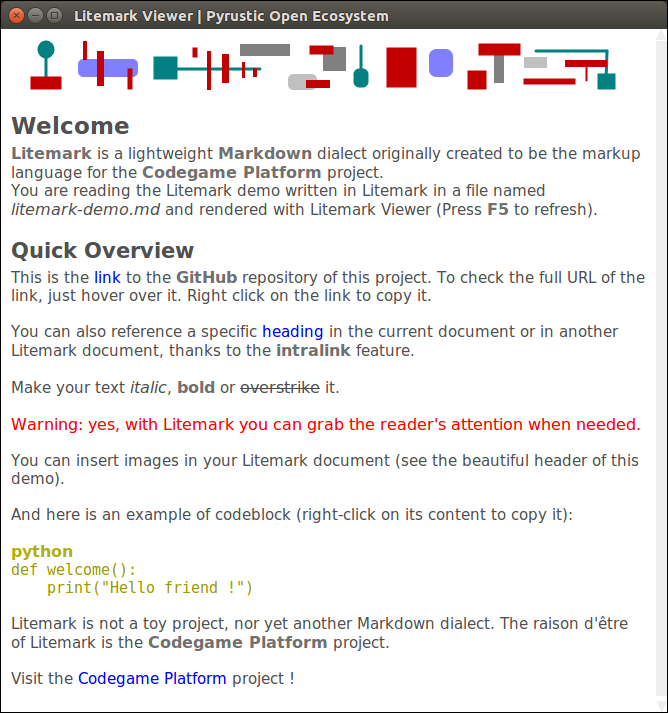
Litemark is a lightweight Markdown dialect originally created to be the markup language for the Codegame Platform project. When you run litemark from the command line interface without any arguments, the Litemark Viewer opens and displays the rendered demo.
Figure

Litemark demo rendered in the Litemark Viewer

Figure

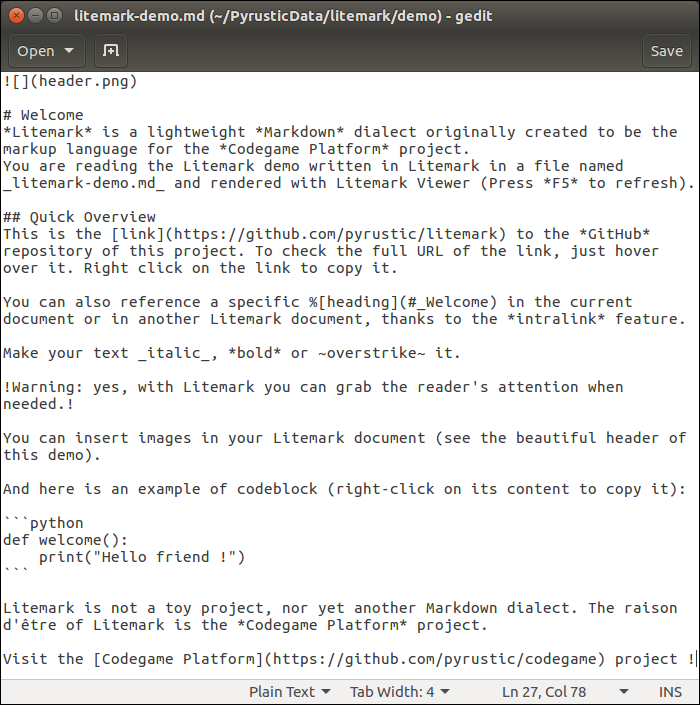
litemark-demo.md (plain text)

Usage

The name Litemark refers to both the markup language and the distribution package.

The distribution package comes with an API, a command line interface, and a graphical viewer.

API

It is easy to break an arbitrary plain text into a flat list of tokens:

import litemark


plain_text = """Hello *World* ! Visit the [repository](https://github.com/pyrustic/litemark) !"""

for token in litemark.scan(plain_text):
    # a token instance is a named tuple with 2 fields: name and data 
    print(token)

The output:

Token(name='STRING', data='Hello ')
Token(name='BOLD', data='World')
Token(name='STRING', data=' ')
Token(name='STRING', data='! ')
Token(name='STRING', data='Visit ')
Token(name='STRING', data='the ')
Token(name='LINK', data=('repository', 'https://github.com/pyrustic/litemark', ''))
Token(name='STRING', data=' ')
Token(name='STRING', data='!')
Token(name='STRING', data='')

The formal names of the tokens are defined in litemark.Element:

class Element:
    CODEBLOCK = "CODEBLOCK"
    HEADING = "HEADING"
    BOLD = "BOLD"
    ITALIC = "ITALIC"
    WARNING = "WARNING"
    OVERSTRIKE = "OVERSTRIKE"
    IMAGE = "IMAGE"
    INTRALINK = "INTRALINK"
    LINK = "LINK"

The token's data field represents a string for all elements except the following:

  • Element.CODEBLOCK: 2-tuple (str-title, str-content)
  • Element.HEADING: 2-tuple (int-level, str-content)
  • Element.IMAGE: 3-tuple (str-inline, str-path, str-alt)
  • Element.INTRALINK: 3-tuple (str-inline, str-path, str-alt)
  • Element.LINK: 3-tuple (str-inline, str-URL, str-alt)

Command line interface

To open litemark-demo.md in the graphical Viewer:

$ litemark

To open a specific litemark file in the graphical Viewer:

$ cd /path/to/root
$ litemark my-file.md

Note:

Litemark is created for use in a desktop application. Thus, the Litemark Scanner assumes that the images referenced in a litemark document are relative to the root directory. The root directory is simply the current working directory. For this reason, you must first do a cd (change directory) to the root before rendering a document.

Graphical Viewer

It is easy to embed a Litemark Viewer in your Python desktop app:

import litemark
import tkinter as tk

root_directory = "/home/alex/demo"
litemark_filename = "/home/alex/demo/document.md"

# your GUI
gui = tk.Tk()
gui.geometry("500x500+0+0")
# let's embed a Litemark Viewer in this GUI
# -- text widget
text_widget = tk.Text(gui)
text_widget.pack(expand=1, fill=tk.BOTH)
# -- the viewer instance
viewer = litemark.Viewer(widget=text_widget, root=root_directory)
viewer.open(litemark_filename)
viewer.readonly = True
# done !
gui.mainloop()

This is a work in progress. A reference documentation will be released soon.

Installation

Install for the first time

pip install litemark

Upgrade

pip install litemark --upgrade --upgrade-strategy eager

Related projects

  • Codegame Platform: create, distribute, and run codegames
  • shared: library to store, expose, read, and edit collections of data

This is a work in progress...

Owner
Pyrustic Open Ecosystem to develop and distribute Python apps
Awesome Django Markdown Editor, supported for Bootstrap & Semantic-UI

martor Martor is a Markdown Editor plugin for Django, supported for Bootstrap & Semantic-UI. Features Live Preview Integrated with Ace Editor Supporte

659 Jan 04, 2023
Convert mind maps to markdown for import into Roam.

Mind Map to Markdown for Roam import Got a Mind Map with contents you'd like to import into Roam? Soon, this Python application might do what just you

Romilly Cocking 3 Dec 09, 2021
WyPyPlus is a minimal wiki in 42 lines of Python code.

🍦 WyPyPlus: A personal wiki in 42 lines of code 🍦 WyPyPlus (pronounced "whippy plus") is a minimalist wiki server in 42 lines of code based on wypy

Leo Chen 8 Apr 07, 2022
Comprehensive Markdown plugin built for Django

Django MarkdownX Django MarkdownX is a comprehensive Markdown plugin built for Django, the renowned high-level Python web framework, with flexibility,

neutronX 740 Jan 08, 2023
A minimal platform for Markdown-based blogs

madblog This project provides a minimal blogging platform based on Markdown files. Demos This project powers the following blogs: Platypush My persona

Fabio Manganiello 2 Aug 02, 2022
A lightweight and fast-to-use Markdown document generator based on Python

A lightweight and fast-to-use Markdown document generator based on Python

快乐的老鼠宝宝 1 Jan 10, 2022
A Straightforward Markdown Journal

Introducing Pepys: A straightforward markdown journal "It is rightly made for those who love to document their daily life events" - FOSSBytes Pepys is

Luke Briggs 23 Nov 12, 2022
A Python implementation of John Gruber’s Markdown with Extension support.

Python-Markdown This is a Python implementation of John Gruber's Markdown. It is almost completely compliant with the reference implementation, though

Python-Markdown 3.1k Dec 30, 2022
Static site generator that supports Markdown and reST syntax. Powered by Python.

Pelican Pelican is a static site generator, written in Python. Write content in reStructuredText or Markdown using your editor of choice Includes a si

Pelican dev team 11.3k Jan 05, 2023
A Python implementation of John Gruber’s Markdown with Extension support.

Python-Markdown This is a Python implementation of John Gruber's Markdown. It is almost completely compliant with the reference implementation, though

Python-Markdown 3.1k Dec 31, 2022
Notedown - Markdown <=> IPython Notebook

Python 2/3 and IPython 4 / Jupyter compatible! Convert IPython Notebooks to markdown (and back) notedown is a simple tool to create IPython notebooks

Aaron O'Leary 840 Jan 04, 2023
Preview GitHub README.md files locally before committing them.

Grip -- GitHub Readme Instant Preview Render local readme files before sending off to GitHub. Grip is a command-line server application written in Pyt

Joe Esposito 5.9k Jan 08, 2023
Convert HTML to Markdown-formatted text.

html2text html2text is a Python script that converts a page of HTML into clean, easy-to-read plain ASCII text. Better yet, that ASCII also happens to

Alireza Savand 1.3k Dec 31, 2022
A markdown template manager for writing API docs in python.

DocsGen-py A markdown template manager for writing API docs in python. Contents Usage API Reference Usage You can install the latest commit of this re

Ethan Evans 1 May 10, 2022
Toci is a markdown tool to generate an outline from a given Jupyter notebook.

Toci is a markdown tool to generate an outline from a given Jupyter notebook. It traverses the markdown cells of a given ipynb file to form a toc for you.

Hakan Özler 7 Jan 22, 2022
Converts a grading Excel sheet into Markdown documents.

GradeDocs Turns Excel worksheets into grade/score documents. Example Given such an Excel Worksheet (see examples/example.xlsx): The following commands

Patrick Bucher 1 Dec 19, 2021
Provides syntax for Python-Markdown which allows for the inclusion of the contents of other Markdown documents.

Markdown-Include This is an extension to Python-Markdown which provides an "include" function, similar to that found in LaTeX (and also the C pre-proc

Chris MacMackin 85 Dec 30, 2022
Yuque2md - Offline download the markdown file and image from yuque

yuque2md 按照语雀知识库里的目录,导出语雀知识库中所有的markdown文档,并离线图片到本地 使用 安装 Python3.x clone 项目 下载依

JiaJianHuang 4 Oct 30, 2022
Extensions for Python Markdown

PyMdown Extensions Extensions for Python Markdown. Documentation Extension documentation is found here: https://facelessuser.github.io/pymdown-extensi

Isaac Muse 685 Jan 01, 2023
A markdown lexer and parser which gives the programmer atomic control over markdown parsing to html.

A markdown lexer and parser which gives the programmer atomic control over markdown parsing to html.

stonepresto 4 Aug 13, 2022