ranger 1.9.3



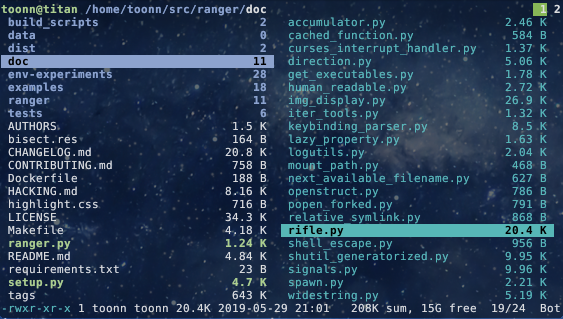
ranger is a console file manager with VI key bindings. It provides a minimalistic and nice curses interface with a view on the directory hierarchy. It ships with rifle, a file launcher that is good at automatically finding out which program to use for what file type.
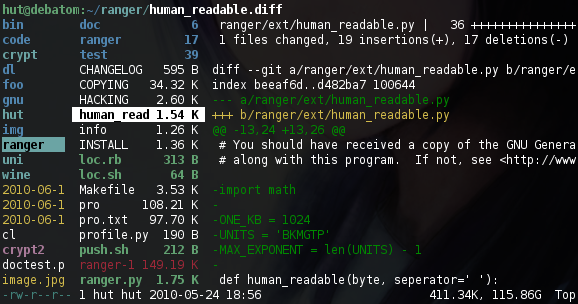
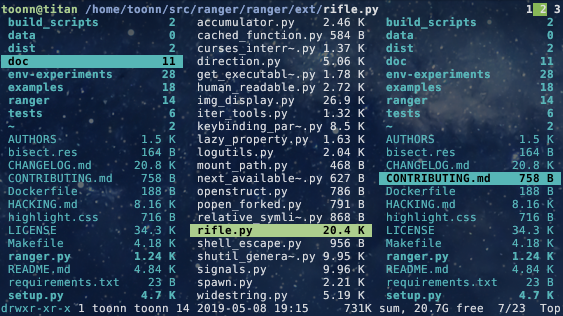
For mc aficionados there's also the multi-pane viewmode.
This file describes ranger and how to get it to run. For instructions on the usage, please read the man page (man ranger in a terminal). See HACKING.md for development-specific information.
For configuration, check the files in ranger/config/ or copy the default config to ~/.config/ranger with ranger --copy-config (see instructions).
The examples/ directory contains several scripts and plugins that demonstrate how ranger can be extended or combined with other programs. These files can be found in the git repository or in /usr/share/doc/ranger.
A note to packagers: Versions meant for packaging are listed in the changelog on the website.
About
- Authors: see
AUTHORSfile - License: GNU General Public License Version 3
- Website: https://ranger.github.io/
- Download: https://ranger.github.io/ranger-stable.tar.gz
- Bug reports: https://github.com/ranger/ranger/issues
- git clone https://github.com/ranger/ranger.git
Design Goals
- An easily maintainable file manager in a high level language
- A quick way to switch directories and browse the file system
- Keep it small but useful, do one thing and do it well
- Console-based, with smooth integration into the unix shell
Features
- UTF-8 Support (if your Python copy supports it)
- Multi-column display
- Preview of the selected file/directory
- Common file operations (create/chmod/copy/delete/...)
- Renaming multiple files at once
- VIM-like console and hotkeys
- Automatically determine file types and run them with correct programs
- Change the directory of your shell after exiting ranger
- Tabs, bookmarks, mouse support...
Dependencies
- Python (
>=2.6or>=3.1) with thecursesmodule and (optionally) wide-unicode support - A pager (
lessby default)
Optional dependencies
For general usage:
filefor determining file typeschardet(Python package) for improved encoding detection of text filessudoto use the "run as root" featurepython-bidi(Python package) to display right-to-left file names correctly (Hebrew, Arabic)
For enhanced file previews (with scope.sh):
img2txt(fromcaca-utils) for ASCII-art image previewsw3mimgdisplay,ueberzug,mpv,iTerm2,kitty,terminologyorurxvtfor image previewsconvert(fromimagemagick) to auto-rotate images and for SVG previewsffmpeg, orffmpegthumbnailerfor video thumbnailshighlight,batorpygmentizefor syntax highlighting of codeatool,bsdtar,unrarand/or7zto preview archivesbsdtar,tar,unrar,unzipand/orzipinfo(andsed) to preview archives as their first imagelynx,w3morelinksto preview html pagespdftotextormutool(andfmt) for textualpdfpreviews,pdftoppmto preview as imagedjvutxtfor textual DjVu previews,ddjvuto preview as imagecalibreorepub-thumbnailerfor image previews of ebookstransmission-showfor viewing BitTorrent informationmediainfoorexiftoolfor viewing information about media filesodt2txtfor OpenDocument text files (odt,ods,odpandsxw)pythonorjqfor JSON filesfontimagefor font previewsopenscadfor 3D model previews (stl,off,dxf,scad,csg)
Installing
Use the package manager of your operating system to install ranger. You can also install ranger through PyPI: pip install ranger-fm.
Check current version: 


Installing from a clone
Note that you don't have to install ranger; you can simply run ranger.py.
To install ranger manually:
sudo make install
This translates roughly to:
sudo python setup.py install --optimize=1 --record=install_log.txt
This also saves a list of all installed files to install_log.txt, which you can use to uninstall ranger.
Getting Started
After starting ranger, you can use the Arrow Keys or h j k l to navigate, Enter to open a file or q to quit. The third column shows a preview of the current file. The second is the main column and the first shows the parent directory.
Ranger can automatically copy default configuration files to ~/.config/ranger if you run it with the switch --copy-config=( rc | scope | ... | all ). See ranger --help for a description of that switch. Also check ranger/config/ for the default configuration.
Going Further
- To get the most out of ranger, read the Official User Guide.
- For frequently asked questions, see the FAQ.
- For more information on customization, see the wiki.
Community
For help, support, or if you just want to hang out with us, you can find us here:
- IRC: channel #ranger on Libera.Chat. Don't have an IRC client? Join us via the webchat!
- Reddit: r/ranger

 1 Jan 06, 2022
 6 Jun 17, 2022
 1 Jan 13, 2022
 3 May 28, 2022
 17 Dec 15, 2022
 5 Feb 20, 2022
 6 Dec 25, 2021
 1 Dec 11, 2021
 15 Apr 15, 2022
 206 Dec 29, 2022
 5 May 08, 2022
 23 Jun 29, 2022
 8 Jan 20, 2022
 52 Nov 12, 2022
 34 Dec 07, 2022
 3 Jan 23, 2022
 9 Mar 02, 2022
 5 Dec 15, 2021
 15 Jan 10, 2022
 18 Dec 28, 2022