

PyDEns is a framework for solving Ordinary and Partial Differential Equations (ODEs & PDEs) using neural networks

Overview

License Python TensorFlow Run Status

PyDEns

PyDEns is a framework for solving Ordinary and Partial Differential Equations (ODEs & PDEs) using neural networks. With PyDEns one can solve

This page outlines main capabilities of PyDEns. To get an in-depth understanding we suggest you to also read the tutorial.

Getting started with PyDEns: solving common PDEs

Let's solve poisson equation

using simple feed-forward neural network with tanh-activations. The first step is to add a grammar of tokens - expressions used for writing down differential equations - to the current namespace:

from pydens import Solver, NumpySampler, add_tokens
import numpy as np

add_tokens()
# we've now got functions like sin, cos, D in our namespace. More on that later!

You can now set up a PyDEns-model for solving the task at hand using configuration dictionary. Note the use of differentiation token D and sin-token:

pde = {'n_dims': 2,
       'form': lambda u, x, y: D(D(u, x), x) + D(D(u, y), y) - 5 * sin(np.pi * (x + y)),
       'boundary_condition': 1}

body = {'layout': 'fa fa fa f',
        'units': [15, 25, 15, 1],
        'activation': [tf.nn.tanh, tf.nn.tanh, tf.nn.tanh]}

config = {'body': body,
          'pde': pde}

us = NumpySampler('uniform', dim=2) # procedure for sampling points from domain

and run the optimization procedure

dg = Solver(config)
dg.fit(batch_size=100, sampler=us, n_iters=1500)

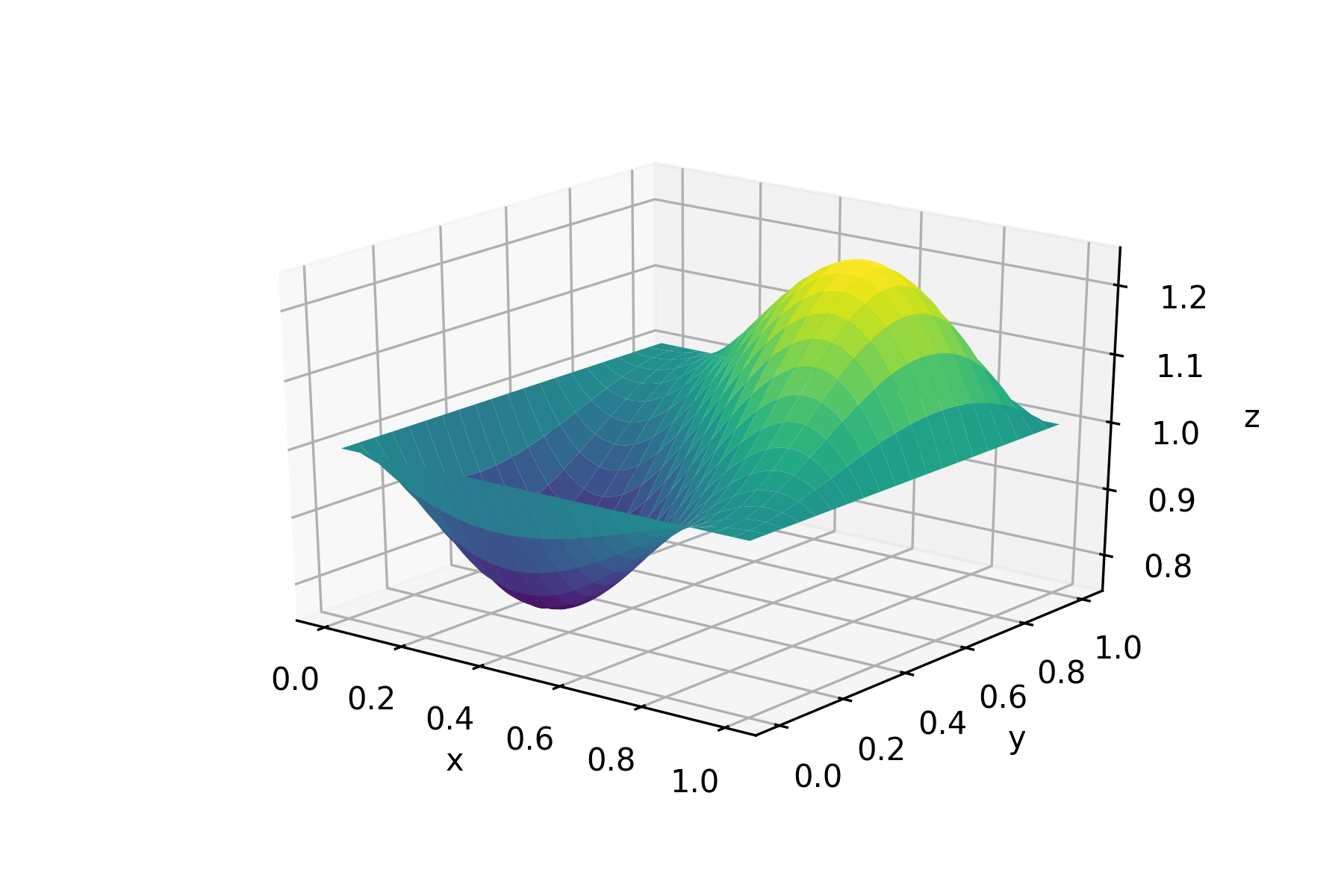
in a fraction of second we've got a mesh-free approximation of the solution on [0, 1]X[0, 1]-square:
Going deeper into PyDEns-capabilities

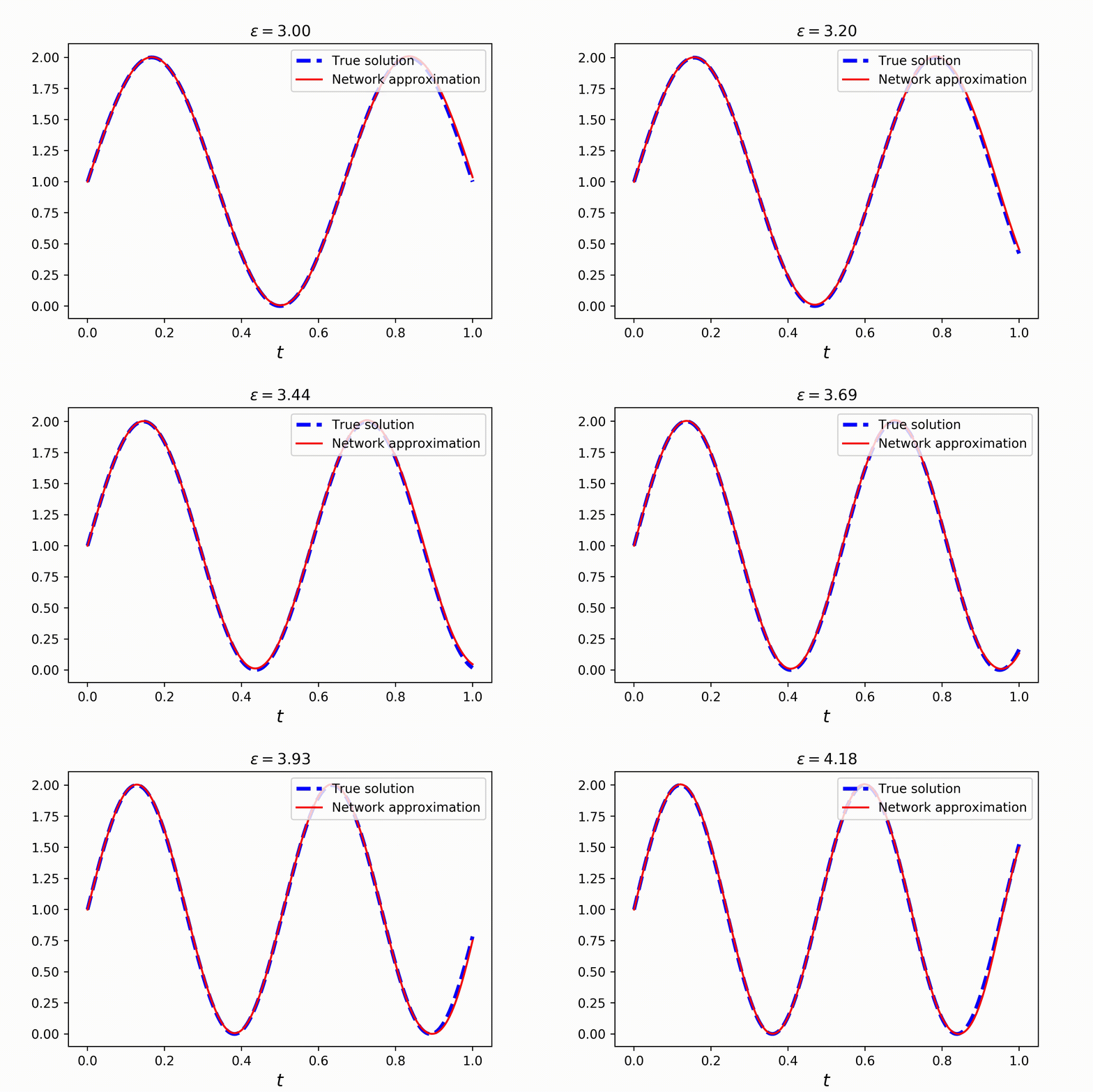
PyDEns allows to do much more than just solve common PDEs: it also deals with (i) parametric families of PDEs and (ii) PDEs with trainable coefficients.

Solving parametric families of PDEs

Consider a family of ordinary differential equations

Clearly, the solution is a sin wave with a phase parametrized by ϵ:

Solving this problem is just as easy as solving common PDEs. You only need to introduce parameter in the equation, using token P:

pde = {'n_dims': 1,
       'form': lambda u, t, e: D(u, t) - P(e) * np.pi * cos(P(e) * np.pi * t),
       'initial_condition': 1}

config = {'pde': pde}
# One for argument, one for parameter
s = NumpySampler('uniform') & NumpySampler('uniform', low=1, high=5)

dg = Solver(config)
dg.fit(batch_size=1000, sampler=s, n_iters=5000)
# solving the whole family takes no more than a couple of seconds!

Check out the result:
Solving PDEs with trainable coefficients

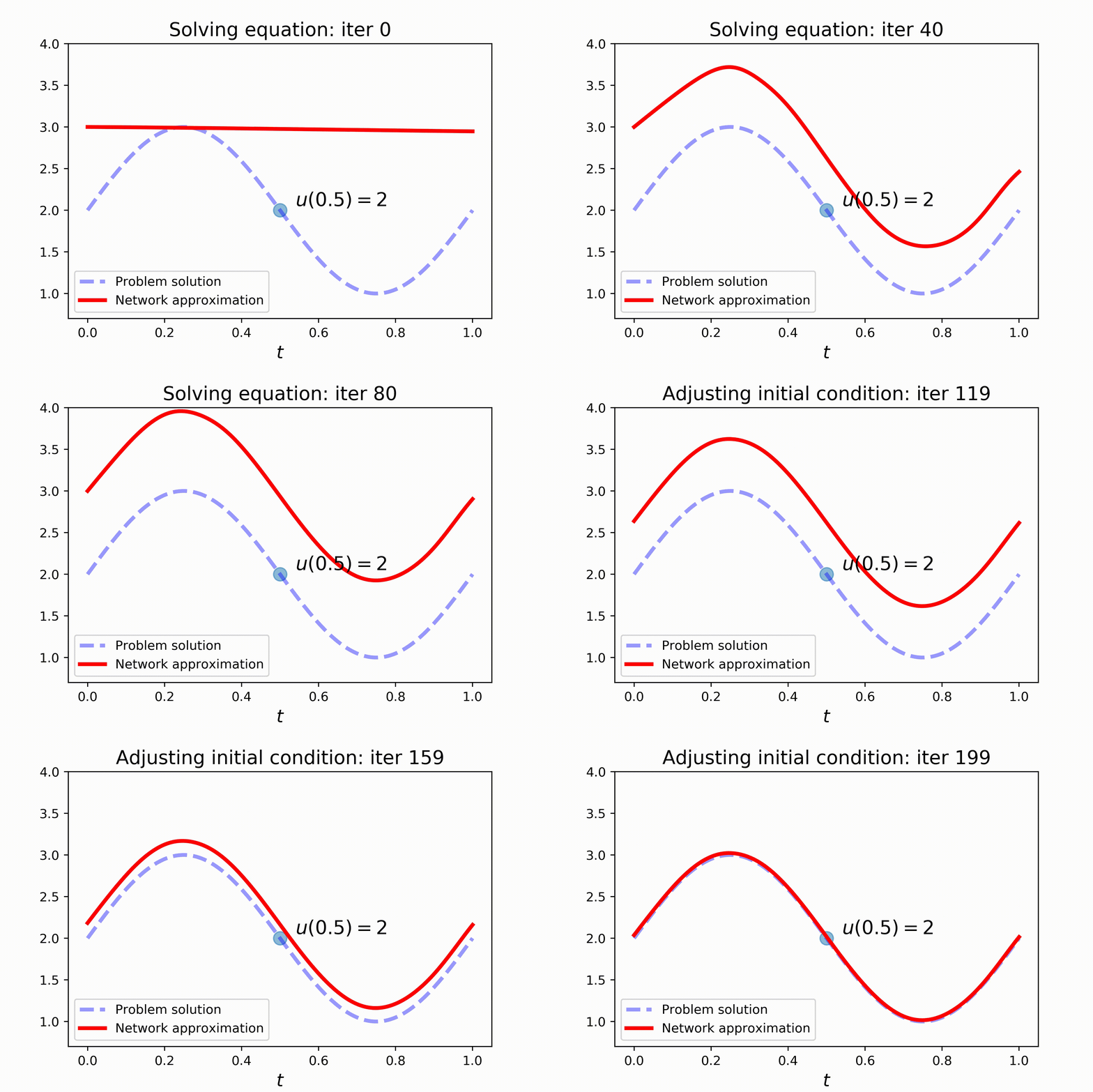
With PyDEns things can get even more interesting! Assume that the initial state of the system is unknown and yet to be determined:

Of course, without additional information, the problem is undefined. To make things better, let's fix the state of the system at some other point:

Setting this problem requires a slightly more complex configuring. Note the use of V-token, that stands for trainable variable, in the initial condition of the problem. Also pay attention to train_steps-key of the config, where two train steps are configured: one for better solving the equation and the other for satisfying the additional constraint:

pde = {'n_dims': 1,
       'form': lambda u, t: D(u, t) - 2 * np.pi * cos(2 * np.pi * t),
       'initial_condition': lambda: V(3.0)}

config = {'pde': pde,
          'track': {'u05': lambda u, t: u - 2},
          'train_steps': {'initial_condition_step': {'scope': 'addendums',
                                                     'loss': {'name': 'mse', 'predictions': 'u05'}},
                          'equation_step': {'scope': '-addendums'}}}

s1 = NumpySampler('uniform')
s2 = ConstantSampler(0.5)

Model-fitting comes in two parts now: (i) solving the equation and (ii) adjusting initial condition to satisfy the additional constraint:

dg.fit(batch_size=150, sampler=s1, n_iters=2000, train_mode='equation_step')
dg.fit(batch_size=150, sampler=s2, n_iters=2000, train_mode='initial_condition_step')

Check out the results:
Installation

First of all, you have to manually install tensorflow, as you might need a certain version or a specific build for CPU / GPU.

Stable python package

With modern pipenv

pipenv install pydens

With old-fashioned pip

pip3 install pydens

Development version

pipenv install git+https://github.com/analysiscenter/pydens.git
pip3 install git+https://github.com/analysiscenter/pydens.git

Installation as a project repository:

Do not forget to use the flag --recursive to make sure that BatchFlow submodule is also cloned.

git clone --recursive https://github.com/analysiscenter/pydens.git

In this case you need to manually install the dependencies.

Citing PyDEns

Please cite PyDEns if it helps your research.

Roman Khudorozhkov, Sergey Tsimfer, Alexander Koryagin. PyDEns framework for solving differential equations with deep learning. 2019.
@misc{pydens_2019,
  author       = {Khudorozhkov R. and Tsimfer S. and Koryagin. A.},
  title        = {PyDEns framework for solving differential equations with deep learning},
  year         = 2019
}
Comments
  • compilation error in Google Collab

    compilation error in Google Collab

    I am getting compilation error in the coding line given below...Kindly tell me ....how to fix it.... I am using google collab for compilation

    dg = Solver(config) dg.fit(batch_size=50, sampler=s, n_iters=300, bar='notebook')

    OperatorNotAllowedInGraphError Traceback (most recent call last) in () ----> 1 dg = Solver(config) 2 dg.fit(batch_size=50, sampler=s, n_iters=300, bar='notebook')

    15 frames /usr/local/lib/python3.6/dist-packages/tensorflow_core/python/framework/ops.py in _disallow_in_graph_mode(self, task) 521 raise errors.OperatorNotAllowedInGraphError( 522 "{} is not allowed in Graph execution. Use Eager execution or decorate" --> 523 " this function with @tf.function.".format(task)) 524 525 def _disallow_bool_casting(self):

    OperatorNotAllowedInGraphError: iterating over tf.Tensor is not allowed in Graph execution. Use Eager execution or decorate this function with @tf.function.

    opened by sumantkrsoni 11
  • "No module named 'pydens.batchflow' "

    I'm using Spyder3 to run this code:

    ` import pydens as pde from pydens import D import numpy as np import tensorflow as tf

    pde.add_tokens()

    pde = {'n_dims': 2, 'form': lambda u, x, y: D(D(u, x), x) + D(D(u, y), y) - 5 * pde.sin(np.pi * (x + y)), 'boundary_condition': 1}

    body = {'layout': 'fa fa fa f', #estrutura da rede neural (layers) 'units': [15, 25, 15, 1], #neurônios por camada 'activation': [tf.nn.tanh, tf.nn.tanh, tf.nn.tanh]} #ativação advinda do TFlow

    config = {'body': body, 'pde': pde}

    us = pde.NumpySampler('uniform', dim=2)

    dg = pde.Solver(config) dg.fit(batch_size=100, sampler=us, n_iters=1500) ` ...and I'm getting this error:

    `File "C:\Users\my_user\Anaconda3\lib\site-packages\pydens\letters.py", line 20, in from .batchflow.models.tf.layers import conv_block

    ModuleNotFoundError: No module named 'pydens.batchflow'`

    My tersorflow are actualized and I got PyDEns and Batchflow with pip on conda terminal.

    opened by adsmendesdaniel 9
  • How can I change the interval of x

    How can I change the interval of x

    Hello Everyone I want to change the interval of x. Instead of using the default one [0,1], I want to have [1, 1.5] so I can define my boundary conditions in these two points? How could I modify the code?

    opened by katayooneshkofti 3
  • How to install easily with PIP command?

    How to install easily with PIP command?

    Dear Guys I am extremely interested in working with your product but I have a problem installing the packages. I installed using different ways but I faced "No module named 'pydens.batchflow'" and I do not have any idea to solve it. I will appreciate it if could do a favor of installing.

    Thanks in advanced

    opened by hossein-amini67 2
  • Compilation error

    Compilation error

    Hello, I want to code according to the pydens and during compilation I am using an error at "dg solver line". Kindly fix it ASAP so that I can move further to code my problem.

    I am using tensorflow 1.15 version ======================code================

    %tensorflow_version 1.x import os import sys

    Stop TF from showing unnecessary deprecation warnings

    import warnings warnings.filterwarnings('ignore') from tensorflow import logging logging.set_verbosity(logging.ERROR) os.environ['TF_CPP_MIN_LOG_LEVEL'] = '2'

    import numpy as np import tensorflow as tf from tqdm import tqdm_notebook import matplotlib.pyplot as plt

    sys.path.append('..') # this line is not needed if PyDEns is installed as package from pydens import Solver, NumpySampler, cart_prod, add_tokens from pydens import plot_loss, plot_pair_1d, plot_2d, plot_sections_2d, plot_sections_3d

    add_tokens()

    describing pde-problem in pde-dict

    pde = { 'n_dims': 1, 'form': lambda u, t: D(u, t) - 2 * np.pi * cos(2 * np.pi * t), 'initial_condition': 1 }

    put it together in model-config

    config = { 'pde': pde, 'track': {'dt': lambda u, t: D(u, t)} # allows to later fetch this value from the model }

    uniform sampling scheme

    s = NumpySampler('uniform')

    train the network on batches of 100 points

    dg = Solver(config) dg.fit(batch_size=100, sampler=s, n_iters=2000, bar='notebook')

    plot_loss(dg.loss, color='cornflowerblue')

    plot real solution and network approximation

    pts = np.linspace(0, 1, 200).reshape(-1, 1) sol = lambda t: np.sin(2 * np.pi * t) + 1 true = [sol(t[0]) for t in pts] approxs = dg.solve(pts)

    plt.plot(pts, true, 'b--', linewidth=3, label='True solution') plt.plot(pts, approxs, 'r', label='Network approximation') plt.xlabel(r'$t$', fontdict={'fontsize': 14}) plt.legend() plt.show()

    plot approximation of solution-derivative

    der = lambda t: 2 * np.pi * np.cos(2 * np.pi * t) true_der = [der(t[0]) for t in pts] ders = dg.solve(pts, fetches='dt')

    plt.plot(pts, true_der, 'b--', linewidth=3, label=r'True derivative') plt.plot(pts, ders, 'r', label=r'Network approximation of $\frac{d u}{d t}$') plt.xlabel(r'$t$', fontdict={'fontsize': 14}) plt.legend() plt.show()

    plot_pair_1d(model=dg, solution=lambda t: np.sin(2np.pit)+1, confidence=0.15, alpha=0.2)

    plot_pair_1d(model=dg, solution=lambda t: 2 * np.pi * np.cos(2 * np.pi * t), fetches='dt')


    ======================error is==================== OperatorNotAllowedInGraphError Traceback (most recent call last) in () 40 41 # train the network on batches of 100 points ---> 42 dg = Solver(config) 43 dg.fit(batch_size=100, sampler=s, n_iters=2000, bar='notebook') 44

    15 frames /tensorflow-1.15.2/python3.6/tensorflow_core/python/framework/ops.py in _disallow_in_graph_mode(self, task) 521 raise errors.OperatorNotAllowedInGraphError( 522 "{} is not allowed in Graph execution. Use Eager execution or decorate" --> 523 " this function with @tf.function.".format(task)) 524 525 def _disallow_bool_casting(self):

    OperatorNotAllowedInGraphError: iterating over tf.Tensor is not allowed in Graph execution. Use Eager execution or decorate this function with @tf.function.

    opened by sumantkrsoni 2
  • "SyntalxTreeNode" object not iterable error

    While running the solved example:

    import os
    import warnings
    import sys
    
    warnings.filterwarnings('ignore')
    from tensorflow import logging
    logging.set_verbosity(logging.ERROR)
    os.environ['TF_CPP_MIN_LOG_LEVEL'] = '3'
    
    import numpy as np
    import tensorflow as tf
    from tqdm import tqdm_notebook
    import matplotlib.pyplot as plt
    
    sys.path.append('..')
    from pydens import Solver, NumpySampler, cart_prod
    from pydens import plot_loss, plot_2d, plot_pair_1d, plot_sections_2d, plot_sections_3d
    
    from pydens import add_tokens
    add_tokens()
    
    # describing pde-problem in pde-dict
    pde = {'n_dims': 1,
           'form': lambda u, t: D(u, t) - 2 * np.pi * cos(2 * np.pi * t),
           'initial_condition': 1 # will be transformed into callable returning 1
          }
    
    # put it together in model-config
    config = {'pde': pde,
              'track': {'dt': lambda u, t: D(u, t)}}
    
    # uniform sampling scheme
    s = NumpySampler('uniform')
    
    #
    ## train the network on batches of 100 points
    dg = Solver(config)
    

    I run into the following error: TypeError: 'SyntaxTreeNode' object is not iterable

    The stacktrace is:

    File "<ipython-input-21-1b5c74329633>", line 1, in <module>
        runfile('/home/nirvik/Documents/neuronal_model_python/temp.py', wdir='/home/nirvik/Documents/neuronal_model_python')
    
      File "/usr/lib/python3/dist-packages/spyder/utils/site/sitecustomize.py", line 705, in runfile
        execfile(filename, namespace)
    
      File "/usr/lib/python3/dist-packages/spyder/utils/site/sitecustomize.py", line 102, in execfile
        exec(compile(f.read(), filename, 'exec'), namespace)
    
      File "/home/nirvik/Documents/neuronal_model_python/temp.py", line 38, in <module>
        dg = Solver(config)
    
      File "/home/nirvik/.local/lib/python3.6/site-packages/pydens/wrapper.py", line 21, in __init__
        self.model = model_class(config)
    
      File "/home/nirvik/.local/lib/python3.6/site-packages/pydens/batchflow/batchflow/models/tf/base.py", line 262, in __init__
        super().__init__(*args, **kwargs)
    
      File "/home/nirvik/.local/lib/python3.6/site-packages/pydens/batchflow/batchflow/models/base.py", line 38, in __init__
        self.build(*args, **kwargs)
    
      File "/home/nirvik/.local/lib/python3.6/site-packages/pydens/batchflow/batchflow/models/tf/base.py", line 331, in build
        config = self.build_config()
    
      File "/home/nirvik/.local/lib/python3.6/site-packages/pydens/model_tf.py", line 117, in build_config
        n_parameters = get_num_parameters(form[0])
    
      File "/home/nirvik/.local/lib/python3.6/site-packages/pydens/syntax_tree.py", line 77, in get_num_parameters
        tree = form(*[SyntaxTreeNode('_' + str(i)) for i in range(n_args)])
    
      File "/home/nirvik/Documents/neuronal_model_python/temp.py", line 25, in <lambda>
        'form': lambda u, t: D(u, t) - 2 * np.pi * 2 * t^3,
    
      File "/home/nirvik/.local/lib/python3.6/site-packages/pydens/tokens.py", line 63, in <lambda>
        if isinstance(args[0], SyntaxTreeNode) else method_(*args, **kwargs))
    
      File "/home/nirvik/.local/lib/python3.6/site-packages/pydens/letters.py", line 82, in D
        return np.stack([self.D(func, coordinate) for coordinate in coordinates],
    ```
    
    I am new to using this package...please help.
    opened by NirvikNU 2
  • Plotting problem

    Plotting problem

    pyDens not plotting after running solver.fit() on both Jupyter notebook and google colaboratory. Using the first example from Github solver.fit() seems to run fine but I was expecting a plot of the results to appear. What am i missing?

    opened by babycamel 1
  • Torch

    Torch

    This pr adds torch-based model and solver and removes tensorflow completely. Leaves only one tutorial covering wide range of examples; updates pylint to working state.

    Classes added by this pr:

    • TorchModel
    • Solver
    • ConvBlockModel - model based on conv_block from batchflow.

    NOTE: despite the diff looking complex, there are basically two files in the library: model_torch.py and the tutorial notebook.

    opened by akoryagin 1
  • Solver and loader

    Solver and loader

    Main addition

    • Add saving and loading capabilities to a PyDEns-Solver class. Saving is done via Solver.save-method, while loading is performed by adding path-argument to a Solver-initialization procedure.
    opened by akoryagin 1
  • There are some references so I can learn the body

    There are some references so I can learn the body "layout characters/symbols"?

    For example: """ body = {'layout': 'fa f', 'units': [10, 1], 'activation': [tf.nn.tanh,]} """ This means that there are one first full connected layer with 10 units and activation "tanh" ('fa') and a final full connected layer with no activation ('f').

    But what about: """ body = {'layout': 'faR fa fa+ f', 'units': [10, 25, 10, 1], 'activation': [tf.nn.tanh, tf.nn.tanh, tf.nn.tanh]} """ What does 'R' mean? And the character '+'?

    Thank you.

    opened by adsmendesdaniel 1
  • Plotutils update

    Plotutils update

    Main additions

    • update plot utils: now all plot funcs for 3d-problems allow for three different plot-modes: imshow, contourf and 3d-view
    • move file with plot utils into pydens-module for convenient usage in tutorials
    • update tutorials using plot-funcs thus making them shorter
    opened by akoryagin 1
  • LBFGS optimizer not working

    LBFGS optimizer not working

    The code block below results in error:

    solver = Solver(equation=pde, ndims=2,constraints=constraints,domain=domain,layout='fa fa f', units=(10,20,1), activation='Sigmoid')
    solver.fit(batch_size=100, niters=5000, lr=0.01,optimizer='LBFGS')
    

    Error:

      0%|                                                                                   | 0/5000 [00:00<?, ?it/s]
    ---------------------------------------------------------------------------
    TypeError                                 Traceback (most recent call last)
    File <timed exec>:8, in <module>
    
    File D:\anaconda3\envs\pydens_gpu\lib\site-packages\pydens\model_torch.py:461, in Solver.fit(self, niters, batch_size, sampler, loss_terms, optimizer, criterion, lr, **kwargs)
        459 # Optimizer step.
        460 loss.backward()
    --> 461 self.optimizer.step()
        463 # Gather and store training stats.
        464 self.losses.append(loss.detach().cpu().numpy())
    
    File D:\anaconda3\envs\pydens_gpu\lib\site-packages\torch\optim\optimizer.py:88, in Optimizer._hook_for_profile.<locals>.profile_hook_step.<locals>.wrapper(*args, **kwargs)
         86 profile_name = "Optimizer.step#{}.step".format(obj.__class__.__name__)
         87 with torch.autograd.profiler.record_function(profile_name):
    ---> 88     return func(*args, **kwargs)
    
    File D:\anaconda3\envs\pydens_gpu\lib\site-packages\torch\autograd\grad_mode.py:27, in _DecoratorContextManager.__call__.<locals>.decorate_context(*args, **kwargs)
         24 @functools.wraps(func)
         25 def decorate_context(*args, **kwargs):
         26     with self.clone():
    ---> 27         return func(*args, **kwargs)
    
    TypeError: step() missing 1 required positional argument: 'closure'
    

    Any idea on how to use LBFGS optimizer ?

    opened by pradhyumna85 0
  • Learning from Data

    Learning from Data

    Sorry if this is obvious of a question, but is there a way to learn the PDE from data? I don't have the PDE as is shown throughout the examples https://github.com/analysiscenter/pydens/blob/master/tutorials/1.%20Solving%20PDEs.ipynb to define a function for the solver.

    opened by cadop 0
  • How to solve if Parametric heat-equation in the example has 2 or 3 boundary conditions?

    How to solve if Parametric heat-equation in the example has 2 or 3 boundary conditions?

    Hi, Can Pydens handle the PDE with more than 2 boundary conditions? In the parametric heat-equation example, would you please show me how to change the boundary condition to: case 1: u(x,y,t=0)=1000 u(x=0, y=0, t)=200 case 2: u(x,y,t=0)=1000 u(x=0, y=0, t)=200 u(xe,0)=u(-xe,0)=u(0,ye)=u(ye,0)=1000 (e represents edge, which indicates all boundaries have same value)

    opened by jingfu9402 1
  • Pyden Installation Problem

    Pyden Installation Problem

    Dear all, I have a problem installing the packages. In Jypyter notebook , Python 3; I use pip install pydens and it has installed successfully. Next when writing from pydens import Solver, NumpySampler, add_tokens getting error "module 'tensorflow' has no attribute 'layers'" Plz fix it.

    opened by Arup-nit 1
Releases(v1.0.2)
Owner
Data Analysis Center
Identifying a Training-Set Attack’s Target Using Renormalized Influence Estimation

Identifying a Training-Set Attack’s Target Using Renormalized Influence Estimation By: Zayd Hammoudeh and Daniel Lowd Paper: Arxiv Preprint Coming soo

Zayd Hammoudeh 2 Oct 08, 2022
Open-source implementation of Google Vizier for hyper parameters tuning

Advisor Introduction Advisor is the hyper parameters tuning system for black box optimization. It is the open-source implementation of Google Vizier w

tobe 1.5k Jan 04, 2023
✨✨✨An awesome open source toolbox for stereo matching.

OpenStereo This is an awesome open source toolbox for stereo matching. Supported Methods: BM SGM(T-PAMI'07) GCNet(ICCV'17) PSMNet(CVPR'18) StereoNet(E

Wang Qingyu 6 Nov 04, 2022
Interactive Image Generation via Generative Adversarial Networks

iGAN: Interactive Image Generation via Generative Adversarial Networks Project | Youtube | Paper Recent projects: [pix2pix]: Torch implementation for

Jun-Yan Zhu 3.9k Dec 23, 2022
Label Studio is a multi-type data labeling and annotation tool with standardized output format

Website • Docs • Twitter • Join Slack Community What is Label Studio? Label Studio is an open source data labeling tool. It lets you label data types

Heartex 11.7k Jan 09, 2023
HODEmu, is both an executable and a python library that is based on Ragagnin 2021 in prep.

HODEmu HODEmu, is both an executable and a python library that is based on Ragagnin 2021 in prep. and emulates satellite abundance as a function of co

Antonio Ragagnin 1 Oct 13, 2021
🧑‍🔬 verify your TEAL program by experiment and observation

Graviton - Testing TEAL with Dry Runs Tutorial Local Installation The following instructions assume that you have make available in your local environ

Algorand 18 Jan 03, 2023
This is an official repository of CLGo: Learning to Predict 3D Lane Shape and Camera Pose from a Single Image via Geometry Constraints

CLGo This is an official repository of CLGo: Learning to Predict 3D Lane Shape and Camera Pose from a Single Image via Geometry Constraints An earlier

刘芮金 32 Dec 20, 2022
YOLTv5 rapidly detects objects in arbitrarily large aerial or satellite images that far exceed the ~600×600 pixel size typically ingested by deep learning object detection frameworks

YOLTv5 rapidly detects objects in arbitrarily large aerial or satellite images that far exceed the ~600×600 pixel size typically ingested by deep learning object detection frameworks.

Adam Van Etten 145 Jan 01, 2023
Deep GPs built on top of TensorFlow/Keras and GPflow

GPflux Documentation | Tutorials | API reference | Slack What does GPflux do? GPflux is a toolbox dedicated to Deep Gaussian processes (DGP), the hier

Secondmind Labs 107 Nov 02, 2022
A PyTorch implementation of Sharpness-Aware Minimization for Efficiently Improving Generalization

sam.pytorch A PyTorch implementation of Sharpness-Aware Minimization for Efficiently Improving Generalization ( Foret+2020) Paper, Official implementa

Ryuichiro Hataya 102 Dec 28, 2022
Unofficial Tensorflow Implementation of ConvNeXt from A ConvNet for the 2020s

Tensorflow Implementation of "A ConvNet for the 2020s" This is the unofficial Tensorflow Implementation of ConvNeXt from "A ConvNet for the 2020s" pap

DK 11 Oct 12, 2022
Beginner-friendly repository for Hacktober Fest 2021. Start your contribution to open source through baby steps. 💜

Hacktober Fest 2021 🎉 Open source is changing the world – one contribution at a time! 🎉 This repository is made for beginners who are unfamiliar wit

Abhilash M Nair 32 Dec 11, 2022
Clairvoyance: a Unified, End-to-End AutoML Pipeline for Medical Time Series

Clairvoyance: A Pipeline Toolkit for Medical Time Series Authors: van der Schaar Lab This repository contains implementations of Clairvoyance: A Pipel

van_der_Schaar \LAB 89 Dec 07, 2022
Image super-resolution (SR) is a fast-moving field with novel architectures attracting the spotlight

Revisiting RCAN: Improved Training for Image Super-Resolution Introduction Image super-resolution (SR) is a fast-moving field with novel architectures

Zudi Lin 76 Dec 01, 2022
Libtorch yolov3 deepsort

Overview It is for my undergrad thesis in Tsinghua University. There are four modules in the project: Detection: YOLOv3 Tracking: SORT and DeepSORT Pr

Xu Wei 226 Dec 13, 2022
pytorch implementation of Attention is all you need

A Pytorch Implementation of the Transformer: Attention Is All You Need Our implementation is largely based on Tensorflow implementation Requirements N

230 Dec 07, 2022
GANimation: Anatomically-aware Facial Animation from a Single Image (ECCV'18 Oral) [PyTorch]

GANimation: Anatomically-aware Facial Animation from a Single Image [Project] [Paper] Official implementation of GANimation. In this work we introduce

Albert Pumarola 1.8k Dec 28, 2022
MiniSom is a minimalistic implementation of the Self Organizing Maps

MiniSom Self Organizing Maps MiniSom is a minimalistic and Numpy based implementation of the Self Organizing Maps (SOM). SOM is a type of Artificial N

Giuseppe Vettigli 1.2k Jan 03, 2023
Physical Anomalous Trajectory or Motion (PHANTOM) Dataset

Physical Anomalous Trajectory or Motion (PHANTOM) Dataset Description This dataset contains the six different classes as described in our paper[]. The

0 Dec 16, 2021