REST API for sentence tokenization and embedding using Multilingual Universal Sentence Encoder.

Overview

What is MUSE?

MUSE stands for Multilingual Universal Sentence Encoder - multilingual extension (16 languages) of Universal Sentence Encoder (USE).
MUSE/USE models encode sentences into embedding vectors of fixed size.

MUSE paper: link.
USE paper: link.
USE Visually Explainer article: link.

What is MUSE as Service?

MUSE as Service is REST API for sentence tokenization and embedding using MUSE.
It is written on flask + gunicorn.
You can configure gunicorn with gunicorn.conf.py file.

Installation

# clone repo
git clone https://github.com/dayyass/muse_as_service.git

# install dependencies
cd muse_as_service
pip install -r requirements.txt

Run Service

To launch a service use a docker container (either locally or on a server):

docker build -t muse_as_service .
docker run -d -p 5000:5000 --name muse_as_service muse_as_service

NOTE: you can launch a service without docker using gunicorn: sh ./gunicorn.sh, or flask: python app.py, but it is preferable to launch the service inside the docker container.
NOTE: instead of building a docker image, you can pull it from Docker Hub:
docker pull dayyass/muse_as_service

Usage

After you launch the service, you can tokenize and embed any {sentence} using GET requests ({ip} is the address where the service was launched):

http://{ip}:5000/tokenize?sentence={sentence}
http://{ip}:5000/embed?sentence={sentence}

You can use python requests library to work with GET requests (example notebook):

import numpy as np
import requests

ip = "localhost"
port = 5000

sentence = "This is sentence example."

# tokenizer
response = requests.get(
    url=f"http://{ip}:{port}/tokenize",
    params={"sentence": f"{sentence}"},
)
tokenized_sentence = response.json()["content"]

# embedder
response = requests.get(
    url=f"http://{ip}:{port}/embed",
    params={"sentence": f"{sentence}"},
)
embedding = np.array(response.json()["content"][0])

# results
print(tokenized_sentence)  # ['▁This', '▁is', '▁sentence', '▁example', '.']
print(embedding.shape)  # (512,)

But it is better to use the built-in client MUSEClient for sentence tokenization and embedding, that wraps the functionality of the requests library and provides the user with a simpler interface (example notebook):

from muse_as_service import MUSEClient

ip = "localhost"
port = 5000

sentence = "This is sentence example."

# init client
client = MUSEClient(
    ip=ip,
    port=port,
)

# tokenizer
tokenized_sentence = client.tokenize(sentence)

# embedder
embedding = client.embed(sentence)

# results
print(tokenized_sentence)  # ['▁This', '▁is', '▁sentence', '▁example', '.']
print(embedding.shape)  # (512,)

Citation

If you use muse_as_service in a scientific publication, we would appreciate references to the following BibTex entry:

@misc{dayyass_muse_as_service,
    author = {El-Ayyass, Dani},
    title = {Multilingual Universal Sentence Encoder REST API},
    howpublished = {\url{https://github.com/dayyass/muse_as_service}},
    year = {2021},
}
You might also like...
Multilingual Emotion classification using BERT (fine-tuning). Published at the WASSA workshop (ACL2022).

XLM-EMO: Multilingual Emotion Prediction in Social Media Text Abstract Detecting emotion in text allows social and computational scientists to study h

Transformer-based Text Auto-encoder (T-TA) using TensorFlow 2.

T-TA (Transformer-based Text Auto-encoder) This repository contains codes for Transformer-based Text Auto-encoder (T-TA, paper: Fast and Accurate Deep

Some embedding layer implementation using ivy library

ivy-manual-embeddings Some embedding layer implementation using ivy library. Just for fun. It is based on NYCTaxiFare dataset from kaggle (cut down to

A Multilingual Latent Dirichlet Allocation (LDA) Pipeline with Stop Words Removal, n-gram features, and Inverse Stemming, in Python.

Multilingual Latent Dirichlet Allocation (LDA) Pipeline This project is for text clustering using the Latent Dirichlet Allocation (LDA) algorithm. It

Multilingual text (NLP) processing toolkit

polyglot Polyglot is a natural language pipeline that supports massive multilingual applications. Free software: GPLv3 license Documentation: http://p

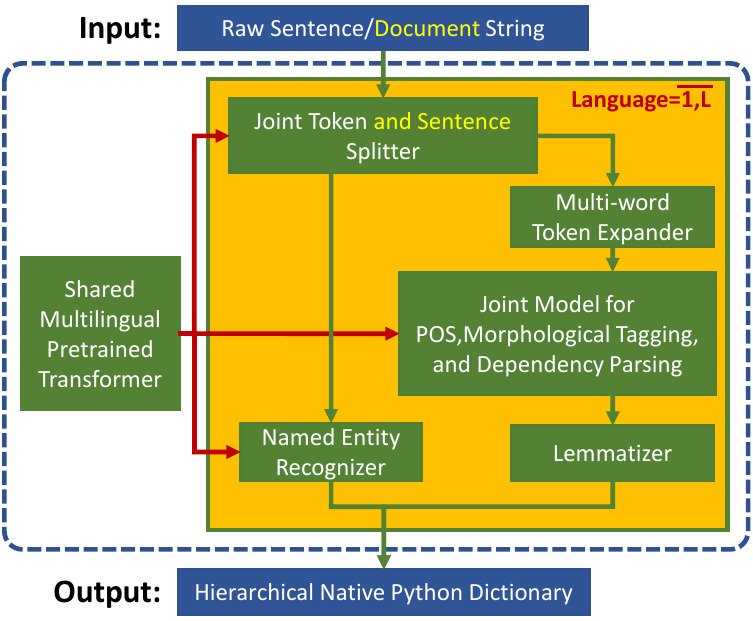
Trankit is a Light-Weight Transformer-based Python Toolkit for Multilingual Natural Language Processing

Trankit: A Light-Weight Transformer-based Python Toolkit for Multilingual Natural Language Processing Trankit is a light-weight Transformer-based Pyth

Multilingual text (NLP) processing toolkit

polyglot Polyglot is a natural language pipeline that supports massive multilingual applications. Free software: GPLv3 license Documentation: http://p

Multilingual text (NLP) processing toolkit

polyglot Polyglot is a natural language pipeline that supports massive multilingual applications. Free software: GPLv3 license Documentation: http://p

Comments
  • How to change batch size

    How to change batch size

    I got the following OOM message: Error on request: Traceback (most recent call last): File "D:\ProgramData\Anaconda3\envs\muse-as-a-service\lib\site-packages\werkzeug\serving.py", line 324, in run_wsgi execute(self.server.app) File "D:\ProgramData\Anaconda3\envs\muse-as-a-service\lib\site-packages\werkzeug\serving.py", line 313, in execute application_iter = app(environ, start_response) File "D:\ProgramData\Anaconda3\envs\muse-as-a-service\lib\site-packages\flask\app.py", line 2091, in call return self.wsgi_app(environ, start_response) File "D:\ProgramData\Anaconda3\envs\muse-as-a-service\lib\site-packages\flask\app.py", line 2076, in wsgi_app response = self.handle_exception(e) File "D:\ProgramData\Anaconda3\envs\muse-as-a-service\lib\site-packages\flask_restful_init_.py", line 271, in error_router return original_handler(e) File "D:\ProgramData\Anaconda3\envs\muse-as-a-service\lib\site-packages\flask\app.py", line 2073, in wsgi_app response = self.full_dispatch_request() File "D:\ProgramData\Anaconda3\envs\muse-as-a-service\lib\site-packages\flask\app.py", line 1518, in full_dispatch_request rv = self.handle_user_exception(e) File "D:\ProgramData\Anaconda3\envs\muse-as-a-service\lib\site-packages\flask_restful_init_.py", line 271, in error_router return original_handler(e) File "D:\ProgramData\Anaconda3\envs\muse-as-a-service\lib\site-packages\flask\app.py", line 1516, in full_dispatch_request rv = self.dispatch_request() File "D:\ProgramData\Anaconda3\envs\muse-as-a-service\lib\site-packages\flask\app.py", line 1502, in dispatch_request return self.ensure_sync(self.view_functions[rule.endpoint])(**req.view_args) File "D:\ProgramData\Anaconda3\envs\muse-as-a-service\lib\site-packages\flask_restful_init_.py", line 467, in wrapper resp = resource(*args, **kwargs) File "D:\ProgramData\Anaconda3\envs\muse-as-a-service\lib\site-packages\flask\views.py", line 84, in view return current_app.ensure_sync(self.dispatch_request)(*args, **kwargs) File "D:\ProgramData\Anaconda3\envs\muse-as-a-service\lib\site-packages\flask_restful_init_.py", line 582, in dispatch_request resp = meth(*args, **kwargs) File "D:\ProgramData\Anaconda3\envs\muse-as-a-service\lib\site-packages\flask_jwt_extended\view_decorators.py", line 127, in decorator return current_app.ensure_sync(fn)(*args, **kwargs) File "F:\repos3\muse-as-service\muse-as-service\src\muse_as_service\endpoints.py", line 56, in get embedding = self.embedder(args["sentence"]).numpy().tolist() File "D:\ProgramData\Anaconda3\envs\muse-as-a-service\lib\site-packages\keras\engine\base_layer.py", line 1037, in call outputs = call_fn(inputs, *args, **kwargs) File "D:\ProgramData\Anaconda3\envs\muse-as-a-service\lib\site-packages\tensorflow_hub\keras_layer.py", line 229, in call result = f() File "D:\ProgramData\Anaconda3\envs\muse-as-a-service\lib\site-packages\tensorflow\python\saved_model\load.py", line 664, in _call_attribute return instance.call(*args, **kwargs) File "D:\ProgramData\Anaconda3\envs\muse-as-a-service\lib\site-packages\tensorflow\python\eager\def_function.py", line 885, in call result = self._call(*args, **kwds) File "D:\ProgramData\Anaconda3\envs\muse-as-a-service\lib\site-packages\tensorflow\python\eager\def_function.py", line 957, in _call filtered_flat_args, self._concrete_stateful_fn.captured_inputs) # pylint: disable=protected-access File "D:\ProgramData\Anaconda3\envs\muse-as-a-service\lib\site-packages\tensorflow\python\eager\function.py", line 1964, in _call_flat ctx, args, cancellation_manager=cancellation_manager)) File "D:\ProgramData\Anaconda3\envs\muse-as-a-service\lib\site-packages\tensorflow\python\eager\function.py", line 596, in call ctx=ctx) File "D:\ProgramData\Anaconda3\envs\muse-as-a-service\lib\site-packages\tensorflow\python\eager\execute.py", line 60, in quick_execute inputs, attrs, num_outputs) tensorflow.python.framework.errors_impl.ResourceExhaustedError: 2 root error(s) found. (0) Resource exhausted: OOM when allocating tensor with shape[32851,782,512] and type float on /job:localhost/replica:0/task:0/device:GPU:0 by allocator GPU_0_bfc [[{{node StatefulPartitionedCall/StatefulPartitionedCall/EncoderTransformer/Transformer/SparseTransformerEncode/Layer_0/SelfAttention/SparseMultiheadAttention/ComputeQKV/ScatterNd}}]] Hint: If you want to see a list of allocated tensors when OOM happens, add report_tensor_allocations_upon_oom to RunOptions for current allocation info. This isn't available when running in Eager mode.

         [[StatefulPartitionedCall/StatefulPartitionedCall/EncoderTransformer/Transformer/layer_prepostprocess/layer_norm/add_1/_128]]
    

    Hint: If you want to see a list of allocated tensors when OOM happens, add report_tensor_allocations_upon_oom to RunOptions for current allocation info. This isn't available when running in Eager mode.

    (1) Resource exhausted: OOM when allocating tensor with shape[32851,782,512] and type float on /job:localhost/replica:0/task:0/device:GPU:0 by allocator GPU_0_bfc [[{{node StatefulPartitionedCall/StatefulPartitionedCall/EncoderTransformer/Transformer/SparseTransformerEncode/Layer_0/SelfAttention/SparseMultiheadAttention/ComputeQKV/ScatterNd}}]] Hint: If you want to see a list of allocated tensors when OOM happens, add report_tensor_allocations_upon_oom to RunOptions for current allocation info. This isn't available when running in Eager mode.

    question 
    opened by jiangweiatgithub 3
  • slow response from service

    slow response from service

    I have been comparing the efficency between the muse as service and the original "hub.load" method, and see a noticeable slow reponse in the former, both running separately on my Quadro RTX 5000. Can I safely assume this slowness is due to the very nature of the web service? If so, is there any way to improve it?

    invalid 
    opened by jiangweiatgithub 1
Releases(v1.1.2)
Owner
Dani El-Ayyass
Senior NLP Engineer @ Sber AI, Master Student in Applied Mathematics and Computer Science @ CMC MSU
Dani El-Ayyass
基于“Seq2Seq+前缀树”的知识图谱问答

KgCLUE-bert4keras 基于“Seq2Seq+前缀树”的知识图谱问答 简介 博客:https://kexue.fm/archives/8802 环境 软件:bert4keras=0.10.8 硬件:目前的结果是用一张Titan RTX(24G)跑出来的。 运行 第一次运行的时候,会给知

苏剑林(Jianlin Su) 65 Dec 12, 2022
Text editor on python tkinter to convert english text to other languages with the help of ployglot.

Transliterator Text Editor This is a simple transliteration program which is used to convert english word to phonetically matching word in another lan

Merin Rose Tom 1 Jan 16, 2022
NeoDays-based tileset for the roguelike CDDA (Cataclysm Dark Days Ahead)

NeoDaysPlus Reduced contrast, expanded, and continuously developed version of the CDDA tileset NeoDays that's being completed with new sprites for mis

0 Nov 12, 2022
Sorce code and datasets for "K-BERT: Enabling Language Representation with Knowledge Graph",

K-BERT Sorce code and datasets for "K-BERT: Enabling Language Representation with Knowledge Graph", which is implemented based on the UER framework. R

Weijie Liu 834 Jan 09, 2023
A deep learning-based translation library built on Huggingface transformers

DL Translate A deep learning-based translation library built on Huggingface transformers and Facebook's mBART-Large 💻 GitHub Repository 📚 Documentat

Xing Han Lu 244 Dec 30, 2022
Multilingual word vectors in 78 languages

Aligning the fastText vectors of 78 languages Facebook recently open-sourced word vectors in 89 languages. However these vectors are monolingual; mean

Babylon Health 1.2k Dec 17, 2022
A fast and lightweight python-based CTC beam search decoder for speech recognition.

pyctcdecode A fast and feature-rich CTC beam search decoder for speech recognition written in Python, providing n-gram (kenlm) language model support

Kensho 315 Dec 21, 2022
Azure Text-to-speech service for Home Assistant

Azure Text-to-speech service for Home Assistant The Azure text-to-speech platform uses online Azure Text-to-Speech cognitive service to read a text wi

Yassine Selmi 2 Aug 06, 2022
This is a simple item2vec implementation using gensim for recbole

recbole-item2vec-model This is a simple item2vec implementation using gensim for recbole( https://recbole.io ) Usage When you want to run experiment f

Yusuke Fukasawa 2 Oct 06, 2022
Prithivida 690 Jan 04, 2023
:mag: Transformers at scale for question answering & neural search. Using NLP via a modular Retriever-Reader-Pipeline. Supporting DPR, Elasticsearch, HuggingFace's Modelhub...

Haystack is an end-to-end framework that enables you to build powerful and production-ready pipelines for different search use cases. Whether you want

deepset 6.4k Jan 09, 2023
मराठी भाषा वाचविण्याचा एक प्रयास. इंग्रजी ते मराठीचा शब्दकोश. An attempt to preserve the Marathi language. A lightweight and ad free English to Marathi thesaurus.

For English, scroll down मराठी शब्द मराठी भाषा वाचवण्यासाठी मी हा ओपन सोर्स प्रोजेक्ट सुरू केला आहे. माझ्या मते, आपली भाषा हळूहळू आणि कोणाचाही लक्षात

मुक्त स्त्रोत 20 Oct 11, 2022
ProteinBERT is a universal protein language model pretrained on ~106M proteins from the UniRef90 dataset.

ProteinBERT is a universal protein language model pretrained on ~106M proteins from the UniRef90 dataset. Through its Python API, the pretrained model can be fine-tuned on any protein-related task in

241 Jan 04, 2023
Pretrained Japanese BERT models

Pretrained Japanese BERT models This is a repository of pretrained Japanese BERT models. The models are available in Transformers by Hugging Face. Mod

Inui Laboratory 387 Dec 30, 2022
Journey is a NLP-Powered Developer assistant

Journey Journey is a NLP-Powered Developer assistant Using on the powerful Natural Language Processing library Mindmeld, this projects aims to assist

Christian Eilers 21 Dec 11, 2022
🦆 Contextually-keyed word vectors

sense2vec: Contextually-keyed word vectors sense2vec (Trask et. al, 2015) is a nice twist on word2vec that lets you learn more interesting and detaile

Explosion 1.5k Dec 25, 2022
KakaoBrain KoGPT (Korean Generative Pre-trained Transformer)

KoGPT KoGPT (Korean Generative Pre-trained Transformer) https://github.com/kakaobrain/kogpt https://huggingface.co/kakaobrain/kogpt Model Descriptions

Kakao Brain 797 Dec 26, 2022
null

CP-Cluster Confidence Propagation Cluster aims to replace NMS-based methods as a better box fusion framework in 2D/3D Object detection, Instance Segme

Yichun Shen 41 Dec 08, 2022
Conversational-AI-ChatBot - Intelligent ChatBot built with Microsoft's DialoGPT transformer to make conversations with human users!

Conversational AI ChatBot Intelligent ChatBot built with Microsoft's DialoGPT transformer to make conversations with human users! In this project? Thi

Rajkumar Lakshmanamoorthy 6 Nov 30, 2022
a CTF web challenge about making screenshots

screenshotter (web) A CTF web challenge about making screenshots. It is inspired by a bug found in real life. The challenge was created by @LiveOverfl

219 Jan 02, 2023