COCO-Stuff 10K dataset v1.1 (outdated)
Holger Caesar, Jasper Uijlings, Vittorio Ferrari
Overview
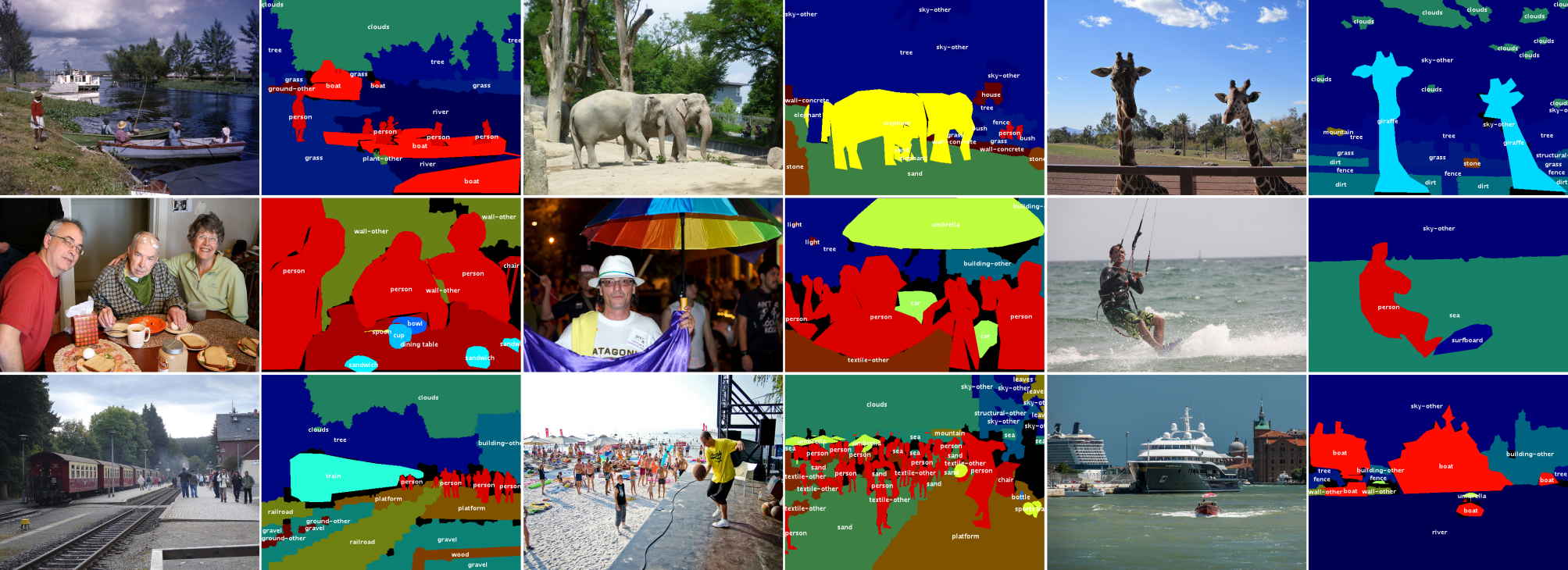
Overview
- Highlights
- Updates
- Results and Future Plans
- Dataset
- Semantic Segmentation Models
- Annotation Tool
- Misc
Highlights
- 10,000 complex images from COCO [2]
- Dense pixel-level annotations
- 91 thing and 91 stuff classes
- Instance-level annotations for things from COCO [2]
- Complex spatial context between stuff and things
- 5 captions per image from COCO [2]
Updates
- 11 Jul 2017: Added working Deeplab models for Resnet and VGG
- 06 Apr 2017: Dataset version 1.1: Modified label indices
- 31 Mar 2017: Published annotations in JSON format
- 09 Mar 2017: Added label hierarchy scripts
- 08 Mar 2017: Corrections to table 2 in arXiv paper [1]
- 10 Feb 2017: Added script to extract SLICO superpixels in annotation tool
- 12 Dec 2016: Dataset version 1.0 and arXiv paper [1] released
Results
The current release of COCO-Stuff-10K publishes both the training and test annotations and users report their performance individually. We invite users to report their results to us to complement this table. In the near future we will extend COCO-Stuff to all images in COCO and organize an official challenge where the test annotations will only be known to the organizers.
For the updated table please click here.
| Method | Source | Class-average accuracy | Global accuracy | Mean IOU | FW IOU |
|---|---|---|---|---|---|
| FCN-16s [3] | [1] | 34.0% | 52.0% | 22.7% | - |
| Deeplab VGG-16 (no CRF) [4] | [1] | 38.1% | 57.8% | 26.9% | - |
| FCN-8s [3] | [6] | 38.5% | 60.4% | 27.2% | - |
| DAG-RNN + CRF [6] | [6] | 42.8% | 63.0% | 31.2% | - |
| OHE + DC + FCN+ [5] | [5] | 45.8% | 66.6% | 34.3% | 51.2% |
| Deeplab ResNet (no CRF) [4] | - | 45.5% | 65.1% | 34.4% | 50.4% |
| W2V + DC + FCN+ [5] | [5] | 45.1% | 66.1% | 34.7% | 51.0% |
Dataset
| Filename | Description | Size |
|---|---|---|
| cocostuff-10k-v1.1.zip | COCO-Stuff dataset v. 1.1, images and annotations | 2.0 GB |
| cocostuff-10k-v1.1.json | COCO-Stuff dataset v. 1.1, annotations in JSON format (optional) | 62.3 MB |
| cocostuff-labels.txt | A list of the 1+91+91 classes in COCO-Stuff | 2.3 KB |
| cocostuff-readme.txt | This document | 6.5 KB |
| Older files | ||
| cocostuff-10k-v1.0.zip | COCO-Stuff dataset version 1.0, including images and annotations | 2.6 GB |
Usage
To use the COCO-Stuff dataset, please follow these steps:
- Download or clone this repository using git:
git clone https://github.com/nightrome/cocostuff10k.git - Open the dataset folder in your shell:
cd cocostuff10k - If you have Matlab, run the following commands:
- Add the code folder to your Matlab path:
startup(); - Run the demo script in Matlab
demo_cocoStuff(); - The script displays an image, its thing, stuff and thing+stuff annotations, as well as the image captions.
- Alternatively run the following Linux commands or manually download and unpack the dataset:
wget --directory-prefix=downloads http://calvin.inf.ed.ac.uk/wp-content/uploads/data/cocostuffdataset/cocostuff-10k-v1.1.zipunzip downloads/cocostuff-10k-v1.1.zip -d dataset/
MAT Format
The COCO-Stuff annotations are stored in separate .mat files per image. These files follow the same format as used by Tighe et al.. Each file contains the following fields:
- S: The pixel-wise label map of size [height x width].
- names: The names of the thing and stuff classes in COCO-Stuff. For more details see Label Names & Indices.
- captions: Image captions from [2] that are annotated by 5 distinct humans on average.
- regionMapStuff: A map of the same size as S that contains the indices for the approx. 1000 regions (superpixels) used to annotate the image.
- regionLabelsStuff: A list of the stuff labels for each superpixel. The indices in regionMapStuff correspond to the entries in regionLabelsStuff.
JSON Format
Alternatively, we also provide stuff and thing annotations in the COCO-style JSON format. The thing annotations are copied from COCO. We encode every stuff class present in an image as a single annotation using the RLE encoding format of COCO. To get the annotations:
- Either download them:
wget --directory-prefix=dataset/annotations-json http://calvin.inf.ed.ac.uk/wp-content/uploads/data/cocostuffdataset/cocostuff-10k-v1.1.json - Or extract them from the .mat file annotations using this Python script.
Label Names & Indices
To be compatible with COCO, version 1.1 of COCO-Stuff has 91 thing classes (1-91), 91 stuff classes (92-182) and 1 class "unlabeled" (0). Note that 11 of the thing classes from COCO 2015 do not have any segmentation annotations. The classes desk, door and mirror could be either stuff or things and therefore occur in both COCO and COCO-Stuff. To avoid confusion we add the suffix "-stuff" to those classes in COCO-Stuff. The full list of classes can be found here.
The older version 1.0 of COCO-Stuff had 80 thing classes (2-81), 91 stuff classes (82-172) and 1 class "unlabeled" (1).
Label Hierarchy
The hierarchy of labels is stored in CocoStuffClasses. To visualize it, run CocoStuffClasses.showClassHierarchyStuffThings() (also available for just stuff and just thing classes) in Matlab. The output should look similar to the following figure: 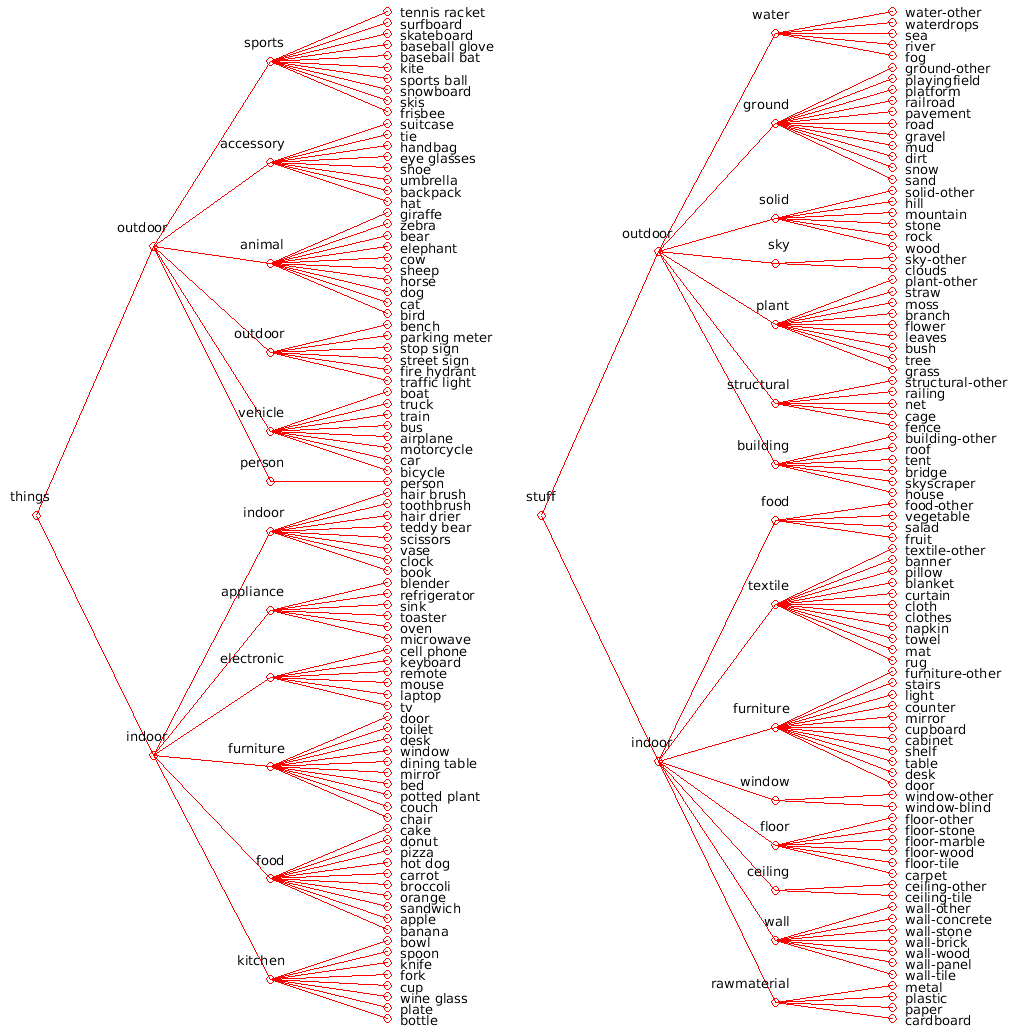
Semantic Segmentation Models
To encourage further research of stuff and things we provide the trained semantic segmentation model (see Sect. 4.4 in [1]).
DeepLab VGG-16
Use the following steps to download and setup the DeepLab [4] semantic segmentation model trained on COCO-Stuff. It requires deeplab-public-ver2, which is built on Caffe:
- Install Cuda. I recommend version 7.0. For version 8.0 you will need to apply the fix described here in step 3.
- Download deeplab-public-ver2:
git submodule update --init models/deeplab/deeplab-public-ver2 - Compile and configure deeplab-public-ver2 following the author's instructions. Depending on your system setup you might have to install additional packages, but a minimum setup could look like this:
cd models/deeplab/deeplab-public-ver2cp Makefile.config.example Makefile.config- Optionally add CuDNN support or modify library paths in the Makefile.
make all -j8cd ../..
- Configure the COCO-Stuff dataset:
- Create folders:
mkdir models/deeplab/deeplab-public-ver2/cocostuff && mkdir models/deeplab/deeplab-public-ver2/cocostuff/data - Create a symbolic link to the images:
cd models/deeplab/cocostuff/data && ln -s ../../../../dataset/images images && cd ../../../.. - Convert the annotations by running the Matlab script:
startup(); convertAnnotationsDeeplab();
- Download the base VGG-16 model:
wget --directory-prefix=models/deeplab/cocostuff/model/deeplabv2_vgg16 http://calvin.inf.ed.ac.uk/wp-content/uploads/data/cocostuffdataset/deeplabv2_vgg16_init.caffemodel
- Run
cd models/deeplab && ./run_cocostuff_vgg16.shto train and test the network on COCO-Stuff.
DeepLab ResNet 101
The default Deeplab model performs center crops of size 513*513 pixels of an image, if any side is larger than that. Since we want to segment the whole image at test time, we choose to resize the images to 513x513, perform the semantic segmentation and then rescale it elsewhere. Note that without the final step, the performance might differ slightly.
- Follow steps 1-4 of the DeepLab VGG-16 section above.
- Download the base ResNet model:
wget --directory-prefix=models/deeplab/cocostuff/model/deeplabv2_resnet101 http://calvin.inf.ed.ac.uk/wp-content/uploads/data/cocostuffdataset/deeplabv2_resnet101_init.caffemodel
- Rescale the images and annotations:
cd models/deeplabpython rescaleImages.pypython rescaleAnnotations.py
- Run
./run_cocostuff_resnet101.shto train and test the network on COCO-Stuff.
Annotation Tool
In [1] we present a simple and efficient stuff annotation tool which was used to annotate the COCO-Stuff dataset. It uses a paintbrush tool to annotate SLICO superpixels (precomputed using the code of Achanta et al.) with stuff labels. These annotations are overlaid with the existing pixel-level thing annotations from COCO. We provide a basic version of our annotation tool:
- Prepare the required data:
- Specify a username in
annotator/data/input/user.txt. - Create a list of images in
annotator/data/input/imageLists/<user>.list. - Extract the thing annotations for all images in Matlab:
extractThings(). - Extract the superpixels for all images in Matlab:
extractSLICOSuperpixels(). - To enable or disable superpixels, thing annotations and polygon drawing, take a look at the flags at the top of
CocoStuffAnnotator.m.
- Specify a username in
- Run the annotation tool in Matlab:
CocoStuffAnnotator();- The tool writes the .mat label files to
annotator/data/output/annotations. - To create a .png preview of the annotations, run
annotator/code/exportImages.min Matlab. The previews will be saved toannotator/data/output/preview.
- The tool writes the .mat label files to
Misc
References
-
[1] COCO-Stuff: Thing and Stuff Classes in Context
H. Caesar, J. Uijlings, V. Ferrari,
In arXiv preprint arXiv:1612.03716, 2017. -
[2] Microsoft COCO: Common Objects in Context
T.-Y. Lin, M. Maire, S. Belongie et al.,
In European Conference in Computer Vision (ECCV), 2014. -
[3] Fully convolutional networks for semantic segmentation
J. Long, E. Shelhammer and T. Darrell,
In Computer Vision and Pattern Recognition (CVPR), 2015. -
[4] Semantic image segmentation with deep convolutional nets and fully connected CRFs
L.-C. Chen, G. Papandreou, I. Kokkinos et al.,
In International Conference on Learning Representations (ICLR), 2015. -
[5] LabelBank: Revisiting Global Perspectives for Semantic Segmentation
H. Hu, Z. Deng, G.-T. Zhou et al.
In arXiv preprint arXiv:1703.09891, 2017. -
[6] Scene Segmentation with DAG-Recurrent Neural Networks
B. Shuai, Z. Zuo, B. Wang
In IEEE Transactions on Pattern Analysis and Machine Intelligence (PAMI), 2017.
Licensing
COCO-Stuff is a derivative work of the COCO dataset. The authors of COCO do not in any form endorse this work. Different licenses apply:
- COCO images: Flickr Terms of use
- COCO annotations: Creative Commons Attribution 4.0 License
- COCO-Stuff annotations & code: Creative Commons Attribution 4.0 License
Contact
If you have any questions regarding this dataset, please contact us at holger-at-it-caesar.com.

 107 Nov 02, 2022
 625 Dec 30, 2022
 820 Dec 26, 2022
 175 Jan 04, 2023
 4 Jun 13, 2022
 78 Dec 02, 2022
 0 May 22, 2022
 441 Jan 05, 2023
 510 Dec 30, 2022
 64 Nov 22, 2022
 290 Dec 25, 2022
 85 Dec 31, 2022
 22 Dec 02, 2022
 87 Jan 03, 2023
 2 Jun 21, 2022
 59 Nov 24, 2022
 529 Jan 02, 2023
 4.5k Jan 03, 2023
 3.6k Jan 08, 2023
 4 Nov 24, 2022