FastAPI Project Template
The base to start an openapi project featuring: SQLModel, Typer, FastAPI, JWT Token Auth, Interactive Shell, Management Commands.
See also
- Python-Project-Template for a lean, low dependency Python app.
- Flask-Project-Template for a full feature Flask project including database, API, admin interface, etc.
HOW TO USE THIS TEMPLATE
DO NOT FORK this is meant to be used from Use this template feature.
- Click on Use this template
- Give a name to your project
(e.g.my_awesome_projectrecommendation is to use all lowercase and underscores separation for repo names.) - Wait until the first run of CI finishes
(Github Actions will process the template and commit to your new repo) - If you want codecov Reports and Automatic Release to PyPI
On the new repositorysettings->secretsadd yourPIPY_API_TOKENandCODECOV_TOKEN(get the tokens on respective websites) - Read the file CONTRIBUTING.md
- Then clone your new project and happy coding!
NOTE: WAIT until first CI run on github actions before cloning your new project.
What is included on this template?
-
🖼️ The base to start an openapi project featuring: SQLModel, Typer, FastAPI, VueJS. -
📦 A basic setup.py file to provide installation, packaging and distribution for your project.
Template uses setuptools because it's the de-facto standard for Python packages, you can runmake switch-to-poetrylater if you want. -
🤖 A Makefile with the most useful commands to install, test, lint, format and release your project. -
📃 Documentation structure using mkdocs -
💬 Auto generation of change log using gitchangelog to keep a HISTORY.md file automatically based on your commit history on every release. -
🐋 A simple Containerfile to build a container image for your project.
Containerfileis a more open standard for building container images than Dockerfile, you can use buildah or docker with this file. -
🧪 Testing structure using pytest -
✅ Code linting using flake8 -
📊 Code coverage reports using codecov -
🛳️ Automatic release to PyPI using twine and github actions. -
🎯 Entry points to execute your program usingpython -mor$ project_namewith basic CLI argument parsing. -
🔄 Continuous integration using Github Actions with jobs to lint, test and release your project on Linux, Mac and Windows environments.
Curious about architectural decisions on this template? read ABOUT_THIS_TEMPLATE.md
If you want to contribute to this template please open an issue or fork and send a PULL REQUEST.
project_name


project_description
Install
from source
git clone https://github.com/author_name/project_urlname project_name
cd project_name
make install
from pypi
pip install project_name
Executing
$ project_name run --port 8080
or
python -m project_name run --port 8080
or
$ uvicorn project_name:app
CLI
❯ project_name --help
Usage: project_name [OPTIONS] COMMAND [ARGS]...

Options:
  --install-completion [bash|zsh|fish|powershell|pwsh]
                                  Install completion for the specified shell.
  --show-completion [bash|zsh|fish|powershell|pwsh]
                                  Show completion for the specified shell, to
                                  copy it or customize the installation.
  --help                          Show this message and exit.

Commands:
  create-user  Create user
  run          Run the API server.
  shell        Opens an interactive shell with objects auto imported
Creating a user
❯ project_name create-user --help
Usage: project_name create-user [OPTIONS] USERNAME PASSWORD

  Create user

Arguments:
  USERNAME  [required]
  PASSWORD  [required]

Options:
  --superuser / --no-superuser  [default: no-superuser]
  --help
IMPORTANT To create an admin user on the first run:
project_name create-user admin admin --superuser
The Shell
You can enter an interactive shell with all the objects imported.
❯ project_name shell
Auto imports: ['app', 'settings', 'User', 'engine', 'cli', 'create_user', 'select', 'session', 'Content']

In [1]: session.query(Content).all()
Out[1]: [Content(text='string', title='string', created_time='2021-09-14T19:25:00.050441', user_id=1, slug='string', id=1, published=False, tags='string')]

In [2]: user = session.get(User, 1)

In [3]: user.contents
Out[3]: [Content(text='string', title='string', created_time='2021-09-14T19:25:00.050441', user_id=1, slug='string', id=1, published=False, tags='string')]
API
Run with project_name run and access http://127.0.0.1:8000/docs
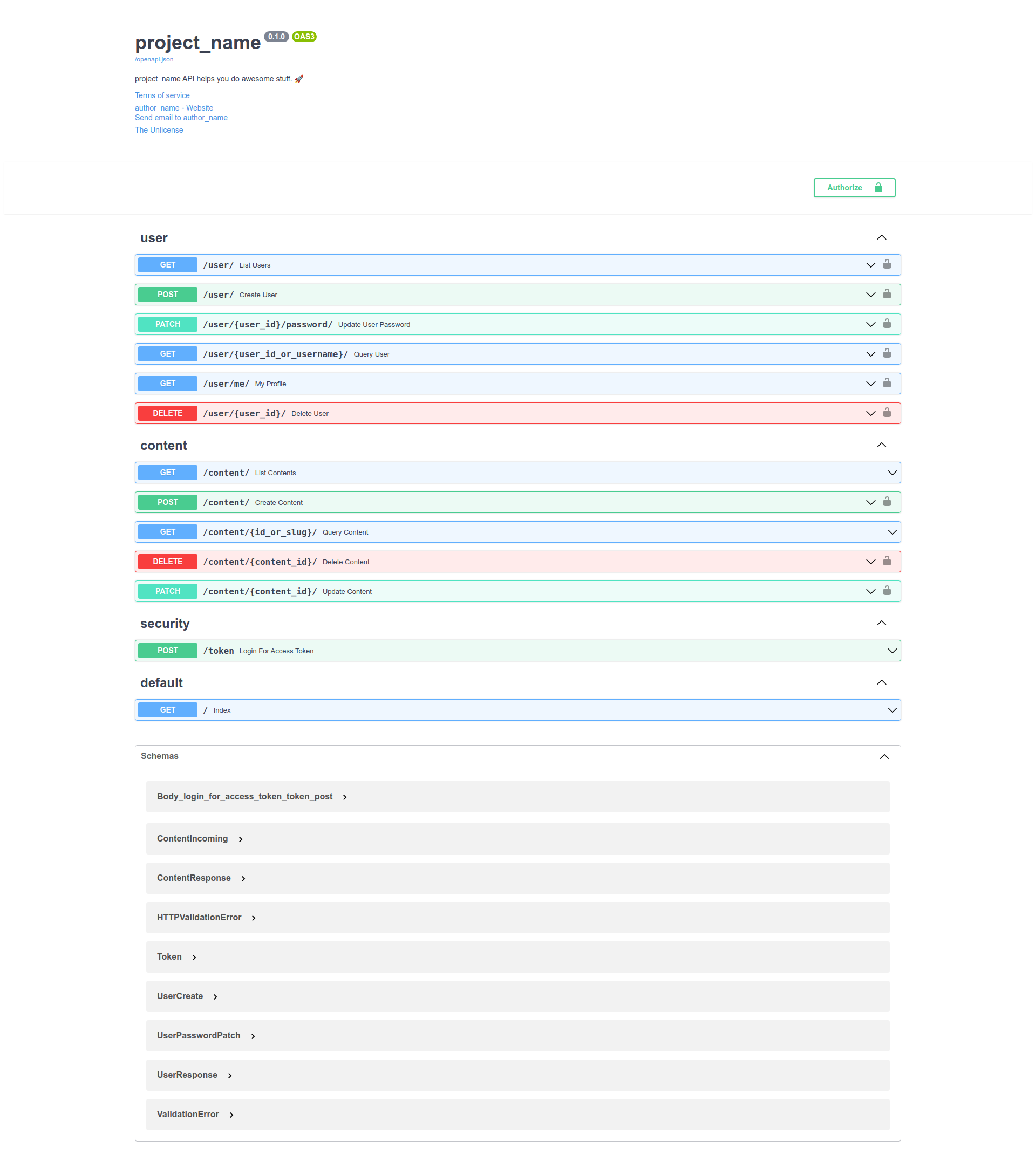
For some api calls you must authenticate using the user created with project_name create-user.
Testing
❯ make test
Black All done! ✨ 🍰 ✨
13 files would be left unchanged.
Isort All done! ✨ 🍰 ✨
6 files would be left unchanged.
Success: no issues found in 13 source files
================================ test session starts ===========================
platform linux -- Python 3.9.6, pytest-6.2.5, py-1.10.0, pluggy-1.0.0 --
/fastapi-project-template/.venv/bin/python3
cachedir: .pytest_cache
rootdir: /fastapi-project-template
plugins: cov-2.12.1
collected 10 items

tests/test_app.py::test_using_testing_db PASSED                           [ 10%]
tests/test_app.py::test_index PASSED                                      [ 20%]
tests/test_cli.py::test_help PASSED                                       [ 30%]
tests/test_cli.py::test_cmds_help[run-args0---port] PASSED                [ 40%]
tests/test_cli.py::test_cmds_help[create-user-args1-create-user] PASSED   [ 50%]
tests/test_cli.py::test_cmds[create-user-args0-created admin2 user] PASSED[ 60%]
tests/test_content_api.py::test_content_create PASSED                     [ 70%]
tests/test_content_api.py::test_content_list PASSED                       [ 80%]
tests/test_user_api.py::test_user_list PASSED                             [ 90%]
tests/test_user_api.py::test_user_create PASSED                           [100%]

----------- coverage: platform linux, python 3.9.6-final-0 -----------
Name                              Stmts   Miss  Cover
-----------------------------------------------------
project_name/__init__.py              4      0   100%
project_name/app.py                  16      1    94%
project_name/cli.py                  21      0   100%
project_name/config.py                5      0   100%
project_name/db.py                   10      0   100%
project_name/models/__init__.py       0      0   100%
project_name/models/content.py       47      1    98%
project_name/routes/__init__.py      11      0   100%
project_name/routes/content.py       52     25    52%
project_name/routes/security.py      15      1    93%
project_name/routes/user.py          52     26    50%
project_name/security.py            103     12    88%
-----------------------------------------------------
TOTAL                               336     66    80%


========================== 10 passed in 2.34s ==================================
Linting and Formatting
make lint  # checks for linting errors
make fmt   # formats the code
Configuration
This project uses Dynaconf to manage configuration.
from project_name.config import settings
Acessing variables
settings.get("SECRET_KEY", default="sdnfjbnfsdf")
settings["SECRET_KEY"]
settings.SECRET_KEY
settings.db.uri
settings["db"]["uri"]
settings["db.uri"]
settings.DB__uri
Defining variables
On files
settings.toml
[development]
dynaconf_merge = true

[development.db]
echo = true
dynaconf_mergeis a boolean that tells if the settings should be merged with the default settings defined in project_name/default.toml.
As environment variables
export PROJECT_NAME_KEY=value
export PROJECT_NAME_KEY="@int 42"
export PROJECT_NAME_KEY="@jinja {{ this.db.uri }}"
export PROJECT_NAME_DB__uri="@jinja {{ this.db.uri | replace('db', 'data') }}"
Secrets
There is a file .secrets.toml where your sensitive variables are stored, that file must be ignored by git. (add that to .gitignore)
Or store your secrets in environment variables or a vault service, Dynaconf can read those variables.
Switching environments
PROJECT_NAME_ENV=production project_name run
Read more on https://dynaconf.com
Development
Read the CONTRIBUTING.md file.

 44 Nov 08, 2022
 32 Jun 21, 2022
 46 Nov 02, 2022
 371 Jan 01, 2023
 145 Dec 28, 2022
 1 Jan 30, 2022
 16 Oct 14, 2021
 472 Jan 02, 2023
 2 Apr 19, 2022
 1 Aug 26, 2021
 10 Nov 30, 2022
 2 Mar 14, 2022
 188 Jan 09, 2023
 95 Jan 08, 2023
 6 Nov 29, 2021
 60 Dec 17, 2022
 2 Nov 17, 2021
 162 Dec 13, 2022
 15 Oct 02, 2022