Weather-API-GUI-Tkinter - A weather tool made using tkinter which works by fetching query city weather using an API

Overview

Weather-API-GUI-Tkinter ☁️ ❄️

version- 1️⃣ . 0️⃣ . 0️⃣

This repo contains a weather forecasting tool made using tkinter which works by fetching query made city's weather using an API.

so what is an API?

  • API is the acronym for Application Programming Interface, which is a software intermediary that allows two applications to talk to each other. Each time you use an app like Facebook, send an instant message, or check the weather on your phone, you’re using an API.
  • When you use an application on your mobile phone, the application connects to the Internet and sends data to a server. The server then retrieves that data, interprets it, performs the necessary actions and sends it back to your phone. The application then interprets that data and presents you with the information you wanted in a readable way. This is what an API is - all of this happens via API.
  • Coming to our weather api project, Weather APIs are Application Programming Interfaces that provide access to current & historical weather data on a global scale. There are several public weather APIs like OpenWeatherMap API, Dark Sky API, & Visual Crossing Weather API.

Here is a illustration of api:
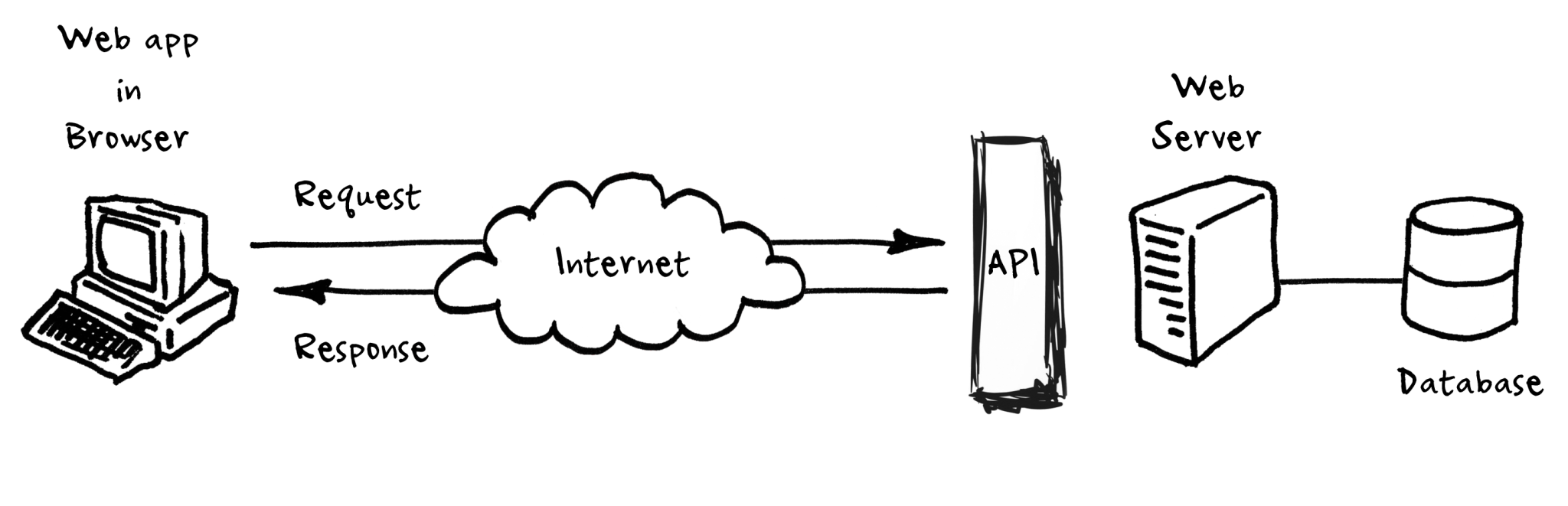
image1-2

Top 10 Weather api are as follows:

  • OpenWeatherMap API
  • Dark Sky API
  • Weather API
  • Simple Weather API
  • Weather2020 API
  • Air Quality API
  • Weather by Location API
  • Visual Crossing Weather API
  • AccuWeather API
  • AerisWeather API

In this project an APi of OpenWeather is used to request weather of a city by sending a query to the api.
query looks like this:

url :  http://api.openweathermap.org/data/2.5/weather
{"q":cityy_name.get(),'units':'metric','appid':api_key }

in the url the city name along with my api id and unit system are comined and sent as an https request using the request modules's request() method, the output is in the format of json file.

the response from the api looks something like this:

{'coord': {'lon': -71.06, 'lat': 42.36}, 'weather': [{'id': 500, 'main': 'Rain', 'description': 'light rain', 'icon': '10d'}], 'base': 'stations', 
    'main': {'temp': 298.88, 'feels_like': 302.56, 'temp_min': 298.15, 'temp_max': 299.82, 'pressure': 1010, 'humidity': 85}, 'visibility': 10000, 
    'wind': {'speed': 2.24, 'deg': 151, 'gust': 4.47}, 'rain': {'1h': 0.25}, 'clouds': {'all': 82}, 'dt': 1596407271, 'sys': {'type': 3, 'id': 2005683, 
    'country': 'US', 'sunrise': 1596361095, 'sunset': 1596412955}, 'timezone': -14400, 'id': 4930956, 'name': 'Boston', 'cod': 200} 

which is then this data is formatted into the gui application by using appropiate dictionary methods.

The GUI application looks like this:

(the GUi is made using frames,canvas,entry methods in tkinter)

(colors are choosen from colorhunt )

  • Any city around the globe can be sent as query and it's current weather condition data can be retrieved and displayed.

imports used in this project are

from tkinter import *
import tkinter,requests
from tkinter.font import BOLD
from urllib import response
from tkinter import BOTH
from PIL import ImageTk, Image
from io import BytesIO
from cv2 import FONT_HERSHEY_COMPLEX

Not just the weather data, even the icon of the weather condition can be retrieved from openweather api, its free to use and faster compared to other api's.

Note:

  • System must be connected to the internet for the app to work.
  • No spelling mistakes must be made while sening query.
  • Enter city name (not country,continent name) then hit submit.

The main intention behind this project is to learn how to work with api's, gathering/retrieving information from web , formatting and producing it in a GUi application which looks good, minimal and easy to use. Feel free to fork the repo and imporve it by changing ui,colors or add more functionality. You can find detailed code xplanation for every line in comments in source, I will also be posting line to line instructions along with xplanation how to build this application along with other very basic GUi applications in learn-tkinter-with-me repo, do check that and it's been a lot of hardwork, struggle making this app work as intended at the same time look good, a lot of trial and error has been made for the colors to make ui look good so leave a star if u like this project.

Owner
SasiVatsal
open source enthusiast.🧑🏼‍💻 Just a teen interest in unix/linux 💻,android📱platforms, intermediate in python, js, c/c++.
SasiVatsal
TkArt - A repository created to explore geometry and art creation using TkInter

tkArt A repository created to explore geometry and art creation using TkInter, a

Jayant Sogikar 18 Oct 01, 2022
TextTUI is a set of extensions to the Textual and Textual-Inputs libraries

TextTUI is a set of extensions to the Textual and Textual-Inputs libraries. Currently a Work in Progress that is based on the 0.1.14 branch of

3 Feb 10, 2022
Signin/Signup GUI form using tkinter in python

SignIn-SignUpFormRepo Hello there, I am Shahid and this is the Signin/Signup GUI form using tkinter in python if you want to use avatar images then pa

Shahid Akhtar 1 Nov 09, 2021
Advanced GUI Calculator with Beautiful UI and Clear Code.

Advanced GUI Calculator with Beautiful UI and Clear Code.

Mohammad Dori 3 Jul 15, 2022
Chatterpatter - A simple GUI complex backend Chat Application made using python

Chatterpatter - A simple GUI complex backend Chat Application made using python

Gurneet Singh 2 Jan 08, 2022
A Python native, OS native GUI toolkit.

Toga A Python native, OS native GUI toolkit. Prerequisites Minimum requirements Toga requires Python 3. Python 2 is not supported. If you're on macOS,

BeeWare 3.3k Dec 31, 2022
A desktop application for JupyterLab, based on Electron.

A desktop application for JupyterLab, based on Electron.

JupyterLab 2.1k Jan 02, 2023
ROS2 + PyQt5 Example

ROS2 + PyQt5 Example

Ar-Ray 4 Nov 15, 2022
Mini is a web browser application based on the Python PyQt web engine, made in 290 lines of code.

Mini Mini is a web browser application based on the Python PyQt web engine, made in 290 lines of code. The code is written and published as is, so the

Dmitry Karpenko 6 Nov 07, 2022
A Url Shortener with GUI made in Python.

Url-Shortener-with-GUI-in-python A Url Shortener with GUI made in Python. To Run this download the zip file and run the main file or Clone this repo.

SidTheMiner 1 Nov 12, 2021
A library for building modern declarative desktop applications in WX.

re-wx is a library for building modern declarative desktop applications. It's built as a management layer on top of WXPython, which means you get all the goodness of a mature, native, cross-platform

Chris 115 Dec 24, 2022
A simple one-line quick entry GUI for your Obsidian daily notes in markdown format.

Quick-note-entry-for-Obsidian A simple one-line quick entry GUI for your Obsidian daily notes in markdown format. Log your day quickly with this simpl

Adrian Papineau 22 Oct 04, 2022
Custom Widgets For PyQt5

pyqtCuWi Custom Widgets Icon Button Documentation Rank Widget Documentation PopUp OuterRadius PopUp Documentation OuterRadius Documentation Producer:

.CODE 0 Apr 04, 2022
OpenPort scanner GUI tool (CNMAP)

CNMAP-GUI- OpenPort scanner GUI tool (CNMAP) as you know it is the advanced tool to find open port, firewalls and we also added here heartbleed scanni

9 Mar 05, 2022
CBMPy Metadraft: a flexible and extensible genome-scale model reconstruction tool

CBMPy Metadraft: a flexible and extensible, GUI-based genome-scale model reconstruction tool that supports multiple Systems Biology standards.

Systems Biology Lab, Vrije Universiteit Amsterdam 1 Mar 14, 2022
Plantasia, all your plants and muchrooms in one place!

Plantasia Project Description Tkinter GUI to be used as a repository for plants and muchrooms. It helps to optimize the search for species that have h

Marco Rodrigues 1 Dec 23, 2021
Generate multifunctional GUIs from classes

magic-class In magicgui you can make simple GUIs from functions. However, we usually have to create GUIs that are composed of several buttons, and eac

25 Dec 15, 2022
pyglet is a cross-platform windowing and multimedia library for Python, for developing games and other visually rich applications.

pyglet pyglet is a cross-platform windowing and multimedia library for Python, intended for developing games and other visually rich applications. It

1.3k Jan 01, 2023
Currency calculator with PyQt5

currency-calculator currency calculator with PyQt5

Vusal Akhundzada 2 Mar 08, 2022
Build GUI for your Python program with JavaScript, HTML, and CSS

https://pywebview.flowrl.com pywebview is a lightweight cross-platform wrapper around a webview component that allows to display HTML content in its o

Roman 3.3k Jan 01, 2023