pixelNeRF: Neural Radiance Fields from One or Few Images
Alex Yu, Vickie Ye, Matthew Tancik, Angjoo Kanazawa
UC Berkeley
arXiv: http://arxiv.org/abs/2012.02190
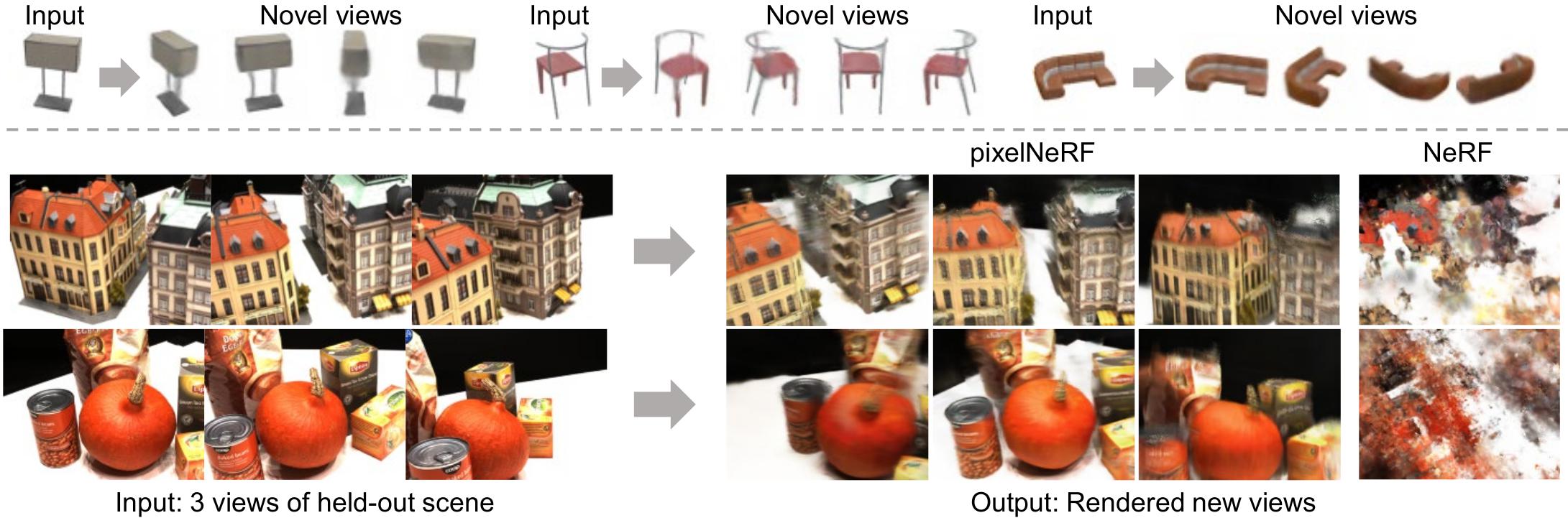
This is the official repository for our paper, pixelNeRF, pending final release. The two object experiment is still missing. Several features may also be added.
Environment setup
To start, we prefer creating the environment using conda:
conda env create -f environment.yml
conda activate pixelnerf
Please make sure you have up-to-date NVIDIA drivers supporting CUDA 10.2 at least.
Alternatively use pip -r requirements.txt.
Getting the data
-
For the main ShapeNet experiments, we use the ShapeNet 64x64 dataset from NMR https://s3.eu-central-1.amazonaws.com/avg-projects/differentiable_volumetric_rendering/data/NMR_Dataset.zip (Hosted by DVR authors)
- For novel-category generalization experiment, a custom split is needed. Download the following script: https://drive.google.com/file/d/1Uxf0GguAUTSFIDD_7zuPbxk1C9WgXjce/view?usp=sharing place the said file under
NMR_Datasetand runpython genlist.pyin the said directory. This generates train/val/test lists for the experiment. Note for evaluation performance reasons, test is only 1/4 of the unseen categories.
- For novel-category generalization experiment, a custom split is needed. Download the following script: https://drive.google.com/file/d/1Uxf0GguAUTSFIDD_7zuPbxk1C9WgXjce/view?usp=sharing place the said file under
-
The remaining datasets may be found in https://drive.google.com/drive/folders/1PsT3uKwqHHD2bEEHkIXB99AlIjtmrEiR?usp=sharing
- Custom two-chair
multi_chair_{train/val/test}.zip. Download splits into a parent directory and pass the parent directory path to training command.- To render out your own dataset, feel free to use our script in
scripts/render_shapenet.py. Seescripts/README.mdfor installation instructions.
- To render out your own dataset, feel free to use our script in
- DTU (4x downsampled, rescaled) in DVR's DTU format
dtu_dataset.zip - SRN chair/car (128x128)
srn_*.zipneeded for single-category exps. Note the car set is a re-rendered version provided by Vincent Sitzmann
- Custom two-chair
While we could have used a common data format, we chose to keep DTU and ShapeNet (NMR) datasets in DVR's format and SRN data in the original SRN format. Our own two-object data is in NeRF's format. Data adapters are built into the code.
Running the model (video generation)
The main implementation is in the src/ directory, while evalutation scripts are in eval/.
First, download all pretrained weight files from https://drive.google.com/file/d/1UO_rL201guN6euoWkCOn-XpqR2e8o6ju/view?usp=sharing. Extract this to
, so that
exists.
ShapeNet Multiple Categories (NMR)
- Download NMR ShapeNet renderings (see Datasets section, 1st link)
- Run using
python eval/gen_video.py -n sn64 --gpu_id/NMR_Dataset -S 0 - For unseen category generalization:
python eval/gen_video.py -n sn64_unseen --gpu_id=/NMR_Dataset -S 0
Replace
with desired GPU id(s), space separated for multiple. Replace -S 0 with -S
to run on a different ShapeNet object id. Replace -P '2' with -P '
to use a different input view. Replace --split test with --split train | val to use different data split. Append -R=20000 if running out of memory.
Result will be at visuals/sn64/videot
or visuals/sn64_unseen/videot
. The script will also print the path.
Pre-generated results for all ShapeNet objects with comparison may be found at https://www.ocf.berkeley.edu/~sxyu/ZG9yaWF0aA/pixelnerf/cross_v2/
ShapeNet Single-Category (SRN)
- Download SRN car (or chair) dataset from Google drive folder in Datasets section. Extract to
/cars_ python eval/gen_video.py -n srn_car --gpu_id=--split test -P '64 104' -D /cars -S 1
Use -P 64 for 1-view (view numbers are from SRN). The chair set case is analogous (replace car with chair). Our models are trained with random 1/2 views per batch during training. This seems to degrade performance especially for 1-view. It may be preferrable to use a fixed number of views instead.
DTU
Make sure you have downloaded the pretrained weights above.
- Download DTU dataset from Google drive folder in Datasets section. Extract to some directory, to get:
/rs_dtu_4 - Run using
python eval/gen_video.py -n dtu --gpu_id=/rs_dtu_4 -S 3 --scale 0.25
Replace
with desired GPU id(s). Replace -S 3 with -S
to run on a different scene. This is not DTU scene number but 0-14 in the val set. Remove --scale 0.25 to render at full resolution (quite slow).
Result will be at visuals/dtu/videov
Note that for DTU, I only use train/val sets, where val is used for test. This is due to the very small size of the dataset. The model overfits to the train set significantly during training.
Real Car Images
Note: requires PointRend from detectron2. Install detectron2 by following https://github.com/facebookresearch/detectron2/blob/master/INSTALL.md.
Make sure you have downloaded the pretrained weights above.
- Download any car image. Place it in
/input - Run the preprocessor script:
python scripts/preproc.py. This savesinput/*_normalize.png. If the result is not reasonable, PointRend didn't work; please try another imge. - Run
python eval/eval_real.py. Outputs will be in/output
The Stanford Car dataset contains many example car images: https://ai.stanford.edu/~jkrause/cars/car_dataset.html. Note the normalization heuristic has been slightly modified compared to the paper. There may be some minor differences. You can pass -e -20 to eval_real.py to set the elevation higher in the generated video.
Overview of flags
Generally, all scripts in the project take the following flags
-n: experiment name, matching checkpoint directory name-D: dataset directory. To save typing, you can set a default data directory for each expname inexpconf.confunderdatadir. For SRN/multi_obj datasets with separate directories e.g.path/cars_train,path/cars_val, put-D path/cars.--split: data set split-S: scene or object id to render--gpu_id: GPU id(s) to use, space delimited. All scripts exceptcalc_metrics.pyare parallelized. If not specified, uses GPU 0. Examples:--gpu_id=0or--gpu_id='0 1 3'.-R: Batch size of rendered rays per object. Default is 50000 (eval) and 128 (train); make it smaller if you run out of memory. On large-memory GPUs, you can set it to 100000 for eval.-c: config file. Automatically inferred for the provided experiments from the expname. Thus the flag is only required when working with your own expnames. You can associate a config file with any additional expnames in theconfigsection of/expconf.conf
Please refer the the following table for a list of provided experiments with associated config and data files:
| Name | expname -n | config -c (automatic from expconf.conf) | Data file | data dir -D |
|---|---|---|---|---|
| ShapeNet category-agnostic | sn64 | conf/exp/sn64.conf | NMR_Dataset.zip (from AWS) | path/NMR_Dataset |
| ShapeNet unseen category | sn64_unseen | conf/exp/sn64_unseen.conf | NMR_Dataset.zip (from AWS) + genlist.py | path/NMR_Dataset |
| SRN chairs | srn_chair | conf/exp/srn.conf | srn_chairs.zip | path/chairs |
| SRN cars | srn_car | conf/exp/srn.conf | srn_cars.zip | path/cars |
| DTU | dtu | conf/exp/dtu.conf | dtu_dataset.zip | path/rs_dtu_4 |
| Two chairs | mult_obj | conf/exp/mult_obj.conf | multi_chair_{train/val/test}.zip | path |
Quantitative evaluation instructions
All evaluation code is in eval/ directory. The full, parallelized evaluation code is in eval/eval.py.
Approximate Evaluation
The full evaluation can be extremely slow (taking many days), especially for the SRN dataset. Therefore we also provide eval_approx.py for approximate evaluation.
- Example
python eval/eval_approx.py -D/cars -n srn_car
Add --seed
to try a different random seed.
Full Evaluation
Here we provide commands for full evaluation with eval/eval.py. After running this you should also use eval/calc_metrics.py, described in the section below, to obtain final metrics.
Append --gpu_id=
to specify GPUs, for example --gpu_id=0 or --gpu_id='0 1 3'. It is highly recommended to use multiple GPUs if possible to finish in reasonable time. We use 4-10 for evaluations as available. Resume-capability is built-in, and you can simply run the command again to resume if the process is terminated.
In all cases, a source-view specification is required. This can be either -P or -L. -P 'view1 view2..' specifies a set of fixed input views. In contrast, -L should point to a viewlist file (viewlist/src_*.txt) which specifies views to use for each object.
Renderings and progress will be saved to the output directory, specified by -O
.
ShapeNet Multiple Categories (NMR)
- Category-agnostic eval
python eval/eval.py -D/NMR_Dataset -n sn64 -L viewlist/src_dvr.txt --multicat -O eval_out/sn64 - Unseen category eval
python eval/eval.py -D/NMR_Dataset -n sn64_unseen -L viewlist/src_gen.txt --multicat -O eval_out/sn64_unseen
ShapeNet Single-Category (SRN)
- SRN car 1-view eval
python eval/eval.py -D/cars -n srn_car -P '64' -O eval_out/srn_car_1v - SRN car 2-view eval
python eval/eval.py -D/cars -n srn_car -P '64 104' -O eval_out/srn_car_2v
The command for chair is analogous (replace car with chair). The input views 64, 104 are taken from SRN. Our method is by no means restricted to using such views.
DTU
- 1-view
python eval/eval.py -D /rs_dtu_4 --split val -n dtu -P '25' -O eval_out/dtu_1v - 3-view
python eval/eval.py -D /rs_dtu_4 --split val -n dtu -P '22 25 28' -O eval_out/dtu_3v - 6-view
python eval/eval.py -D /rs_dtu_4 --split val -n dtu -P '22 25 28 40 44 48' -O eval_out/dtu_6v - 9-view
python eval/eval.py -D /rs_dtu_4 --split val -n dtu -P '22 25 28 40 44 48 0 8 13' -O eval_out/dtu_9v
In training, we always provide 3-views, so the improvement with more views is limited.
Final Metric Computation
The above computes PSNR and SSIM without quantization. The final metrics we report in the paper use the rendered images saved to disk, and also includes LPIPS + category breakdown. To do so run the eval/calc_metrics.py, as in the following examples
- NMR ShapeNet experiment:
python eval/calc_metrics.py -D /NMR_Dataset -O eval_out/sn64 -F dvr --list_name 'softras_test' --multicat --gpu_id= - SRN car 2-view:
python eval/calc_metrics.py -D(warning: untested after changes)/cars -O eval_out/srn_car_2v -F srn --gpu_id= - DTU:
python eval/calc_metrics.py -D /rs_dtu_4/DTU -O eval_out/dtu_3v -F dvr --list_name 'new_val' --exclude_dtu_bad --dtu_sort
Adjust -O according to the -O flag of the eval.py command. (Note: Currently this script has an ugly standalone argument parser.) This should print a metric summary like the following
psnr 26.799268696042386
ssim 0.9102204550379002
lpips 0.10784384977842876
WROTE eval_sn64/all_metrics.txt
airplane     psnr: 29.756697 ssim: 0.946906 lpips: 0.084329 n_inst: 809
bench        psnr: 26.351427 ssim: 0.911226 lpips: 0.116299 n_inst: 364
cabinet      psnr: 27.720198 ssim: 0.910426 lpips: 0.104584 n_inst: 315
car          psnr: 27.579590 ssim: 0.942079 lpips: 0.094841 n_inst: 1500
chair        psnr: 23.835303 ssim: 0.857738 lpips: 0.145518 n_inst: 1356
display      psnr: 24.217023 ssim: 0.867284 lpips: 0.129138 n_inst: 219
lamp         psnr: 28.579184 ssim: 0.912794 lpips: 0.113561 n_inst: 464
loudspeaker  psnr: 24.435302 ssim: 0.855195 lpips: 0.140653 n_inst: 324
rifle        psnr: 30.597488 ssim: 0.968040 lpips: 0.065629 n_inst: 475
sofa         psnr: 26.944224 ssim: 0.907861 lpips: 0.116114 n_inst: 635
table        psnr: 25.591960 ssim: 0.898314 lpips: 0.098103 n_inst: 1702
telephone    psnr: 27.128039 ssim: 0.921897 lpips: 0.097074 n_inst: 211
vessel       psnr: 29.180307 ssim: 0.938936 lpips: 0.110670 n_inst: 388
---
total        psnr: 26.799269 ssim: 0.910220 lpips: 0.107844
Training instructions
Training code is in train/ directory, specifically train/train.py.
- Example for training to DTU:
python train/train.py -n dtu_exp -c conf/exp/dtu.conf -D /rs_dtu_4 -V 3 --gpu_id=--resume - Example for training to SRN cars, 1 view:
python train/train.py -n srn_car_exp -c conf/exp/srn.conf -D/cars --gpu_id= --resume - Example for training to ShapeNet multi-object, 2 view:
python train/train.py -n multi_obj -c conf/exp/multi_obj.conf -D--gpu_id= --resume
Additional flags
--resumeto resume from checkpoint, if available. Usually just pass this to be safe.-Vto specify number of input views to train with. Default is 1.-V 'numbers separated by space'to use random number of views per batch. This does not work so well in our experience but we use it for SRN experiment.
-Bbatch size of objects, default 4--lr,--epochs--no_bbox_stepto specify iteration after which to stop using bounding-box sampling. Set to 0 to disable.
If the checkpoint becomes corrupted for some reason (e.g. if process crashes when saving), a backup is saved to checkpoints/
. To avoid having to specify -c, -D each time, edit
and add rows for your expname in the config and datadir sections.
Log files and visualizations
View logfiles with tensorboard --logdir
. Visualizations are written to
. They are of the form
- Top coarse, bottom fine (1 row if fine sample disabled)
- Left-to-right: input-views, depth, output, alpha.
BibTeX
@misc{yu2020pixelnerf,
      title={pixelNeRF: Neural Radiance Fields from One or Few Images},
      author={Alex Yu and Vickie Ye and Matthew Tancik and Angjoo Kanazawa},
      year={2020},
      eprint={2012.02190},
      archivePrefix={arXiv},
      primaryClass={cs.CV}
}
Acknowledgements
Parts of the code were based on from kwea123's NeRF implementation: https://github.com/kwea123/nerf_pl. Some functions are borrowed from DVR https://github.com/autonomousvision/differentiable_volumetric_rendering and PIFu https://github.com/shunsukesaito/PIFu

 98 Sep 17, 2022
 9 Oct 15, 2022
 11 Dec 05, 2022
 1 Sep 14, 2022
 278 Jan 03, 2023
 93 Dec 17, 2022
 4 Aug 31, 2022
 131 Jan 02, 2023
 104 Jan 05, 2023
 43 Dec 05, 2022
 15 Dec 22, 2022
 110 Dec 07, 2022
 19 Aug 04, 2021
 12 Dec 03, 2022
 20 Sep 09, 2022
 4.9k Jan 05, 2023
 248 Dec 23, 2022
 120 Jan 06, 2023
 590 Dec 26, 2022
 4 Dec 03, 2022