DendroMap
DendroMap is an interactive tool to explore large-scale image datasets used for machine learning.
A deep understanding of your data can be vital to train or debug your model effectively. However, due to the lack of structure and little-to-no metadata, it can be difficult to gain any insight into large-scale image datasets.
DendroMap adds structure to the data by hierarchically clustering together similar images. Then, the clusters are displayed in a modified treemap visualization that supports zooming.
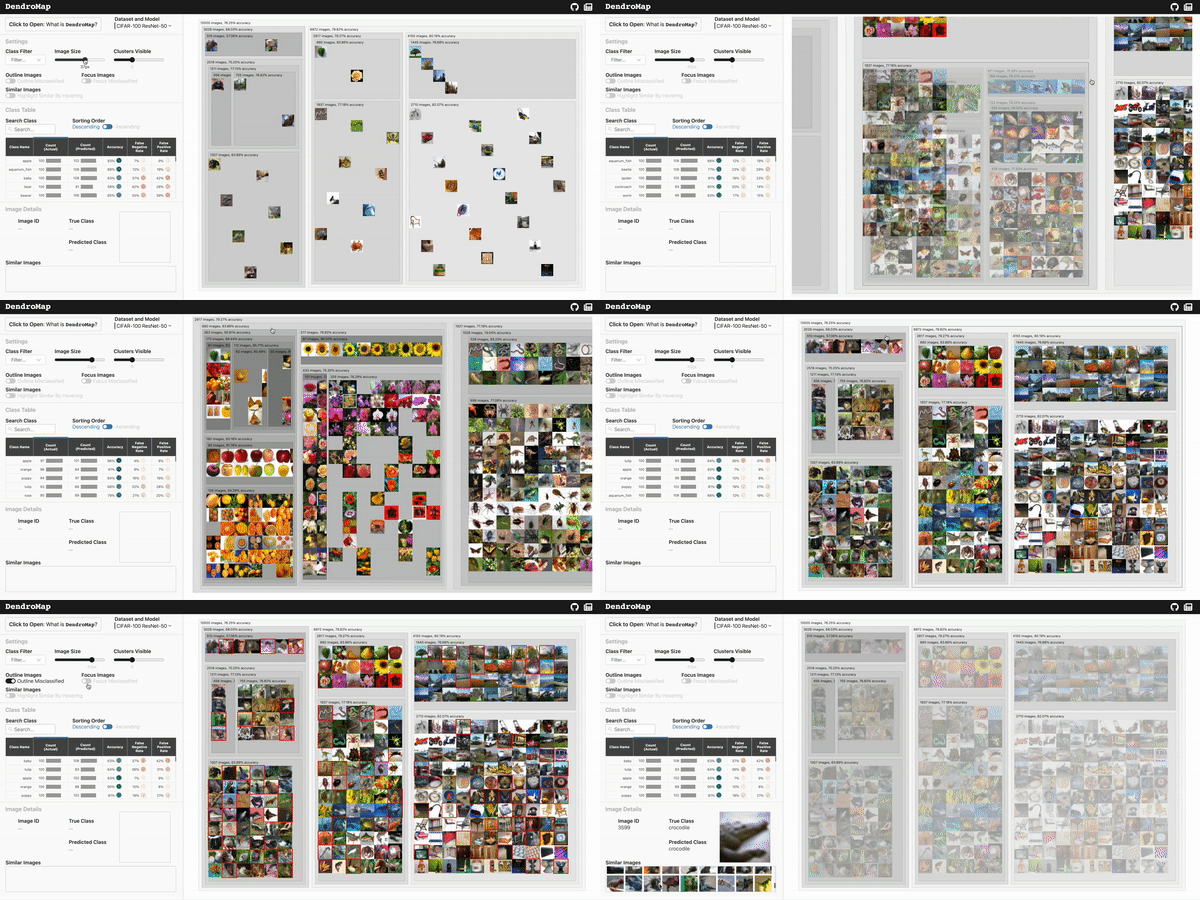
Check out the live demo of DendroMap and explore for yourself on a few different datasets. If you're interested in
- the DendroMap motivations
- how we created the DendroMap visualization
- DendroMap's effectiveness: user study on DendroMap compared to t-SNE grid for exploration
be sure to also check out our research paper:
Visual Exploration of Large-Scale Image Datasets for Machine Learning with Treemaps.
Donald Bertucci, Md Montaser Hamid, Yashwanthi Anand, Anita Ruangrotsakun, Delyar Tabatabai, Melissa Perez, and Minsuk Kahng.
arXiv preprint arXiv:2205.06935, 2022.
Use Your Own Data
In the public deployment, we hosted our data in the DendroMap Data repository. You can use your own data by following the instructions and example in the DendroMap Data README.md and you can use our python functions found in the clustering folder in this repo. There, you will find specific examples and instructions for how to generate the clustering files.
After generating those files, you can add another option in the src/dataOptions.js file as an object to specify how to read your data with the correct format. This is also detailed in the DendroMap Data README.md, and is simple as adding an option like this:
{
	dataset: "YOUR DATASET NAME",
	model: "YOUR MODEL NAME",
	cluster_filepath: "CLUSTER_FILEPATH",
	class_cluster_filepath: "CLASS_CLUSTER_FILEPATH**OPTIONAL**",
	image_filepath: "IMAGE_FILEPATH",
}
in the src/dataOptions.js options array. Paths start from the public folder, so put your data in there. For more information, go to the README.md in the clustering folder. Notebooks that computed the data in DendroMap Data are located there.
DendroMap Component
The DendroMap treemap visualization itself (not the whole project) only relies on having d3.js and the accompanying Javascript files in the src/components/dendroMap directory. You can reuse that Svelte component by importing from src/components/dendroMap/DendroMap.svelte.
The Component is used in src/App.svelte for an example on what props it takes. Here is the rundown of a simple example: at the bare minimum you can create the DendroMap component with these props (propName:type).
<DendroMap
	dendrogramData:dendrogramNode // (root node as nested JSON from dendrogram-data repo)
	imageFilepath:string // relative path from public dir
	imageWidth:number
	imageHeight:number
	width:number
	height:number
	numClustersShowing:number // > 1
/>
A more comprehensive list of props is below, but please look in the src/components/dendroMap/DendroMap.svelte file to see more details: there are many defaults arguments.
<DendroMap
	dendrogramData: dendrogramNode // (root node as nested JSON from dendrogram-data repo)
	imageFilepath: string // relative path from public dir
	imageWidth: number
	imageHeight: number
	width: number
	height: number
	numClustersShowing: number // > 1

	// the very long list of optional props that you can use to customize the DendroMap
	// ? is not in the actual name, just indicates optional
	highlightedOpacity?: number // between [0.0, 1.0]
	hiddenOpacity?: number // between [0.0, 1.0]
	transitionSpeed?: number // milliseconds for the animation of zooming
	clusterColorInterpolateCallback?: (normalized: number) => string // by default uses d3.interpolateGreys
	labelColorCallback?: (d: d3.HierarchyNode) => string
	labelSizeCallback?: (d: d3.HierarchyNode) => string
	misclassificationColor?: string
	outlineStrokeWidth?: string
	outerPadding?: number // the outer perimeter space of a rects
	innerPadding?: number // the touching inside space between rects
	topPadding?: number // additional top padding on the top of rects
	labelYSpace?: number // shifts the image grid down to make room for label on top

	currentParentCluster?: d3.HierarchyNode // this argument is used to bind: for svelte, not really a prop
	// breadth is the default and renders nodes left to right breadth first traversal
	// min_merging_distance is the common way to get dendrogram clusters from a dendrogram
	// max_node_count traverses and splits the next largest sized node, resulting in an even rendering
	renderingMethod?: "breadth" | "min_merging_distance" | "max_node_count" | "custom_sort"
	// this is only in effect if the renderingMethod is "custom_sort". Nodes last are popped and rendered first in the sort
	customSort?: (a: dendrogramNode, b: dendrogramNode) => number // see example in code
	imagesToFocus?: number[] // instance index of the ones to highlight
	outlineMisclassified?: boolean
	focusMisclassified?: boolean
	clusterLabelCallback?: (d: d3.HierarchyNode) => string
	imageTitleCallback?: (d: d3.HierarchyNode) => string

	// will fire based on user interaction
	// detail contains <T> {data: T, element: HTMLElement, event}
	on:imageClick?: ({detail}) => void
	on:imageMouseEnter?: ({detail}) => void
	on:imageMouseLeave?: ({detail}) => void
	on:clusterClick?: ({detail}) => void
	on:clusterMouseEnter?: ({detail}) => void
	on:clusterMouseLeave?: ({detail}) => void
/>
Run Locally!
This project uses Svelte. You can run the code on your local machine by using one of the following: development or build.
Development
cd dendromap      # inside the dendromap directory
npm install       # install packages if you haven't
npm run dev       # live-reloading server on port 8080
then navigate to port 8080 for a live-reloading on file change development server.
Build
cd dendromap		# inside the dendromap directory
npm install       	# install packages if you haven't
npm run build       	# build project
npm run start		# run on port 8080
then navigate to port 8080 for the static build server.
Links
- DendroMap Live Site
- DendroMap Paper
- DendroMap Code (you are here)
- DendroMap Data

 31 Oct 13, 2022
 1 Mar 12, 2022
 8 Apr 25, 2022
 575 Jan 01, 2023
 26 Oct 13, 2022
 2 Dec 27, 2021
 1.5k Jan 08, 2023
 2 May 19, 2022
 3k Jan 08, 2023
 0 Dec 15, 2022
 1k Jan 06, 2023
 15 Nov 08, 2022
 65 Oct 04, 2022
 113 Dec 24, 2022
 17 Dec 13, 2022
 2 Jun 15, 2022
 101 Jan 02, 2023
 6 Dec 25, 2022
 33 Dec 15, 2022
 47 Jul 28, 2022