:fire: 2D and 3D Face alignment library build using pytorch

Overview

Face Recognition

Detect facial landmarks from Python using the world's most accurate face alignment network, capable of detecting points in both 2D and 3D coordinates.

Build using FAN's state-of-the-art deep learning based face alignment method.

Note: The lua version is available here.

For numerical evaluations it is highly recommended to use the lua version which uses indentical models with the ones evaluated in the paper. More models will be added soon.


License Test Face alignmnet Anaconda-Server Badge PyPI version

Features

Detect 2D facial landmarks in pictures

import face_alignment
from skimage import io

fa = face_alignment.FaceAlignment(face_alignment.LandmarksType._2D, flip_input=False)

input = io.imread('../test/assets/aflw-test.jpg')
preds = fa.get_landmarks(input)

Detect 3D facial landmarks in pictures
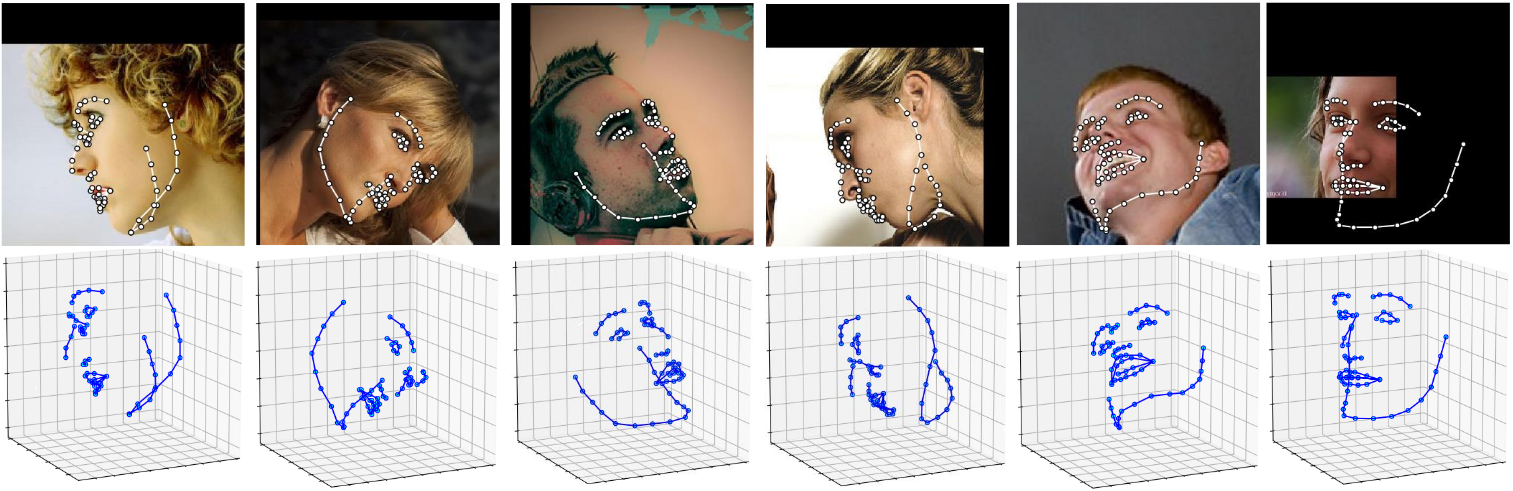
import face_alignment
from skimage import io

fa = face_alignment.FaceAlignment(face_alignment.LandmarksType._3D, flip_input=False)

input = io.imread('../test/assets/aflw-test.jpg')
preds = fa.get_landmarks(input)

Process an entire directory in one go

import face_alignment
from skimage import io

fa = face_alignment.FaceAlignment(face_alignment.LandmarksType._2D, flip_input=False)

preds = fa.get_landmarks_from_directory('../test/assets/')

Detect the landmarks using a specific face detector.

By default the package will use the SFD face detector. However the users can alternatively use dlib, BlazeFace, or pre-existing ground truth bounding boxes.

import face_alignment

# sfd for SFD, dlib for Dlib and folder for existing bounding boxes.
fa = face_alignment.FaceAlignment(face_alignment.LandmarksType._2D, face_detector='sfd')

Running on CPU/GPU

In order to specify the device (GPU or CPU) on which the code will run one can explicitly pass the device flag:

import face_alignment

# cuda for CUDA
fa = face_alignment.FaceAlignment(face_alignment.LandmarksType._2D, device='cpu')

Please also see the examples folder

Installation

Requirements

  • Python 3.5+ (it may work with other versions too). Last version with support for python 2.7 was v1.1.1
  • Linux, Windows or macOS
  • pytorch (>=1.5)

While not required, for optimal performance(especially for the detector) it is highly recommended to run the code using a CUDA enabled GPU.

Binaries

The easiest way to install it is using either pip or conda:

Using pip Using conda
pip install face-alignment conda install -c 1adrianb face_alignment

Alternatively, bellow, you can find instruction to build it from source.

From source

Install pytorch and pytorch dependencies. Please check the pytorch readme for this.

Get the Face Alignment source code

git clone https://github.com/1adrianb/face-alignment

Install the Face Alignment lib

pip install -r requirements.txt
python setup.py install

Docker image

A Dockerfile is provided to build images with cuda support and cudnn. For more instructions about running and building a docker image check the orginal Docker documentation.

docker build -t face-alignment .

How does it work?

While here the work is presented as a black-box, if you want to know more about the intrisecs of the method please check the original paper either on arxiv or my webpage.

Contributions

All contributions are welcomed. If you encounter any issue (including examples of images where it fails) feel free to open an issue. If you plan to add a new features please open an issue to discuss this prior to making a pull request.

Citation

@inproceedings{bulat2017far,
  title={How far are we from solving the 2D \& 3D Face Alignment problem? (and a dataset of 230,000 3D facial landmarks)},
  author={Bulat, Adrian and Tzimiropoulos, Georgios},
  booktitle={International Conference on Computer Vision},
  year={2017}
}

For citing dlib, pytorch or any other packages used here please check the original page of their respective authors.

Acknowledgements

  • To the pytorch team for providing such an awesome deeplearning framework
  • To my supervisor for his patience and suggestions.
  • To all other python developers that made available the rest of the packages used in this repository.
Comments
  • Use own face detection module

    Use own face detection module

    Hello, I want to use my own network for face detection, so I tried to pass face_detector=None to FaceAlignment class, but it gives me an error.

    Is there any functionality to pass cropped faces or its bounding boxes to the get_landmarks method?

    question 
    opened by mark-selyaeff 29
  • sudo python setup.py install can't work

    sudo python setup.py install can't work

    hi, when I run 'sudo python setup.py install', it can't work. the error is: error in face_alignment setup command: 'install_requires' must be a string or list of strings containing valid project/version requirement specifiers

    Could you help me? Thanks a lot.

    opened by haoxuhao 20
  • Cannot download the model?

    Cannot download the model?

    When I'm trying the example, I got something below, I suspect it cannot download the model, could you add a link of model?

    [email protected]:~/workspace/02_work/52-face-aligment/examples$ python detect_landmarks_in_image.py
    Traceback (most recent call last):
      File "detect_landmarks_in_image.py", line 8, in <module>
        fa = face_alignment.FaceAlignment(face_alignment.LandmarksType._3D, enable_cuda=False, flip_input=False)
      File "build/bdist.linux-x86_64/egg/face_alignment/api.py", line 106, in __init__
      File "/home/hw/anaconda2/lib/python2.7/site-packages/torch/serialization.py", line 267, in load
        return _load(f, map_location, pickle_module)
      File "/home/hw/anaconda2/lib/python2.7/site-packages/torch/serialization.py", line 410, in _load
        magic_number = pickle_module.load(f)
    cPickle.UnpicklingError: invalid load key, '<'.
    
    opened by jaysimon 17
  • Detection Confidence Needed.

    Detection Confidence Needed.

    The current code outputs grid coordinates as detection results without detection confidence. Therefore, the model often generates confusing detections for some edge-case images. It is easy to get the face detection confidence, while it is hard to get the alignment confidence. I go through the code but it is not an easy job for new comers. Is there any approach?

    enhancement question 
    opened by MagicFrogSJTU 13
  • AttributeError: 's3fd' object has no attribute 'to'

    AttributeError: 's3fd' object has no attribute 'to'

    Hello,

    great work. I want to use the face-alignment for a study on facial expressions and metacognition at the BCCN Berlin. Unfortunately I encounter the following error AttributeError: 's3fd' object has no attribute 'to' , runing the sfd_detector script (line 45) I have a neuroscience/psychology background, so any help appreciated. Thanks a lot. Carina

    opened by CarinaFo 10
  • Error in Blazeface detection with a vertical video frame (1080x1920 resolution)

    Error in Blazeface detection with a vertical video frame (1080x1920 resolution)

    I am getting an error in landmarks detection with a vertical video frame. This is the image

    Black_kid_PNES1_168

    This is the error:

    /usr/lib/python3.7/importlib/_bootstrap.py:219: RuntimeWarning: numpy.ufunc size changed, may indicate binary incompatibility. Expected 192 from C header, got 216 from PyObject return f(*args, **kwds) /home/aditya/Python_code_learning/dev/kython_env/lib/python3.7/site-packages/face_alignment/utils.py:79: RuntimeWarning: divide by zero encountered in double_scalars t[0, 0] = resolution / h /home/aditya/Python_code_learning/dev/kython_env/lib/python3.7/site-packages/face_alignment/utils.py:80: RuntimeWarning: divide by zero encountered in double_scalars t[1, 1] = resolution / h E

    ERROR: test_predict_points (main.Tester)

    Traceback (most recent call last): File "facealignment_test.py", line 33, in test_predict_points landmarks = fa.get_landmarks_from_image(image) File "/home/aditya/Python_code_learning/dev/kython_env/lib/python3.7/site-packages/torch/autograd/grad_mode.py", line 26, in decorate_context return func(*args, **kwargs) File "/home/aditya/Python_code_learning/dev/kython_env/lib/python3.7/site-packages/face_alignment/api.py", line 153, in get_landmarks_from_image inp = crop(image, center, scale) File "/home/aditya/Python_code_learning/dev/kython_env/lib/python3.7/site-packages/face_alignment/utils.py", line 128, in crop interpolation=cv2.INTER_LINEAR) cv2.error: OpenCV(4.4.0) /tmp/pip-build-qct9o6da/opencv-python/opencv/modules/imgproc/src/resize.cpp:3929: error: (-215:Assertion failed) !ssize.empty() in function 'resize'

    bug 
    opened by rakadambi 9
  • adds `create_target_heatmap` and tests

    adds `create_target_heatmap` and tests

    create_target_heatmap() is useful for people who want to fine-tune or train the model from scratch. Figuring it out was not trivial, so I thought it will save people time. It addresses #128

    opened by siarez 9
  • error when run:fa = face_alignment.FaceAlignment(face_alignment.LandmarksType._2D, enable_cuda=True, flip_input=False)

    error when run:fa = face_alignment.FaceAlignment(face_alignment.LandmarksType._2D, enable_cuda=True, flip_input=False)

    Downloading the face detection CNN. Please wait... Traceback (most recent call last): File "/opt/conda/lib/python3.5/urllib/request.py", line 1254, in do_open h.request(req.get_method(), req.selector, req.data, headers) File "/opt/conda/lib/python3.5/http/client.py", line 1106, in request self._send_request(method, url, body, headers) File "/opt/conda/lib/python3.5/http/client.py", line 1151, in _send_request self.endheaders(body) File "/opt/conda/lib/python3.5/http/client.py", line 1102, in endheaders self._send_output(message_body) File "/opt/conda/lib/python3.5/http/client.py", line 934, in _send_output self.send(msg) File "/opt/conda/lib/python3.5/http/client.py", line 877, in send self.connect() File "/opt/conda/lib/python3.5/http/client.py", line 1260, in connect server_hostname=server_hostname) File "/opt/conda/lib/python3.5/ssl.py", line 377, in wrap_socket _context=self) File "/opt/conda/lib/python3.5/ssl.py", line 752, in init self.do_handshake() File "/opt/conda/lib/python3.5/ssl.py", line 988, in do_handshake self._sslobj.do_handshake() File "/opt/conda/lib/python3.5/ssl.py", line 633, in do_handshake self._sslobj.do_handshake() ssl.SSLEOFError: EOF occurred in violation of protocol (_ssl.c:645)

    During handling of the above exception, another exception occurred:

    Traceback (most recent call last): File "", line 1, in File "/workspace/face-alignment/face_alignment/api.py", line 81, in init os.path.join(path_to_detector)) File "/opt/conda/lib/python3.5/urllib/request.py", line 188, in urlretrieve with contextlib.closing(urlopen(url, data)) as fp: File "/opt/conda/lib/python3.5/urllib/request.py", line 163, in urlopen return opener.open(url, data, timeout) File "/opt/conda/lib/python3.5/urllib/request.py", line 466, in open response = self._open(req, data) File "/opt/conda/lib/python3.5/urllib/request.py", line 484, in _open '_open', req) File "/opt/conda/lib/python3.5/urllib/request.py", line 444, in _call_chain result = func(*args) File "/opt/conda/lib/python3.5/urllib/request.py", line 1297, in https_open context=self._context, check_hostname=self._check_hostname) File "/opt/conda/lib/python3.5/urllib/request.py", line 1256, in do_open raise URLError(err) urllib.error.URLError: <urlopen error EOF occurred in violation of protocol (_ssl.c:645)>

    opened by Edwardmark 9
  • Loss of precision with v1.3

    Loss of precision with v1.3

    Hi It seems that the results of the update (version 1.3.1) are noticeably worse than the last one (version 1.2). I made some benchmark and although it does not seem much in terms of NME, it is there and even more noticeable when you look at the images 2D_benchmark_comparisons_0 02

    (look at the eyes and temple landmarks) 00023_pred version 1.2 00023_pred_1 3 version 1.3 I looked at a bunch of results on the FFHQ dataset, and noticed consistently worse precision.

    I could not track down what causes this difference, my suspicion is currently on the new batch inference code but could not pinpoint it yet

    opened by Xavier31 8
  • [CPU Performance is Better then GPU]

    [CPU Performance is Better then GPU]

    Hi @1adrianb .

    I was bench marking your latest Pytorch source code for both 2D and 3D landmark detection with SFD face detector, I'm observing about 10x faster speed in CPU w.r.t to GPU, which is strange. Any help here would be appreciated.

    CPU - Intel i9, 9th Generation Machine. GPU - GTX GeForce 1070 8GiB.

    Thanks and Regards, Vinayak

    opened by vinayak618 8
  • How to extract the bounding box?

    How to extract the bounding box?

    Dear Adrian,

    First I have to admit that this is a great work! I can use your provided face alignment tool to extract the face shape coordinates in difficult condition. I wonder how can I output the bounding box (rectangle) of the face of an input image? For now, by reading your user guide, I can only extract the shape coordinates. In my understanding, it should be a two-step process, first find the bounding box of a face, and then find the face shape coordinates inside this bounding box. So my question is how can I get the bounding box?

    opened by shansongliu 8
  • get_landmarks_from_batch returns an empty list

    get_landmarks_from_batch returns an empty list

    My code is as follows:

      imgs = imgs.permute(0, 3, 1, 2)# B x C x H x W 
      landmark = self.face_algm.get_landmarks_from_batch(imgs)
    

    The picture I used is the frame intercepted by the MEAD dataset, but it returned an empty list to me, what did I do wrong?

    opened by JSHZT 0
  • Error in examples/demo.ipynb testing on a batch

    Error in examples/demo.ipynb testing on a batch

    In "Testing on a batch":

    fig = plt.figure(figsize=(10, 5))
    for i, pred in enumerate(preds):
        plt.subplot(1, 2, i + 1)
        plt.imshow(frames[1])
        plt.title(f'frame[{i}]')
        for detection in pred:
            plt.scatter(detection[:,0], detection[:,1], 2)
    

    the 2nd loop is redundant, need to plot pred[:, 0], pred[:, 1] only.

    opened by ywangmy 0
  • fix examples/demo.ipynb

    fix examples/demo.ipynb

    change

    fig = plt.figure(figsize=(10, 5))
    for i, pred in enumerate(preds):
        plt.subplot(1, 2, i + 1)
        plt.imshow(frames[1])
        plt.title(f'frame[{i}]')
        for detection in pred:
            plt.scatter(detection[:,0], detection[:,1], 2)
    

    to

    fig = plt.figure(figsize=(10, 5))
    for i, detection in enumerate(preds):
        plt.subplot(1, 2, i + 1)
        plt.imshow(frames[1])
        plt.title(f'frame[{i}]')
        plt.scatter(detection[:,0], detection[:,1], 2)
    
    opened by ywangmy 0
  • about tensor input

    about tensor input

    hey, thanks for your share. when using the method 'get_landmarks_from_image', I input a tensor whose size is (1, 3, 128, 128) to image_or_path. then it will call method 'get_image' from face_alignment.utils. first, it transforms tensor into numpy, then steps into 'elif image.ndim == 4: \n\t image = image[..., :3]. this step changes the size of numpy from (1, 3, 128, 128) into (1, 3, 128, 3). actually, final size will not be used correctly in the method 'detect_from_image' in face_alignment.detection.sfd.sfd_detector.SFDDecetector. if it's a bug here, or it because of my wrong usage. hope for your reply!

    opened by Panghema 1
  • Help for backbone

    Help for backbone

    Hello, thanks for the share, I got lots of help from the program, but I need to change the result of point position, so I need to train a new model to fit it, could I got the information fo backbone, thanks so much.

    opened by trra1988 0
  • Determine confidence scores on landmarks

    Determine confidence scores on landmarks

    Hey!

    Are there anyways to find the confidence scores of the landmark predictions? I see there's a parameter "return_landmark_score" in the "get_landmarks" method but I do not know what the units for that value are . The scores are an array.

    opened by TheFrator 0
Releases(v1.3.4)
  • v1.3.4(Apr 28, 2021)

    [Add] Added option to return the bounding boxes too (#270) [Change] Change the print to warning (#265) [Change] Minor cleanup [Fix] Negative stride error

    Source code(tar.gz)
    Source code(zip)
  • v1.3.2(Dec 21, 2020)

  • v1.3.1(Dec 19, 2020)

  • v1.3.0(Dec 19, 2020)

    Changelog:

    • Increased the model speed between 1.3-2x, especially for 3D landmarks
    • Improved the initialization time
    • Fixed issues with RGB vs BGR and batched vs not batched, added unit tests for it
    • Fixed unit test
    • Code refactoring
    • Fix transpose issue in blazeface detector (thank to @Serega6678 )
    Source code(tar.gz)
    Source code(zip)
  • v1.2.0(Dec 16, 2020)

    Changelog:

    • Improve file structure
    • Remove redundant model handling code. Switch all model handling to torch.hub or torch.hub derived functions
    • Drop support for python 2.7 and for older version of pytorch. See https://www.python.org/doc/sunset-python-2/
    • Fix issues with certain blazeface components re-downloading everytime (#234)
    • Fix issue when no face was detected that resulted in a hard crahs (#210, #226, #229)
    • Fix invalid docker image (#213)
    • Fix travis build issue that tested the code against an outdated pytorch 1.1.0
    Source code(tar.gz)
    Source code(zip)
  • v1.1.1(Sep 12, 2020)

  • v1.1.0(Jul 31, 2020)

  • v1.0.1(Dec 19, 2018)

    Changelog:

    Added support for pytorch 1.0.0
    Minor cleanup
    Improved remote models handling
    

    2D and 3D face alignment code in PyTorch that implements the ["How far are we from solving the 2D & 3D Face Alignment problem? (and a dataset of 230,000 3D facial landmarks)", Adrian Bulat and Georgios Tzimiropoulos, ICCV 2017] paper.

    Source code(tar.gz)
    Source code(zip)
  • v1.0.0(Oct 12, 2018)

    Changelog:

    • Added support for pytorch 0.4.x
    • Improved overall speed
    • Rewrited the face detection part and made it modular (this includes the addition of SFD)
    • Added SFD as the default face detector
    • Added conda and pypi releases
    • Other bug fixes and improvements

    2D and 3D face alignment code in PyTorch that implements the ["How far are we from solving the 2D & 3D Face Alignment problem? (and a dataset of 230,000 3D facial landmarks)", Adrian Bulat and Georgios Tzimiropoulos, ICCV 2017] paper.

    Source code(tar.gz)
    Source code(zip)
  • v0.1.0(Jan 9, 2018)

    2D and 3D face alignment code in PyTorch that implements the ["How far are we from solving the 2D & 3D Face Alignment problem? (and a dataset of 230,000 3D facial landmarks)", Adrian Bulat and Georgios Tzimiropoulos, ICCV 2017] paper.

    Source code(tar.gz)
    Source code(zip)
Owner
Adrian Bulat
AI Researcher at Samsung AI, member of the deeplearning cult.
Adrian Bulat
Hierarchical Memory Matching Network for Video Object Segmentation (ICCV 2021)

Hierarchical Memory Matching Network for Video Object Segmentation Hongje Seong, Seoung Wug Oh, Joon-Young Lee, Seongwon Lee, Suhyeon Lee, Euntai Kim

Hongje Seong 72 Dec 14, 2022
A C implementation for creating 2D voronoi diagrams

Branch OSX/Linux Windows master dev jc_voronoi A fast C/C++ header only implementation for creating 2D Voronoi diagrams from a point set Uses Fortune'

Mathias Westerdahl 481 Dec 29, 2022
Gin provides a lightweight configuration framework for Python

Gin Config Authors: Dan Holtmann-Rice, Sergio Guadarrama, Nathan Silberman Contributors: Oscar Ramirez, Marek Fiser Gin provides a lightweight configu

Google 1.7k Jan 03, 2023
Iranian Cars Detection using Yolov5s, PyTorch

Iranian Cars Detection using Yolov5 Train 1- git clone https://github.com/ultralytics/yolov5 cd yolov5 pip install -r requirements.txt 2- Dataset ../

Nahid Ebrahimian 22 Dec 05, 2022
This is an example of object detection on Micro bacterium tuberculosis using Mask-RCNN

Mask-RCNN on Mycobacterium tuberculosis This is an example of object detection on Mycobacterium Tuberculosis using Mask RCNN. Implement of Mask R-CNN

Jun-En Ding 1 Sep 16, 2021
A library built upon PyTorch for building embeddings on discrete event sequences using self-supervision

pytorch-lifestream a library built upon PyTorch for building embeddings on discrete event sequences using self-supervision. It can process terabyte-si

Dmitri Babaev 103 Dec 17, 2022
This repository contains pre-trained models and some evaluation code for our paper Towards Unsupervised Dense Information Retrieval with Contrastive Learning

Contriever: Towards Unsupervised Dense Information Retrieval with Contrastive Learning This repository contains pre-trained models and some evaluation

Meta Research 207 Jan 08, 2023
Official implementation of deep-multi-trajectory-based single object tracking (IEEE T-CSVT 2021).

DeepMTA_PyTorch Officical PyTorch Implementation of "Dynamic Attention-guided Multi-TrajectoryAnalysis for Single Object Tracking", Xiao Wang, Zhe Che

Xiao Wang(王逍) 7 Dec 03, 2022
Table-Extractor 表格抽取

(t)able-(ex)tractor 本项目旨在实现pdf表格抽取。 Models 版面分析模块(Yolo) 表格结构抽取(ResNet + Transformer) 文字识别模块(CRNN + CTC Loss) Acknowledgements TableMaster attention-i

2 Jan 15, 2022
Leibniz is a python package which provide facilities to express learnable partial differential equations with PyTorch

Leibniz is a python package which provide facilities to express learnable partial differential equations with PyTorch

Beijing ColorfulClouds Technology Co.,Ltd. 16 Aug 07, 2022
SynNet - synthetic tree generation using neural networks

SynNet This repo contains the code and analysis scripts for our amortized approach to synthetic tree generation using neural networks. Our model can s

Wenhao Gao 60 Dec 29, 2022
For visualizing the dair-v2x-i dataset

3D Detection & Tracking Viewer The project is based on hailanyi/3D-Detection-Tracking-Viewer and is modified, you can find the original version of the

34 Dec 29, 2022
Hierarchical Attentive Recurrent Tracking

Hierarchical Attentive Recurrent Tracking This is an official Tensorflow implementation of single object tracking in videos by using hierarchical atte

Adam Kosiorek 147 Aug 07, 2021
dualPC.R contains the R code for the main functions.

dualPC.R contains the R code for the main functions. dualPC_sim.R contains an example run with the different PC versions; it calls dualPC_algs.R whic

3 May 30, 2022
Code for the ICCV 2021 paper "Pixel Difference Networks for Efficient Edge Detection" (Oral).

Microsoft365_devicePhish Abusing Microsoft 365 OAuth Authorization Flow for Phishing Attack This is a simple proof-of-concept script that allows an at

Alex 236 Dec 21, 2022
Hypercomplex Neural Networks with PyTorch

HyperNets Hypercomplex Neural Networks with PyTorch: this repository would be a container for hypercomplex neural network modules to facilitate resear

Eleonora Grassucci 21 Dec 27, 2022
A PyTorch implementation of Implicit Q-Learning

IQL-PyTorch This repository houses a minimal PyTorch implementation of Implicit Q-Learning (IQL), an offline reinforcement learning algorithm, along w

Garrett Thomas 30 Dec 12, 2022
Get started learning C# with C# notebooks powered by .NET Interactive and VS Code.

.NET Interactive Notebooks for C# Welcome to the home of .NET interactive notebooks for C#! How to Install Download the .NET Coding Pack for VS Code f

.NET Platform 425 Dec 25, 2022
Tackling data scarcity in Speech Translation using zero-shot multilingual Machine Translation techniques

Tackling data scarcity in Speech Translation using zero-shot multilingual Machine Translation techniques This repository is derived from the NMTGMinor

Tu Anh Dinh 1 Sep 07, 2022
Toward Multimodal Image-to-Image Translation

BicycleGAN Project Page | Paper | Video Pytorch implementation for multimodal image-to-image translation. For example, given the same night image, our

Jun-Yan Zhu 1.4k Dec 22, 2022
