Packaged, Pytorch-based, easy to use, cross-platform version of the CRAFT text detector

Overview

CRAFT: Character-Region Awareness For Text detection

Downloads PyPI version Conda version CI

Packaged, Pytorch-based, easy to use, cross-platform version of the CRAFT text detector | Paper |

Overview

PyTorch implementation for CRAFT text detector that effectively detect text area by exploring each character region and affinity between characters. The bounding box of texts are obtained by simply finding minimum bounding rectangles on binary map after thresholding character region and affinity scores.

teaser

Getting started

Installation

  • Install using conda for Linux, Mac and Windows (preferred):
conda install -c fcakyon craft-text-detector
  • Install using pip for Linux and Mac:
pip install craft-text-detector

Basic Usage

# import Craft class
from craft_text_detector import Craft

# set image path and export folder directory
image_path = 'figures/idcard.png'
output_dir = 'outputs/'

# create a craft instance
craft = Craft(output_dir=output_dir, crop_type="poly", cuda=False)

# apply craft text detection and export detected regions to output directory
prediction_result = craft.detect_text(image_path)

# unload models from ram/gpu
craft.unload_craftnet_model()
craft.unload_refinenet_model()

Advanced Usage

# import craft functions
from craft_text_detector import (
    read_image,
    load_craftnet_model,
    load_refinenet_model,
    get_prediction,
    export_detected_regions,
    export_extra_results,
    empty_cuda_cache
)

# set image path and export folder directory
image_path = 'figures/idcard.png'
output_dir = 'outputs/'

# read image
image = read_image(image_path)

# load models
refine_net = load_refinenet_model(cuda=True)
craft_net = load_craftnet_model(cuda=True)

# perform prediction
prediction_result = get_prediction(
    image=image,
    craft_net=craft_net,
    refine_net=refine_net,
    text_threshold=0.7,
    link_threshold=0.4,
    low_text=0.4,
    cuda=True,
    long_size=1280
)

# export detected text regions
exported_file_paths = export_detected_regions(
    image_path=image_path,
    image=image,
    regions=prediction_result["boxes"],
    output_dir=output_dir,
    rectify=True
)

# export heatmap, detection points, box visualization
export_extra_results(
    image_path=image_path,
    image=image,
    regions=prediction_result["boxes"],
    heatmaps=prediction_result["heatmaps"],
    output_dir=output_dir
)

# unload models from gpu
empty_cuda_cache()
You might also like...
TextBoxes++: A Single-Shot Oriented Scene Text Detector

TextBoxes++: A Single-Shot Oriented Scene Text Detector Introduction This is an application for scene text detection (TextBoxes++) and recognition (CR

TextBoxes: A Fast Text Detector with a Single Deep Neural Network https://github.com/MhLiao/TextBoxes 基于SSD改进的文本检测算法,textBoxes_note记录了之前整理的笔记。

TextBoxes: A Fast Text Detector with a Single Deep Neural Network Introduction This paper presents an end-to-end trainable fast scene text detector, n

Use Convolutional Recurrent Neural Network to recognize the Handwritten line text image without pre segmentation into words or characters. Use CTC loss Function to train.

Handwritten Line Text Recognition using Deep Learning with Tensorflow Description Use Convolutional Recurrent Neural Network to recognize the Handwrit

Code related to "Have Your Text and Use It Too! End-to-End Neural Data-to-Text Generation with Semantic Fidelity" paper

DataTuner You have just found the DataTuner. This repository provides tools for fine-tuning language models for a task. See LICENSE.txt for license de

This can be use to convert text in a file to handwritten text.

TextToHandwriting This can be used to convert text to handwriting. Clone this project or download the code. Run TextToImage.py give the filename of th

python ocr using tesseract/ with EAST opencv detector

pytextractor python ocr using tesseract/ with EAST opencv text detector Uses the EAST opencv detector defined here with pytesseract to extract text(de

Augmenting Anchors by the Detector Itself

Augmenting Anchors by the Detector Itself Introduction It is difficult to determine the scale and aspect ratio of anchors for anchor-based object dete

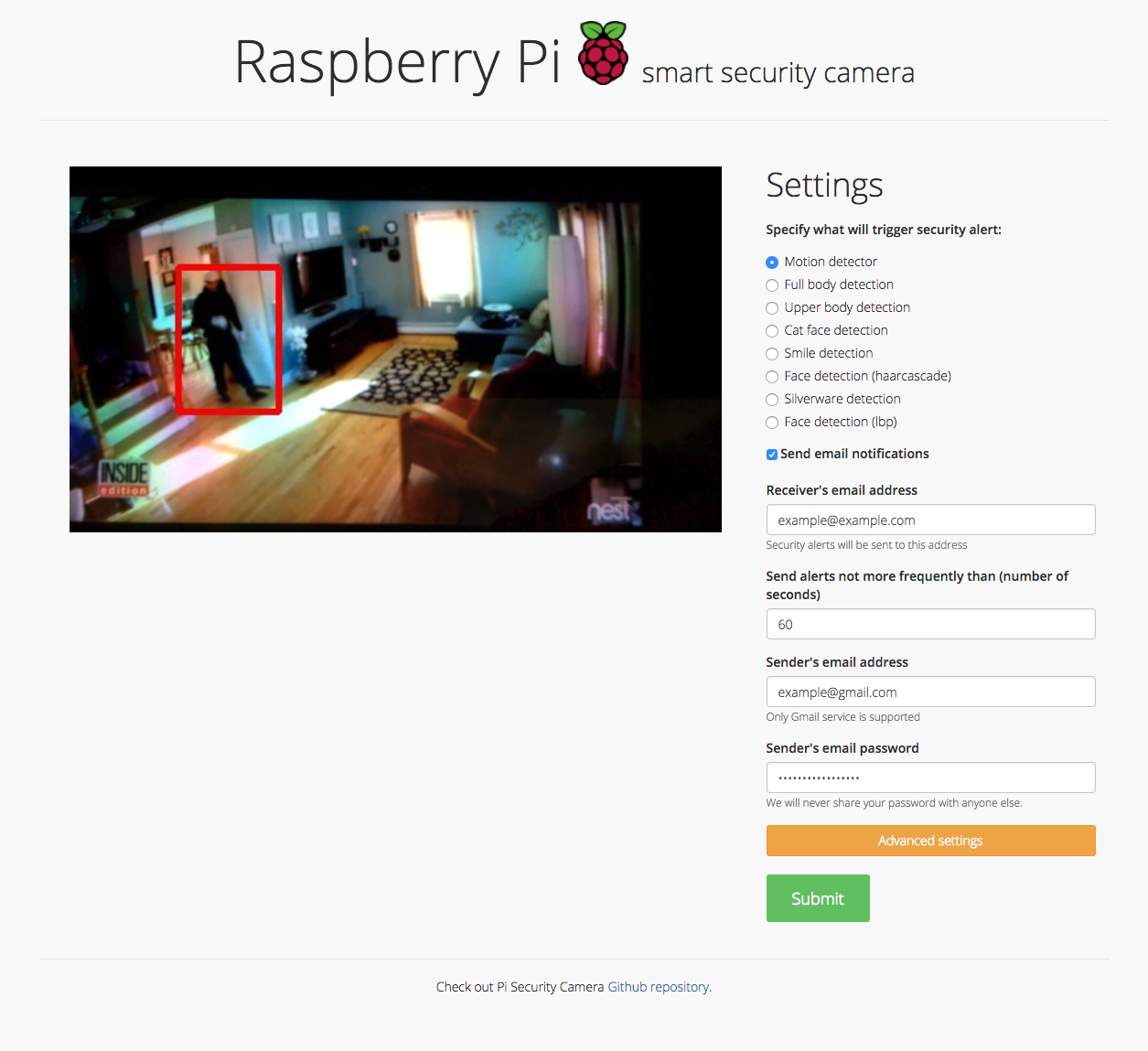
Motion detector, Full body detection, Upper body detection, Cat face detection, Smile detection, Face detection (haar cascade), Silverware detection, Face detection (lbp), and Sending email notifications

Security camera running OpenCV for object and motion detection. The camera will send email with image of any objects it detects. It also runs a server that provides web interface with live stream video.

Comments
  • Add more options for detect_text method

    Add more options for detect_text method

    Hi, sometime I don't want detect_text from file, I want detect_text directly from image in ndarray format, that will save more cost of I/O time. So I contribute this. Thanks for your work

    opened by ducviet00 2
  • Enable package to load model from local path

    Enable package to load model from local path

    When using the pypi package it should be allowed to use a model from a local path, because loading it from a remote location removes the control over what model is currently used. And might also result in pull limits being reached.

    enhancement 
    opened by TanjaBayer 1
  • Fix #8 - Fixing cuda issues in basic usage text detection

    Fix #8 - Fixing cuda issues in basic usage text detection

    Fixing issue #8

    In this quick-fix I referenced craft_net as a global variable. If this is not an acceptable workaround, then consider reorganizing the structure of the code.

    Have a nice day :)

    opened by gaborpelesz 1
  • accept customized weights path when loading models

    accept customized weights path when loading models

    path for the weight file can be specified by:

    load_craftnet_model(weight_path="path/to/weight")
    
    load_refinenet_model(weight_path="path/to/weight")
    
    opened by fcakyon 0
Releases(0.4.3)
  • 0.4.3(May 9, 2022)

    What's Changed

    • Enable package to load model from local path by @TanjaBayer in https://github.com/fcakyon/craft-text-detector/pull/53

    New Contributors

    • @TanjaBayer made their first contribution in https://github.com/fcakyon/craft-text-detector/pull/53

    Full Changelog: https://github.com/fcakyon/craft-text-detector/compare/0.4.2...0.4.3

    Source code(tar.gz)
    Source code(zip)
  • 0.4.2(Jan 6, 2022)

    What's Changed

    • fix opencv version by @fcakyon in https://github.com/fcakyon/craft-text-detector/pull/48

    Full Changelog: https://github.com/fcakyon/craft-text-detector/compare/0.4.1...0.4.2

    Source code(tar.gz)
    Source code(zip)
  • 0.4.1(Dec 20, 2021)

    What's Changed

    • fix crop export by @fcakyon in https://github.com/fcakyon/craft-text-detector/pull/45

    Full Changelog: https://github.com/fcakyon/craft-text-detector/compare/0.4.0...0.4.1

    Source code(tar.gz)
    Source code(zip)
  • 0.4.0(Jul 30, 2021)

  • 0.3.5(May 12, 2021)

  • 0.3.4(Apr 7, 2021)

    • add support for PIL and numpy images in addition to filepath. https://github.com/fcakyon/craft-text-detector/pull/28
    from PIL import Image
    import numpy
    
    # can be filepath, PIL image or numpy array
    image = 'figures/idcard.png' 
    image = Image.open("figures/idcard.png")
    image = numpy.array(Image.open("figures/idcard.png"))
    
    # apply craft text detection
    prediction_result = craft.detect_text(image)
    Source code(tar.gz)
    Source code(zip)
  • 0.3.3(Mar 2, 2021)

  • 0.3.2(Mar 2, 2021)

    path for the weight file can be specified by:

    load_craftnet_model(weight_path="path/to/weight")
    
    load_refinenet_model(weight_path="path/to/weight")
    
    Source code(tar.gz)
    Source code(zip)
  • v0.3.0(May 14, 2020)

    • updated basic usage for better device handling, now Craft instance should be created before calling detect_text:
    # import Craft class
    from craft_text_detector import Craft
    
    # set image path and export folder directory
    image_path = 'figures/idcard.png'
    output_dir = 'outputs/'
    
    # create a craft instance
    craft = Craft(output_dir=output_dir, crop_type="poly", cuda=False)
    
    # apply craft text detection and export detected regions to output directory
    prediction_result = craft.detect_text(image_path)
    
    # unload models from ram/gpu
    craft.unload_craftnet_model()
    craft.unload_refinenet_model()
    
    • some internal naming and styling changes
    Source code(tar.gz)
    Source code(zip)
  • v0.2.1(May 10, 2020)

  • v0.2.0a(Apr 22, 2020)

  • v0.2.0(Apr 22, 2020)

Owner
Senior Machine Learning Engineer, METU & Bilkent alum.
Simple app for visual editing of Page XML files

Name nw-page-editor - Simple app for visual editing of Page XML files. Version: 2021.02.22 Description nw-page-editor is an application for viewing/ed

Mauricio Villegas 27 Jun 20, 2022
The CIS OCR PostCorrectionTool

The CIS OCR Post Correction Tool PoCoTo Source code for the Java-based PoCoTo client enabling fast interactive batch corrections of complete OCR error

CIS OCR Group 36 Dec 15, 2022
Erosion and dialation using structure element in OpenCV python

Erosion and dialation using structure element in OpenCV python

Tamzid hasan 2 Nov 11, 2021
An Implementation of the FOTS: Fast Oriented Text Spotting with a Unified Network

FOTS: Fast Oriented Text Spotting with a Unified Network Introduction This is a pytorch re-implementation of FOTS: Fast Oriented Text Spotting with a

GeorgeJoe 171 Aug 04, 2022
YOLOv5 in DOTA with CSL_label.(Oriented Object Detection)(Rotation Detection)(Rotated BBox)

YOLOv5_DOTA_OBB YOLOv5 in DOTA_OBB dataset with CSL_label.(Oriented Object Detection) Datasets and pretrained checkpoint Datasets : DOTA Pretrained Ch

1.1k Dec 30, 2022
Responsive Doc. scanner using U^2-Net, Textcleaner and Tesseract

Responsive Doc. scanner using U^2-Net, Textcleaner and Tesseract Toolset U^2-Net is used for background removal Textcleaner is used for image cleaning

3 Jul 13, 2022
Virtual Zoom Gesture using OpenCV

Virtual_Zoom_Gesture I have created a virtual zoom gesture where we can Zoom in and Zoom out any image and even we can move that image anywhere on the

Mudit Sinha 2 Dec 26, 2021
Handwriting Recognition System based on a deep Convolutional Recurrent Neural Network architecture

Handwriting Recognition System This repository is the Tensorflow implementation of the Handwriting Recognition System described in Handwriting Recogni

Edgard Chammas 346 Jan 07, 2023
Learning Camera Localization via Dense Scene Matching, CVPR2021

This repository contains code of our CVPR 2021 paper - "Learning Camera Localization via Dense Scene Matching" by Shitao Tang, Chengzhou Tang, Rui Hua

tangshitao 65 Dec 01, 2022
A community-supported supercharged version of paperless: scan, index and archive all your physical documents

Paperless-ngx Paperless-ngx is a document management system that transforms your physical documents into a searchable online archive so you can keep,

5.2k Jan 04, 2023
TensorFlow Implementation of FOTS, Fast Oriented Text Spotting with a Unified Network.

FOTS: Fast Oriented Text Spotting with a Unified Network I am still working on this repo. updates and detailed instructions are coming soon! Table of

Masao Taketani 52 Nov 11, 2022
This can be use to convert text in a file to handwritten text.

TextToHandwriting This can be used to convert text to handwriting. Clone this project or download the code. Run TextToImage.py give the filename of th

Ashutosh Mahapatra 2 Feb 06, 2022
A simple component to display annotated text in Streamlit apps.

Annotated Text Component for Streamlit A simple component to display annotated text in Streamlit apps. For example: Installation First install Streaml

Thiago Teixeira 312 Dec 30, 2022
Image Detector and Convertor App created using python's Pillow, OpenCV, cvlib, numpy and streamlit packages.

Image Detector and Convertor App created using python's Pillow, OpenCV, cvlib, numpy and streamlit packages.

Siva Prakash 11 Jan 02, 2022
A real-time dolly zoom camera effect

Dolly-Zoom I've always been amazed by the gradual perspective change of dolly zoom, and I have some experience in python and OpenCV, so I decided to c

Dylan Kai Lau 52 Dec 08, 2022
virtual mouse which can copy files, close tabs and many other features !

AI Virtual Mouse Controller Developed an AI-based system to control the mouse cursor using Python and OpenCV with the real-time camera. Fingertip loca

Diwas Pandey 23 Oct 05, 2021
Camera Intrinsic Calibration and Hand-Eye Calibration in Pybullet

This repository is mainly for camera intrinsic calibration and hand-eye calibration. Synthetic experiments are conducted in PyBullet simulator. 1. Tes

CAI Junhao 7 Oct 03, 2022
Handwritten Number Recognition using CNN and Character Segmentation

Handwritten-Number-Recognition-With-Image-Segmentation Info About this repository This Repository is aimed at reading handwritten images of numbers an

Sparsha Saha 17 Aug 25, 2022
Detect textlines in document images

Textline Detection Detect textlines in document images Introduction This tool performs border, region and textline detection from document image data

QURATOR-SPK 70 Jun 30, 2022
Provides OCR (Optical Character Recognition) services through web applications

OCR4all As suggested by the name one of the main goals of OCR4all is to allow basically any given user to independently perform OCR on a wide variety

174 Dec 31, 2022